EasyManua.ls Logo

HITEC OPTIC 6 - Setting Subtrims

HITEC OPTIC 6
60 pages
Print Icon
To Next Page IconTo Next Page
To Previous Page IconTo Previous Page
Loading...
For more information - www.modelflight.com.au
Sim
p
le
Transmitter
Setu
p
-
Aerobati
c
Air
p
lane
(
ACGL
Menu
)
RIGHT
LEFT
RIGHT
LEFT
Servo
Pushrod
Front
V
iew
If
the
rudder
moves
the
wrong
direction,
move
over
to
Channel
4
by
pressing
the
Cursor
Right
key.
Now
the
'4'
should
be
flashing
in
the
display.
Activate
the
opposite
direction
for
the
rudder
servo
by
pressing
the
Active/Inhibit
(Clear)
key.
Move
the
left-hand
stick
left-and-right
again
and
verify
the
rudder
moves
the
right
direction.
If
your
model
has
retracts,
set
the
correct
response
direction
when
commanded
by
the
Gear
(SW-2)
switch,
using
the
same
procedure.
If
you're
using
a
second
aileron
servo,
you'll
now
set
the
left
aileron
servo
direction
(otherwise
skip
this
and
the
next
step).
This
is
channel
6,
and
the
'6'
should
be
flashing
for
this
command.
When
you
move
the
right-hand
stick
to
the
right,
the
aileron
on
the
left
wing
should
move
downwards.
Check
that
the
left
aileron
moves
the
correct
way!
If
it
does
not,
activate
the
opposite
direction
for
the
left
aileron
servo
using
the
above
procedures.
Move
the
right-hand
stick
again
and
verify
the
left
aileron
moves
the
proper
directions.
Press
the
Up
or
Down
arrow
keys
to
the
Flap
Travel
function
(
FLPT
),
and
input
a
percentage
of
zero
(
0
)
using
the
Data
-
Decrease
key.
This
temporarily
disables
the
flap
lever
(
Right
Lever
)
so
that
you
can
set
aileron
neutrals
without
regard
to
the
flap
lever
position.
Later
we'll
turn
it
back
on.
23.
Before
we
set
the
servo
neutrals,
we
need
to
be
sure
that
all
the
trims
are
centered.
Press
both
Edit
keys
to
get
to
the
main
menu,
where
voltage
and
time
are
displayed.
Press
the
Up
arrow
until
the
word
TRIM
appears.
By
moving
each
of
the
four
trim
levers
around,
you
can
see
their
positions,
and
move
them
back
to
zero
for
the
next
step.
24.
Once
you
have
centered
all
the
trims,
unscrew
the
screws
holding
the
servo
arms
onto
the
elevator,
aileron,
and
rudder
(we'll
set
the
throttle
travel
later).
You
will
want
to
place
the
servo
arms
on
the
output
shaft
so
they
are
near
neutral
-
that
is,
about
90
°
to
the
servo
case
sides
or,
if the
servo
is
mounted
sideways,
90
°
to
the
pushrod
(sideways
mounting
is
not
recommended).
This
way
you
won't
run
out
of
subtrim
authority.
Remove
all
the
arms
that
are
in
the
way
or
interfere
with
your
pushrods.
90
A
djust
the
clevises
on
each
servo
pushrod
to
get
the
position
of
each
control
to
be
as
close
as
you
can
to
neutral
(lined
up
with
the
adjacent
portion
of
wing
or
tail).
Setting
Subtrims
.
Now
we'll
adjust
all
the
subtrims
to
electronically
set
the
desired
neutral
locations.
To
do
so,
go
back
to
the
programming
menu
by
pressing
both
Edit
keys,
then
press
the
Up
or
Down
arrow
key
repeatedly
until
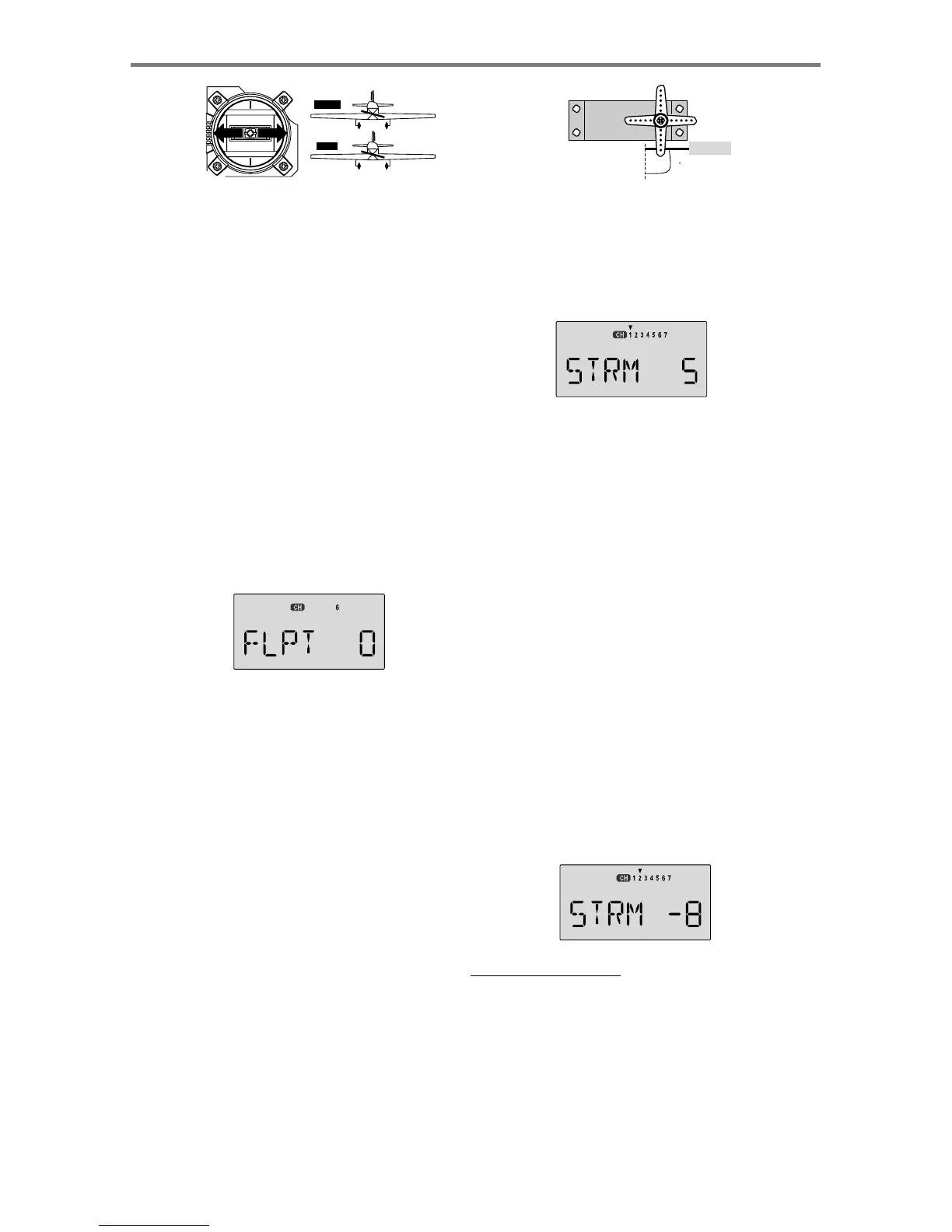
STRM
appears.
25.
Set
the
right
aileron
subtrim
first.
If
the
little
arrow
is
not
pointing
at
channel
1,
press
the
one
of
the
Cursor
Left
or
Right
buttons
until
it
is
(see
figure).
Then,
adjust
the
subtrim
amount
by
adding
or
subtracting
with
the
Data
+Increase
or
-Decrease
keys.
When
you
reach
a
place
where
the
right
aileron
matches
up
with
the
fixed
portion
of
the
wing,
you
are
done.
If
you
can't
get
both
to
match
up,
then
set
the
subtrim
back
to
zero
and
mechanically
adjust
the
clevis
to
get
as
close
as
you
can,
then
readjust
the
subtrim
if
necessary.
26.
Note
1
:
you
should
NOT
use
subtrims
instead
of
mechanically
adjusting
the
pushrods
to
be
close.
This
is
because
you
can
reduce
the
travel
of
the
radio,
especially
if
you
have
to
set
the
subtrim
at
or
above
50%.
As
we
stated
before,
get
the
pushrods
close
mechanically
first,
then
use
the
subtrim
adjustment
to
get
it
just
right.
27.
Note
2:
if
you
mess
up
the
number
you've
entered
or
find
the
percentage
the
wrong
direction,
you
can
get
back
to
zero
quickly
by
pressing
the
Active/Inhibit
(Clear)
button.
28.
Repeat
the
subtrim
adjustment
with
the
elevator
servo
(
CH2
).
First
set
the
pushrod
length
mechanically
to
get
as
close
to
neutral
as
possible,
then
set
the
subtrim
to
get
the
elevator
lined
up
to
be
parallel
with
the
stabilizer
portion.
For
full-flying
surfaces,
use
an
incidence
meter
or
another
method
to
get
the
incidence
angle
recommended
by
the
kit
manufacturer
or
model
designer.
Sim
p
le
Transmitter
Setu
p
-
A
erobatic
A
ir
p
lane
(
ACGL
Menu
)
-
Pa
g
e
18

Table of Contents

Other manuals for HITEC OPTIC 6

Related product manuals