Table 1-1 Front Panel Controls
FunctionName
The power button manually powers the server on and off.Power button
The Unit ID (UID) button helps locate a particular server within a rack of servers. You may remotely
activate this function through various system utilities.
UID button
The Init (Transfer of Control) button initiates a system reset. This preserves the entire memory
image for obtaining a crash dump and OS error information. Use this button to recover a hung
system, and to get debugging information. It is less harsh than a power reset.
Init (ToC)
button
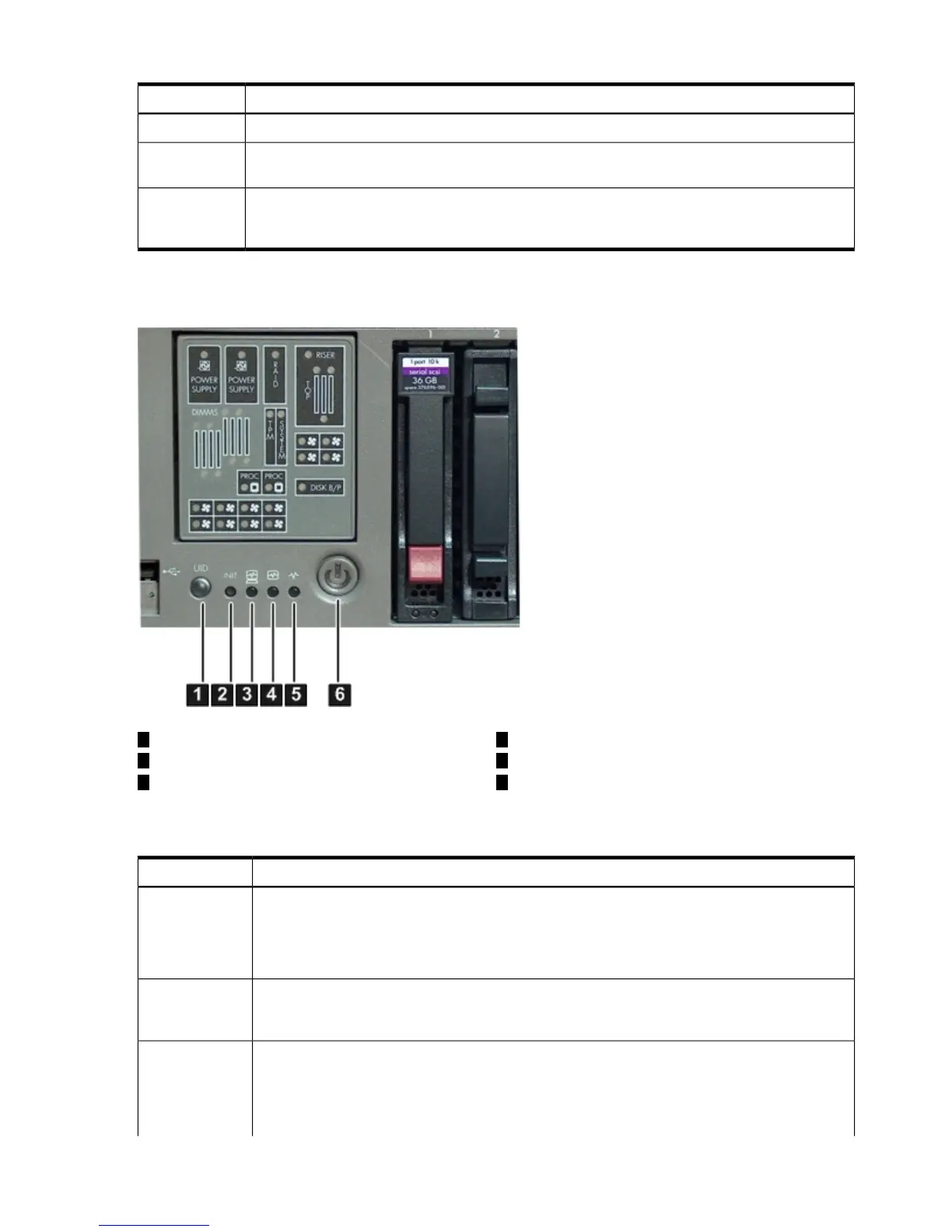
Figure 1-6 shows the front control panel LEDs.
Figure 1-6 Server Status LEDs
4
Internal health LED
1
UID button/LED
2
Init (ToC) button
5
External health LED
63
Power LED (and button)System health LED
Table 1-2 lists the server status LEDs.
Table 1-2 Front Control Panel LEDs
StatesName
UID LED • Off: UID button is not activated
• Blue: UID button is activated
There is an additional UID LED and button located on the rear panel of the server. Both the front
and rear UID LEDs illuminate when you activate either of the front or rear UID buttons
The Init (ToC) (transfer of control) LED button initiates a system reset. This reset preserves the
entire memory image to obtain crash-dump and OS-error information. The LED illuminates when
the system reset is in progress.
Init (ToC) LED
(and button)
Provides information about the system status.System health
LED
The following are LED states:
• Off: system is off
• Green: system is operating normally
28 Overview












 To Next Page