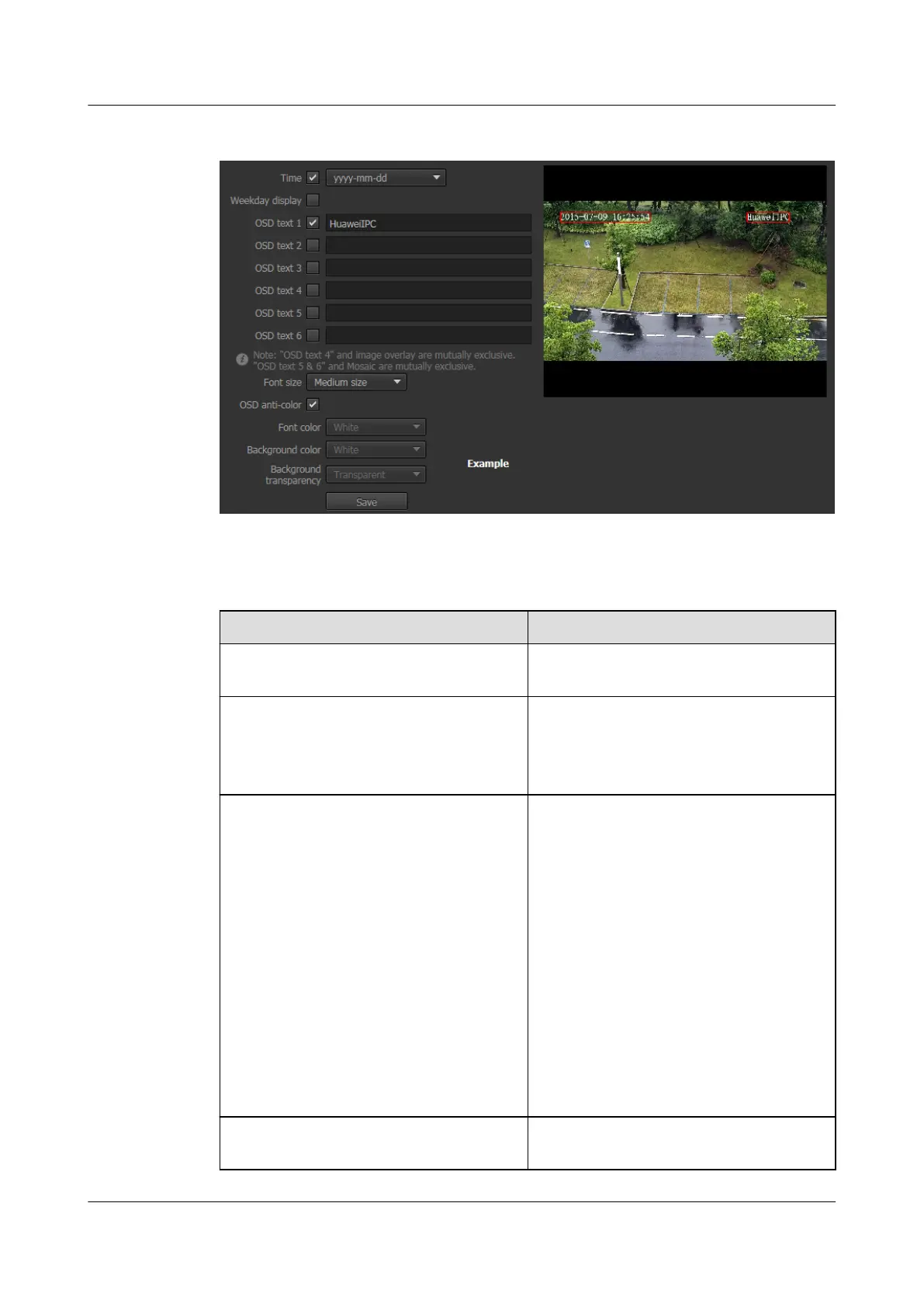
Figure 3-6 OSD Parameters tab page
Step 2 Set parameters. For detailed parameter description, see Table 3-6.
Table 3-6 OSD Parameter description
Parameter
Description
Time Indicates whether to display the weekday
information on the screen.
Weekday display This parameter is available only when you
enable the Time parameter.
Indicates whether to display the weekday
information on the screen.
OSD text Indicates the text displayed on the screen.
NOTE
l You can enter a maximum of 44 characters
for an OSD text, including Chinese
characters accounting for two characters,
English letters, French letters, and other
characters visible on a USA keyboard.
l A maximum of six OSD text items are
supported.
l You can view the text display effect in the
preview area and adjust the text position on
the screen.
l "OSD text 4" and image overlay are mutually
exclusive.
l "OSD text 5 & 6" and Mosaic are mutually
exclusive.
Font size Indicates the OSD text size, which can be
large, medium, or small.
IPC6221-VRZ-SP
Configuration Guide
3 Setting Basic Parameters
Issue 02 (2016-04-06) Huawei Proprietary and Confidential
Copyright © Huawei Technologies Co., Ltd.
19



 To Next Page