NOTE
By default, alarm deployment is enabled for all subdevices of an IPC at any time.
Procedure
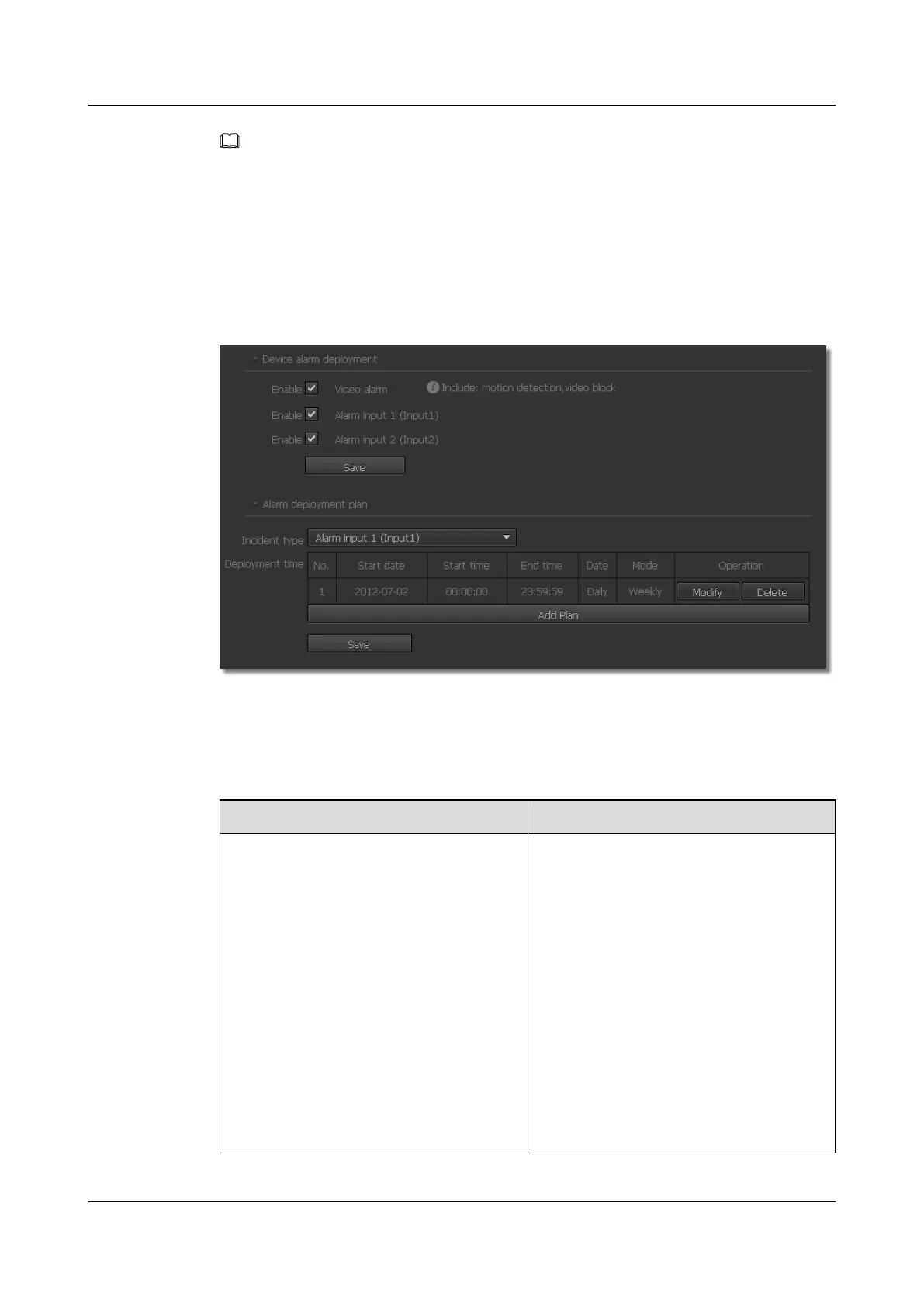
Step 1 Choose Settings > Alarm Configuration > Alarm Deployment Policy.
The Alarm Deployment Policy page is displayed, as shown in Figure 10-3.
Figure 10-3 Alarm Deployment Policy page
Step 2 Select a device alarm deployment in the Device alarm deployment area.
Table 10-2 describes the device alarm deployment.
Table 10-2 Alarm deployment types
Parameter
Description
Video alarm deployment Indicates whether to generate an alarm
when a specified incident occurs. The
incidents include motion detection, lens
block, tripwire detection, intrusion
detection, loitering detection, abandoned
object detection, and removed object
detection.
l Enabled: When a specified incident
(specified in Incident type) occurs
during the alarm deployment time, an
alarm is generated.
l Disabled: When a specified incident
(specified in Incident type) occurs
during the alarm deployment time, no
alarm is generated.
IPC6221-VRZ-SP
Configuration Guide
10 Setting Alarm Parameters
Issue 02 (2016-04-06) Huawei Proprietary and Confidential
Copyright © Huawei Technologies Co., Ltd.
78



 To Next Page