24
fi g. 1.32
1 - M U
B
Setup and Confi gurations
Single unit installation with mast ties – pre-installation
WARNING
During pre-installation, only mast sections can be loaded on the motorized unit
and the two cantilevers. It is important to note that no other loads are allowed on
the bridges until the pre-installation process is complete.
Installation of mast sections and tie levels
11- Using an optional jib arm, a crane or a rough terrain forklift, load mast sections on
the motorized unit (see p. 119 of the Accessories section for more information on
the installation and use of a jib arm). There can be up to a maximum of four mast
sections on each side of the mast at a time.
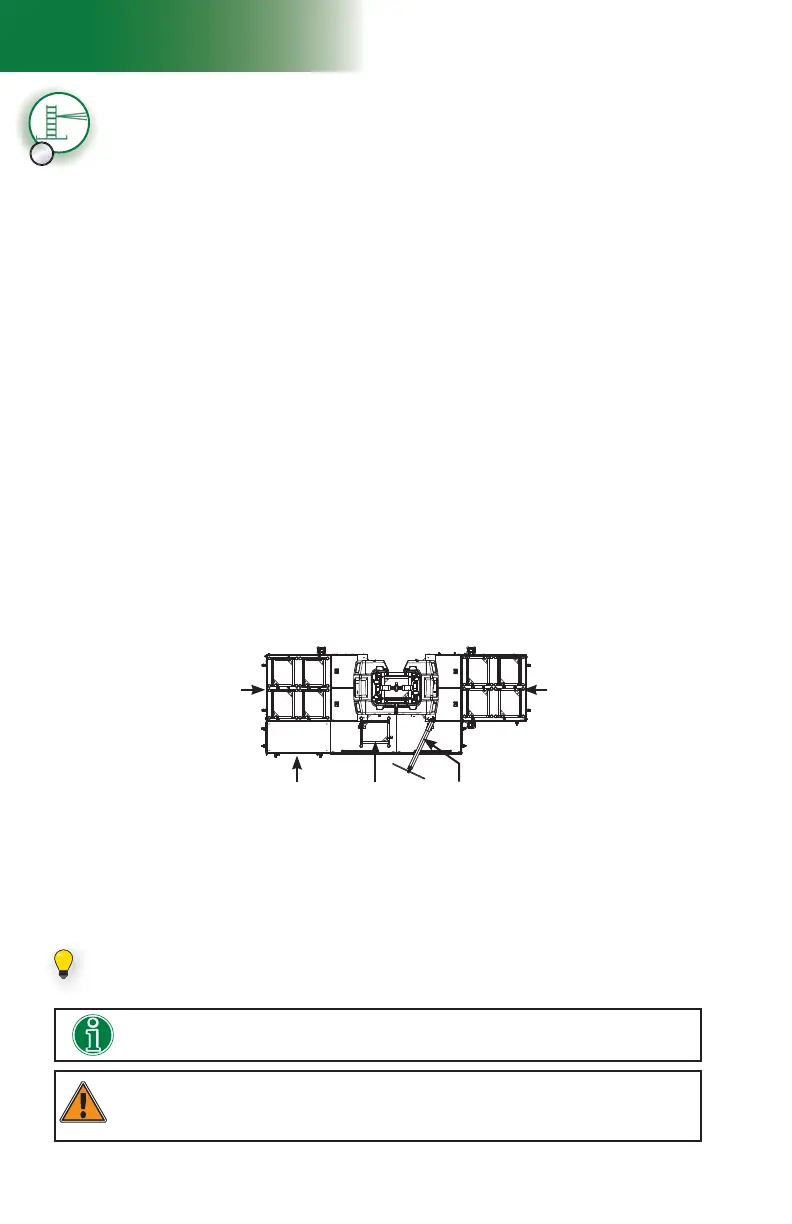
A ninth mast section can be loaded on the link bridge of the motorized unit, as shown
in fi g. 1.32. It is recommended to install an optional deck extension on one of the fi rst
cantilevers attached to the unit to facilitate the handling of mast sections with the jib
arm. The deck extension must be installed on the side opposite to the jib arm, as
shown in fi g. 1.32. For information about the use and installation of an optional deck
extension, refer to p. 55 of the Bridges section.
Mast sections must be loaded equally on either side of the mast and taken alternately
from one side, then the other when installing to ensure good balance. Refer to the
Load Capacities section on p. 94 for more information about loading the platform.
Verifi cation of limit switches and screen alerts
7- Pull out the emergency stop button and unlock the display screen. Make sure that the
appropriate confi guration options have been selected (
F4) on the display screen. For
information about the functions and alerts of the control panel, refer to p. 77 of the
Control Panel section.
8- Inspect the strobe under the main frame and make sure it is working properly.
9- Review the screen alerts and perform a verifi cation of the limit switches. For instructions
on how to verify the limit switches, refer to p. 48 of the Safety Devices section.
10- If any of the limit switches is not working properly, the unit must be put out of service
until it has been inspected and repaired by a qualifi ed person. For the defi nition of a
qualifi ed person, refer to p. 7 of the Performance and Safety section. For more
information about limit switches and their corresponding alerts, refer to p. 77 of the
Control Panel section.
Installing an optional deck extension will facilitate the handling of mast sections
with the jib arm.
If it is required to load 45' (13,7 m) of mast sections, a ninth mast section can be set
on the link bridge of the motorized unit.
12- Install mast sections until a fi rst tie level is required. For instructions on the installation
of a mast section, refer to p. 84 of the Mast and Mast Ties section. Refer to p. 86
of the Mast and Mast Ties section for instructions on how to install mast ties. For more
information about the schedule of installation of tie levels, refer to the Mast Tie Schedule
tables on p. 87 of the Mast and Mast Ties section. Proceed with the installation of
mast sections until the fi rst two tie levels are in place.
Optional deck
extension
Mast section
loaded on the
link bridge
Jib arm
Four mast sections
on fi rst cantilever
attached to unit
Four mast sections
on fi rst cantilever
attached to unit



 To Next Page