74
fi g. 5.1
fi g. 5.2
5 - C P
Control Panel
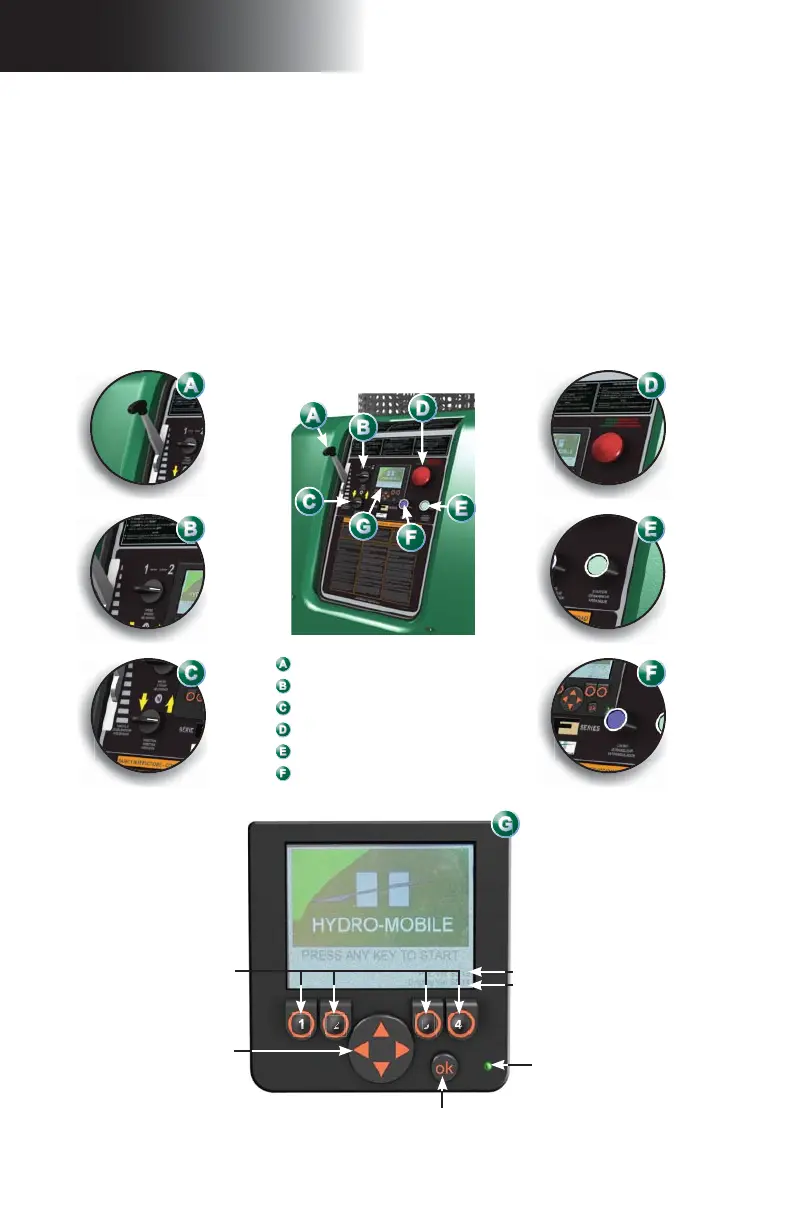
The control panel is the brain behind the Hydro Mobile F2 Series system. The F2 Series
control panel (models F200 and F300, gas-powered or electrical) is a combination of manual
controls and a color non touch screen. Driven by a computer system programmed to detect
and analyze every signal and react accordingly, the display screen will notify the operator
of any important event and display appropriate instructions to respond to the alert (see
fi gures below as well as descriptions and instructions included in the Screen Alerts and
Instructions in the following pages). Instructions and descriptions on the control panel are
displayed in three operating languages (English, French and Spanish). Screen displays
and instructions are in English, French and Spanish.
It is mandatory to comply with the instructions included in the following pages for the
operation of the control panel and to take prompt corrective action when required. For
any event other than those described in this manual, contact a qualifi ed person. For the
defi nition of a qualifi ed person, refer to p. 7 of the Performance and Safety Rules section.
Display screen
1
2
3
4
Option buttons
Navigation button
Power indicator light
PLC software version
Display software version
OK button
Throttle control lever
(installed on gas-powered unit only)
Speed selector
Travel direction selector
Emergency stop button
Engine/motor start button
Choke
(functional on gas-powered unit only)



 To Next Page