46
6
DV MODE PROGRAMMING
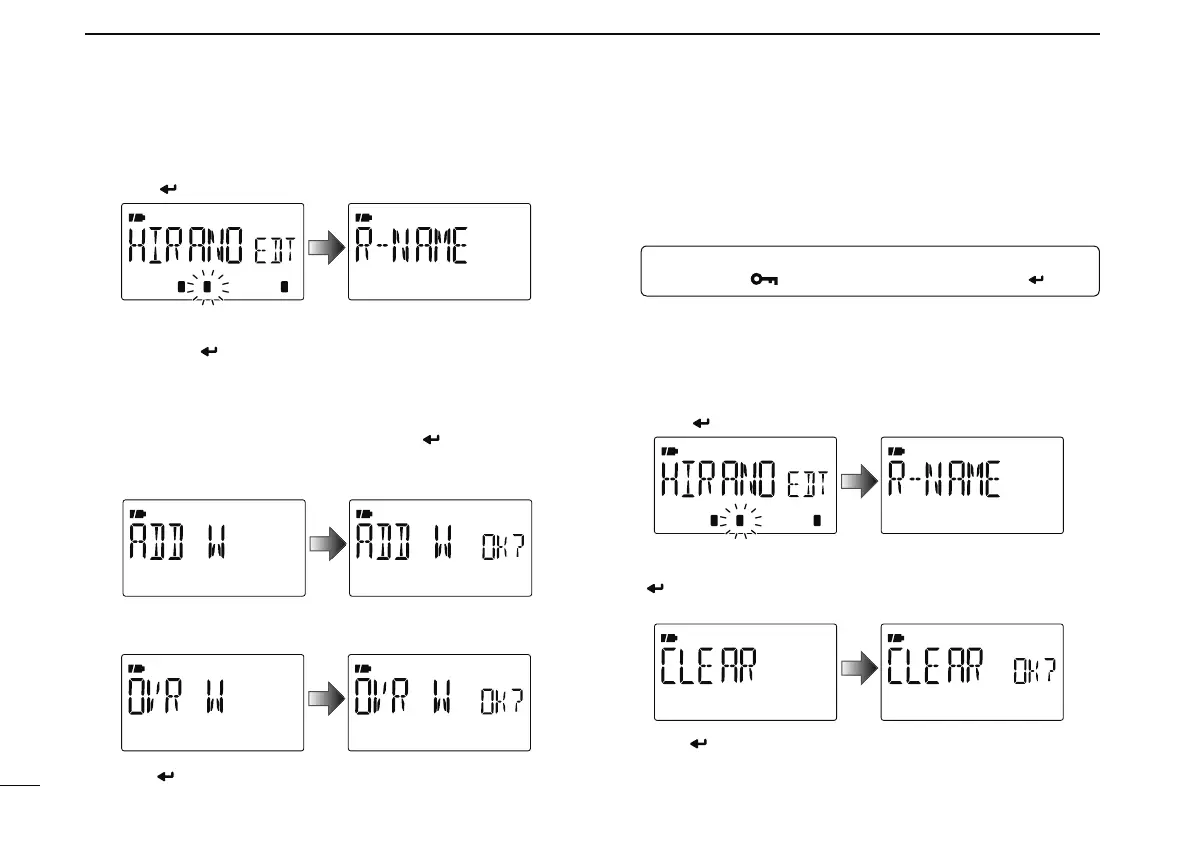
r Push [ ](5) to enter the list.
t Push [](2) or [](8) to select the content to be changed,
then push [
](5) to enter the content and reprogram the
content (see pages 40–43 for new repeater list program-
ming details).
y After programming is finished, push [](2) or [](8) to
select “ADD W” or “OVR W,” then push [
](5).
When “ADD W” is selected;
• “ADD W OK?” appears.
When “OVR W” is selected;
• “OVR W OK?” appears.
y Push [ ](5) again to store the list.
N
Clearing a repeater list
Contents of programmed list can be cleared (erased)
.
q
Enter “EDIT-L” in RPT-L menu.
MENU ¶ RPT-L ¶ EDIT-L
(Push [MENU ]), (Push [](2)/[](8), then push [ ](5).)
• Programmed repeater name appears.
w Push [](2) or [](8) to select the desired repeater list to
be erased.
• Push and hold [BAND] for 1 sec. to enter group selection, rotate
[DIAL] to select the desired group (0–9) then push [BAND].
e Push [ ](5) to enter the list.
r Push [](2) or [ ](8) to select “CLEAR,” then push
[
](5).
• “CLEAR OK?” appears.
t Push [ ](5) again to clear the list.



 To Next Page