53
7
DV MODE OPERATION
7
1
2
3
4
5
6
8
9
10
11
12
13
14
15
16
17
18
19
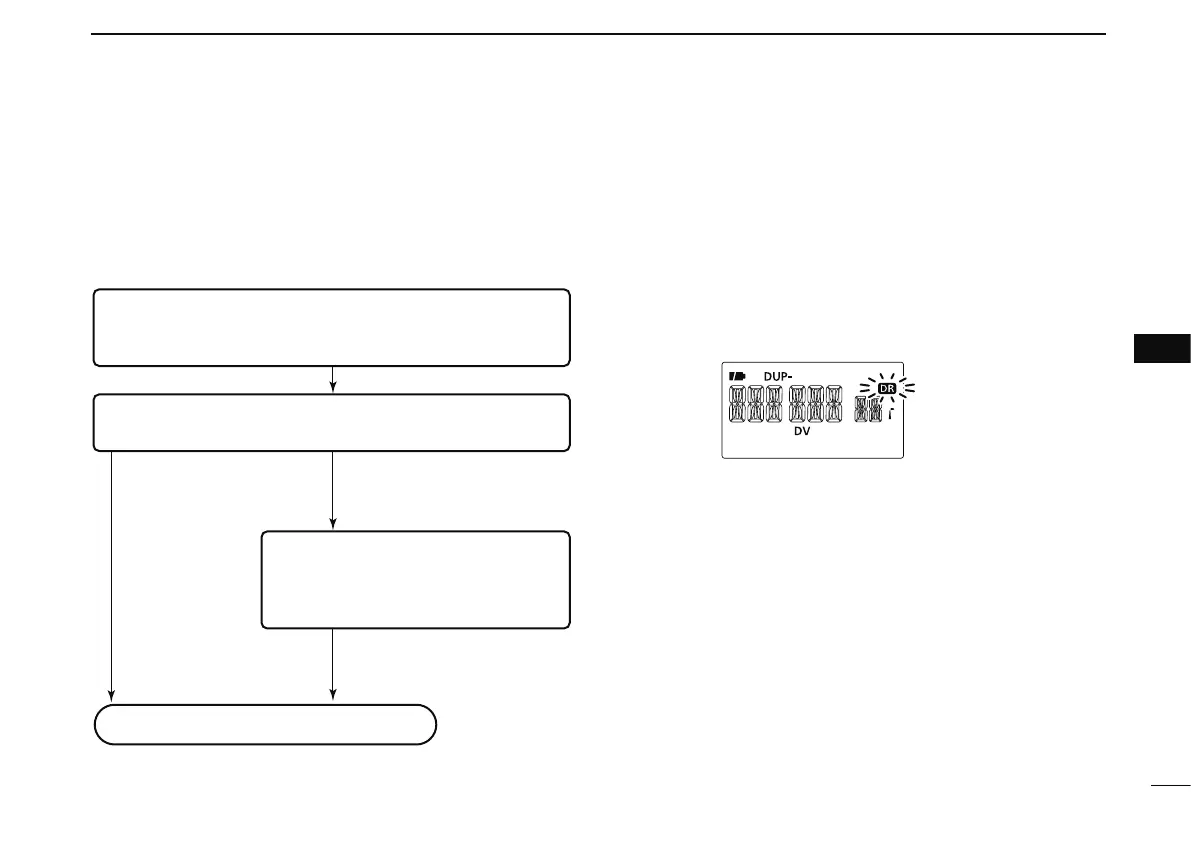
DR (D-STAR Repeater) mode is used for D-STAR repeater
operation. In this mode, you can select the pre-programmed
repeaters and UR call sign by using [DIAL].
• DR mode operation flow chart
Step 3: (RPT2 selection)
Select linked repeater, gateway repeater
or if the other station is in the same area,
select NOT USE.
Push PTT to transmit, release to receive.
Step 1: (RPT1 selection)
Select the access repeater.
- Access repeater scan is useful to find a repeater.
Step 2: (UR call sign selection)
Select UR call sign.
Calling a CQ
In the same area: CQCQCQ
To other area: Repeater name
In the same area: NOT USE
In the same zone: Repeater name
To a different zone: GW
Calling a specific station
• Repeater settings can be stored into a memory channel.
D Access repeater scan
q Push [DR] to select the DR mode.
• The DV mode is selected automatically.
w Push and hold [SCAN](V/MHz) for 1 sec. to start the scan.
• The scan pauses when a signal is received.
• Rotate [DIAL] to change the scanning direction, or to resume
manually.
• Push [V/MHz] to stop the scan.
During access repeater scan
• Skip setting
Unwanted access repeater can be skipped for rapid selection
or scan.
q Push [DR] to select the DR mode.
w Rotate [DIAL] to select the desired access repeater to be
skipped.
• Push and hold [BAND] for 1 sec. to enter group selection, rotate
[DIAL] to select the desired group (0–9) then push [BAND].
• While pushing and holding [SKIP](5), rotating [DIAL] selects a
skip channel.
e Push and hold [SKIP](5) for 1 sec. to toggle the skip
setting ON and OFF.
• “SKIP” appears when the channel is set as skip channel.
N DR (D-STAR Repeater) mode operation



 To Next Page