76
7
DV MODE OPERATION
D DV auto detect
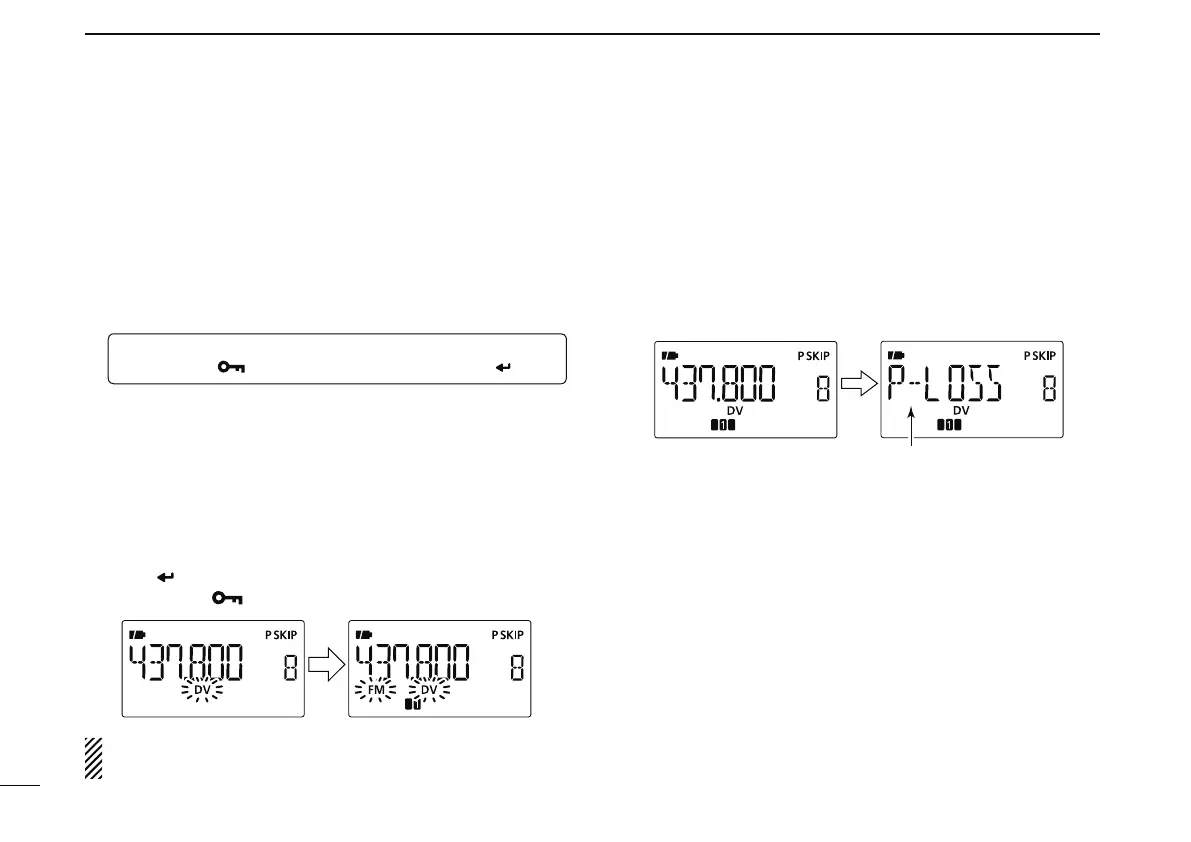
The “DV” mode indicator and “FM” mode indicator blink when
a non-DV signal is received during DV mode operation.
When a signal other than the DV mode is received, the IC-E80D
DV automatic detection switches to monitor in the FM mode.
q Enter “DV DET” in the DV SET mode.
MENU ¶ DV SET ¶ DV DET
(p. 133)
(Push [MENU ]), (Push [](2)/[](8), then push [ ](5).)
w Push [](2) or [](8) to turn the DV automatic detect
function ON and OFF.
OFF : “DV” blinks then “FM” also blinks, but the trans-
ceiver receives in the DV mode even if non-DV
mode signals are received.
ON : “DV” blinks then “FM” also blinks, when the trans-
ceiver monitors the receiving signal in other than
DV mode, the signal is in FM mode.
e Push [
](5) to return to the DV SET mode.
r Push
[MENU ] to return to the frequency screen.
NOTE: The received FM audio may be distorted when
receiving an FM signal with DV automatic detect function.
D Packet loss indication
While operating voice communication or low-speed data com-
munication via the internet network from one zone to another
zone, some packets may be lost due to network error (poor
data throughput performance). In such a case, the IC-E80D
displays “P-LOSS” instead of the frequency screen on the
display to indicate Packet Loss has occurred.
N Other functions in the DV mode



 To Next Page