77
8
GPS/GPS-A OPERATION
1
2
3
4
5
6
7
8
9
10
11
12
13
14
15
16
17
18
19
N GPS operation
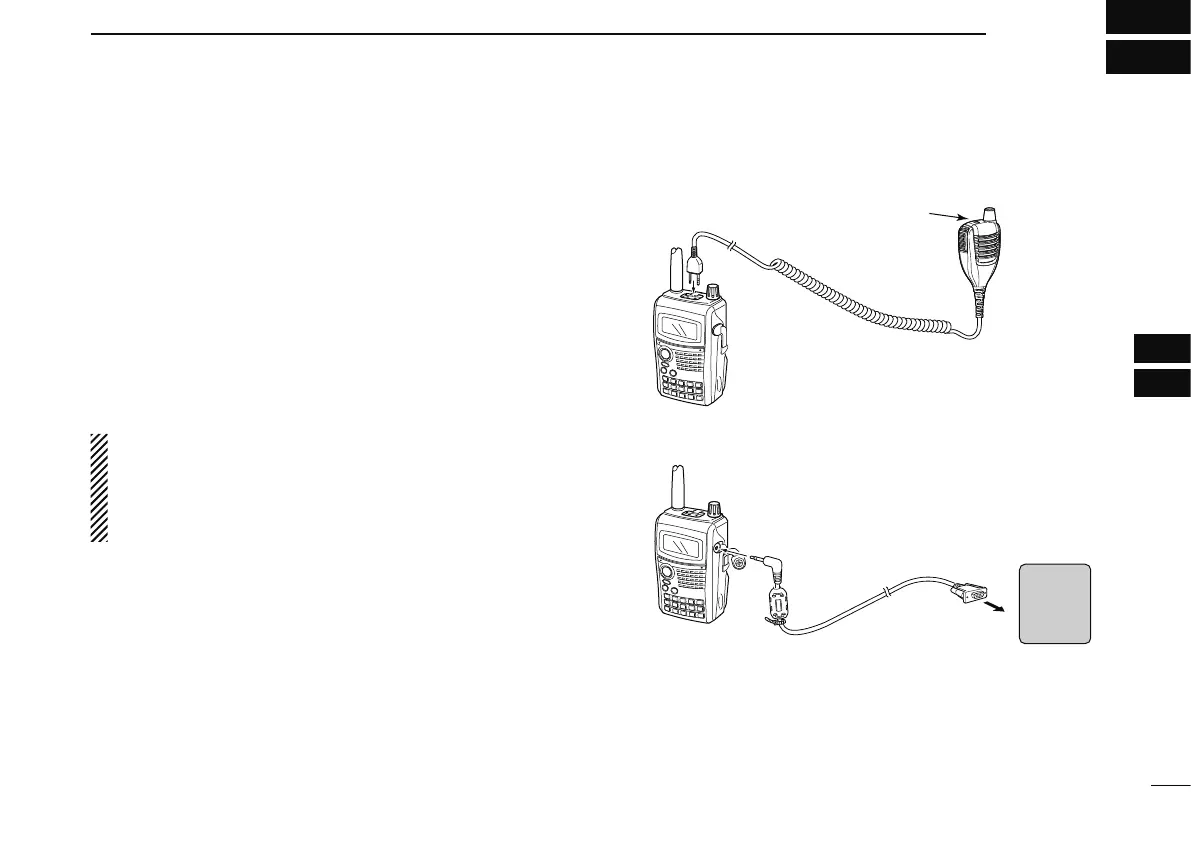
You can display GPS data when in FM, FM-N, WFM, AM
and DV modes. You can also transmit GPS data when in the
DV mode. To receive GPS data, connect an optional GPS
speaker microphone (HM-189GPS) or connect a third-party
GPS receiver* that has an RS-232C output and NMEA data
format. Third-party GPS receivers connect to the IC-E80D’s
[DATA] jack.
In addition, the GPS message transmission is also available
in GPS mode operation.
* Set “GPS-TX” to “DVG” or “DVA” at step w of next page when
connecting a 3rd party GPS receiver.
NOTE: The IC-E80D receives GPS data (position, etc.)
from the HM-189GPS only when the IC-E80D is
receiving. When transmitting, GPS data are not updated
and the IC-E80D transmits the GPS data it received
before you pushed [PTT].
• When connecting the HM-189GPS
HM-189GPS
(optional)
Top key
to [SP/MIC]
• When connecting the GPS receiver
OPC-1529R
(optional)
to [DATA]
to RS-232C port
(null modem
adapter is required)
GPS
receiver



 To Next Page