Section 5 - Commissioning
COMMISSIONING
56 Installation and Maintenance
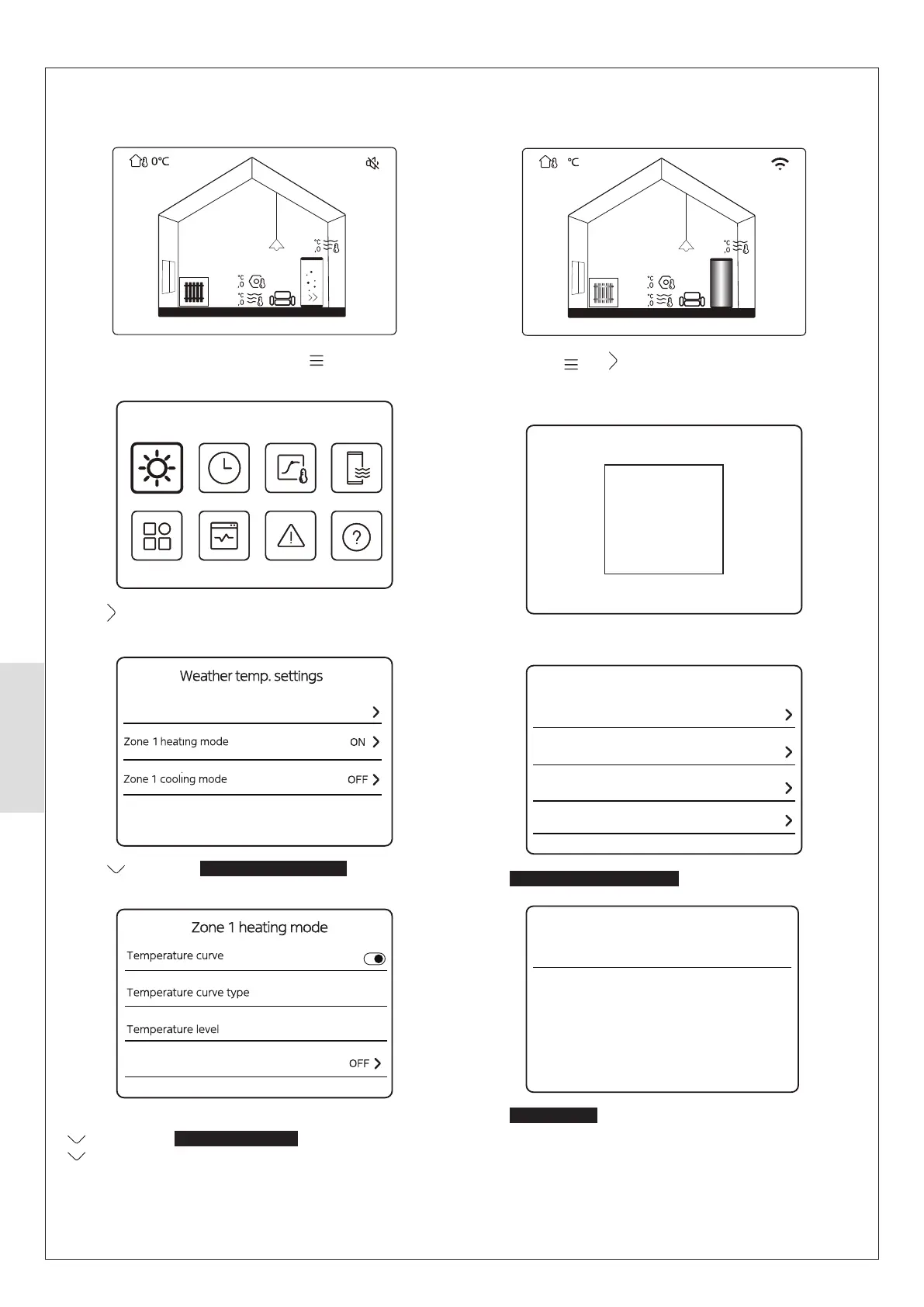
5.5.4 Enabling CH operation
Enable CH operation as follows:
Zone1
25
25
60
From the Home Screen (above), press to move to the
Menu page (below).
Mode
Press twice to highlight the Weather temp. settings option,
then press O and the below will be shown.
Weather temp. settings introduction
Press to highlight Zone 1 heating mode then press O
and the following screen will be shown.
ECO
ECO timer
6
Press O so that Temperature curve is enabled, then press
twice so that Temperature level is highlighted, press
shown and press O to store.
Zone1
37
5
25
39
Press and hold and together.
Note: TW2 zone 2 thermistor must be clipped to the zone 2
Please input the password
For serviceman
32 4
Enter 234
Temp. type setting
Room thermostat setting
Other heat source
Service call
For serviceman
Select
Room thermostat setting
Room thermostat Double zone
Room thermostat setting
Select Double zone
5.5.5 Enabling CH Zone 2 (if applicable)
Enable CH zones as follows:



 To Next Page