65
INSTALLER
USERMAINTENANCE TECHNICIAN
TECHNICAL DATA
2.4 USING THE APPLIANCE
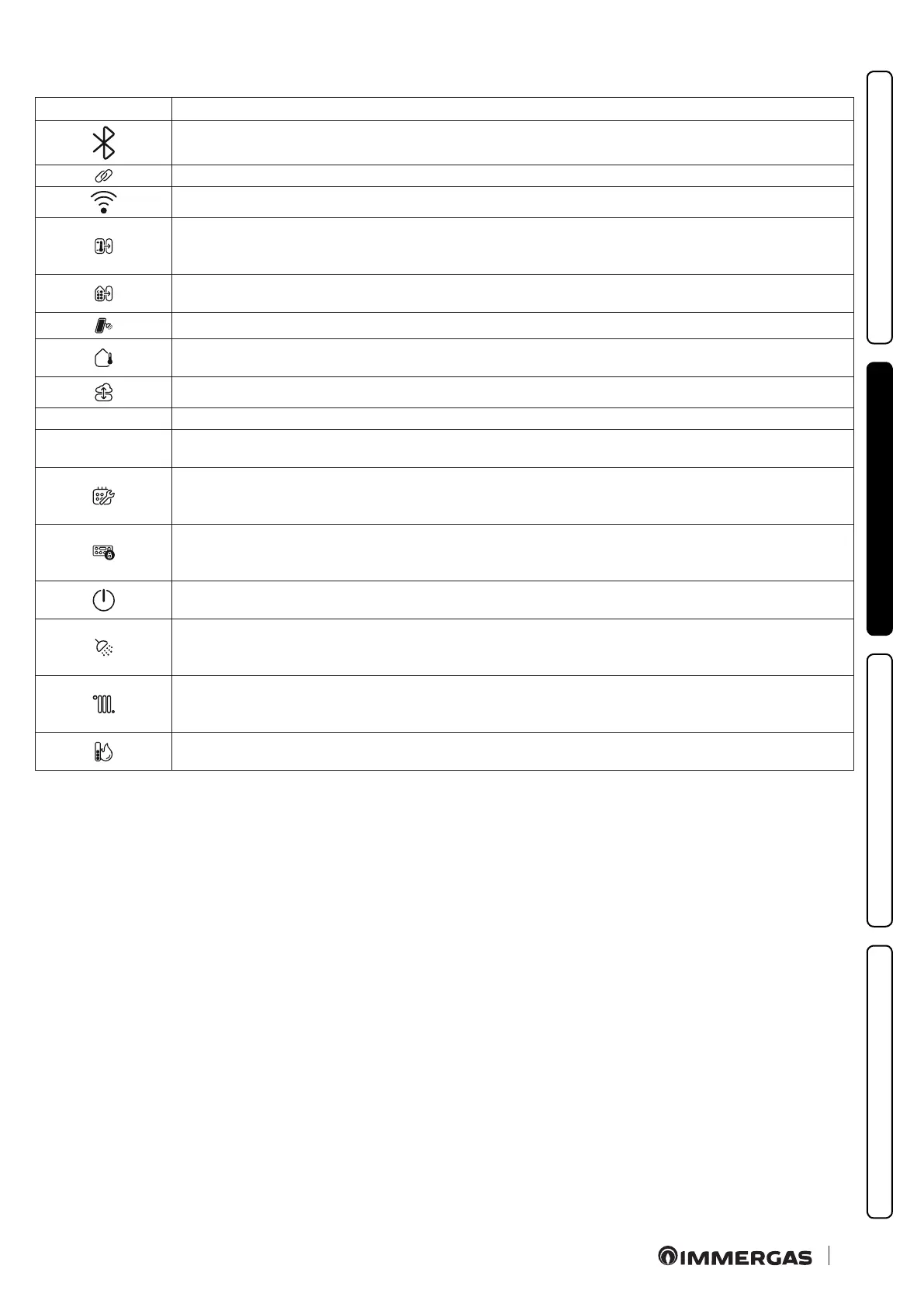
Symbol Description and operation
Not used
Not used
Not used
- e symbol on steady indicates the presence of a remote device connected, e.g.: CAR
V2
, Smartech Plus, commercial
remote.
It is also active in stand-by and when displaying faults.
- A permanently active symbol indicates the presence of a zone control unit or a BMS system.
It is also active in stand-by and when displaying faults.
Not used
e symbol indicates the presence of an external probe.
It is also active in stand-by and when displaying faults.
e symbol indicates that the boiler is connected to the external server and can be controlled via App (e.g. Dominus).
BOOST Not used
RESET
- e symbol ashes when there are faults that must be or can be reset manually.
- e symbol ashes when special functions are in progress that can be stopped by pressing the key.
- e symbol is permanently active if a service call for maintenance is requested.
- e symbol ashes during calibration.
It is also active in stand-by.
- e symbol is on steady when the keyboard lock is active.
- e symbol ashes when the user presses a key while the keyboard lock is active.
It is also active in stand-by and when displaying faults.
- e symbol on steady indicates that the boiler is in Stand-by at the request of a remote device.
- e symbol is ashing when the boiler is in OFF; the setting can only be activated or deactivated from the control panel.
- e symbol is permanently active when the boiler can meet a DHW request.
- e symbol ashes during a DHW request or during the chimney sweep function. ey are also displayed during the
deaeration function and with a fault in progress.
- e symbol is permanently active when the boiler can meet a C.H. request.
- e symbol ashes during a C.H. request or during the chimney sweep function.
ey are also displayed during the de-aeration function and with a fault in progress.
e ame icon is only present when the burner is on.
e bars represent the output power level.







 To Next Page