93
INSTALLER
USERMAINTENANCE TECHNICIAN
TECHNICAL DATA
MODEINFORESET
+
-
+
-
66
You may then:
- proceed to the next calibration step by pressing MODE;
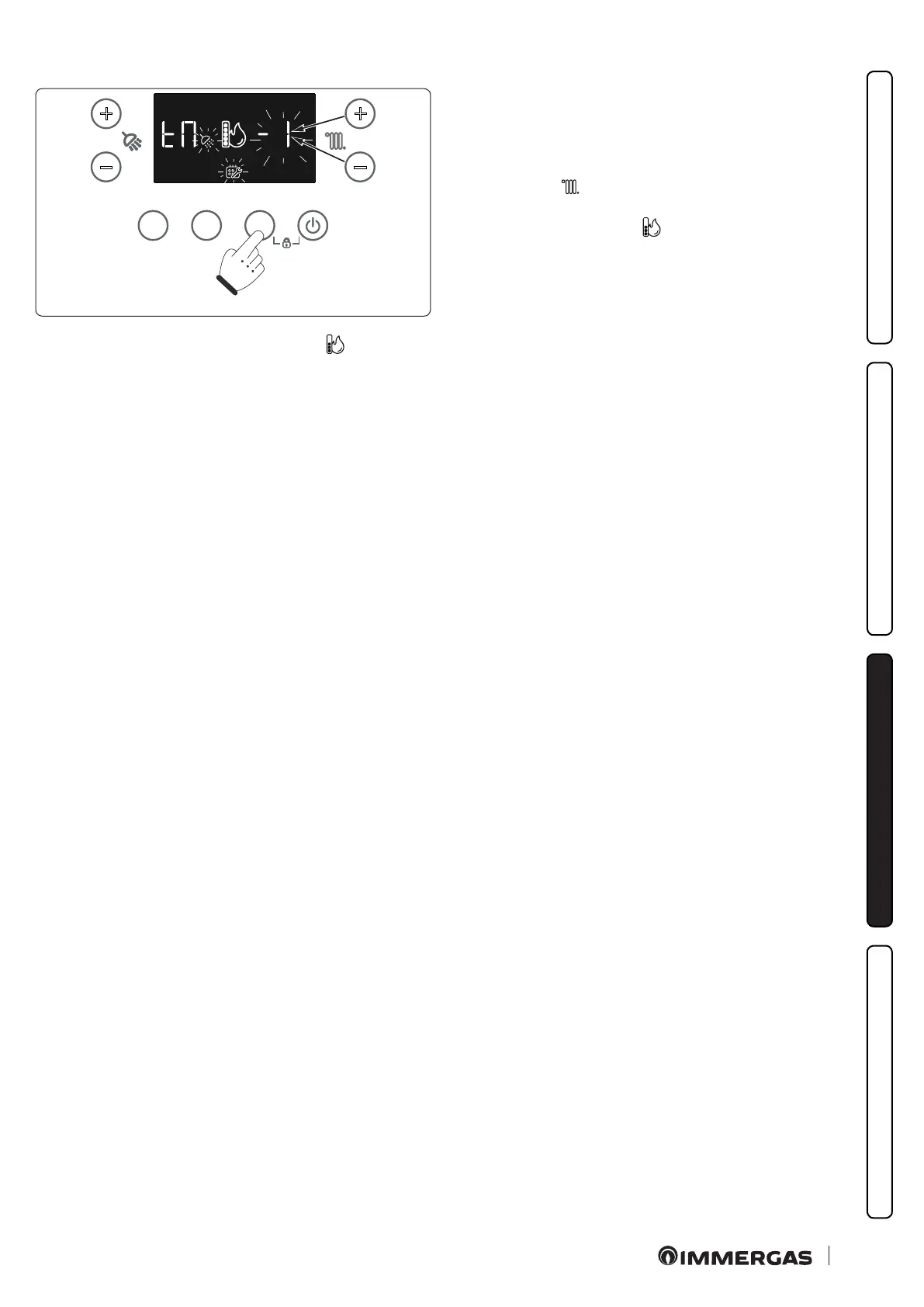
- (ONLY IF NECESSARY) change the value of the ame set to
correct the CO
2
value. (Increase the ame set value to decrease
the CO
2
value). Press the +/- buttons (7-8) to adjust the heating
temperature ( ) by selecting a value between -1, 0 and 1 (the
edited value will ash). Conrm the value by pressing the
MODE button (the symbol will start ashing and the indi-
cation (MA, AC, Mi) of the current phase alternating with the
ow temperature will appear again on the right digit).
When the new ame set is reached, the symbol (
) will become steady again and the previously set value will be displayed on the right
digit. It is possible to move on to the next stage by pressing the MODE button or to make a further correction by decreasing or increasing
the ame set value by a further unit (up to a maximum of -5 - +5) in the same way.
e procedure will end either automatically at the end of the maximum time or by pressing the MODE button on completion of the last
calibration step (Mi) with digit ashing to conrm successful calibration.
To exit early, press the RESET button.







 To Next Page