direction. Position and torque modes work in a similar way.
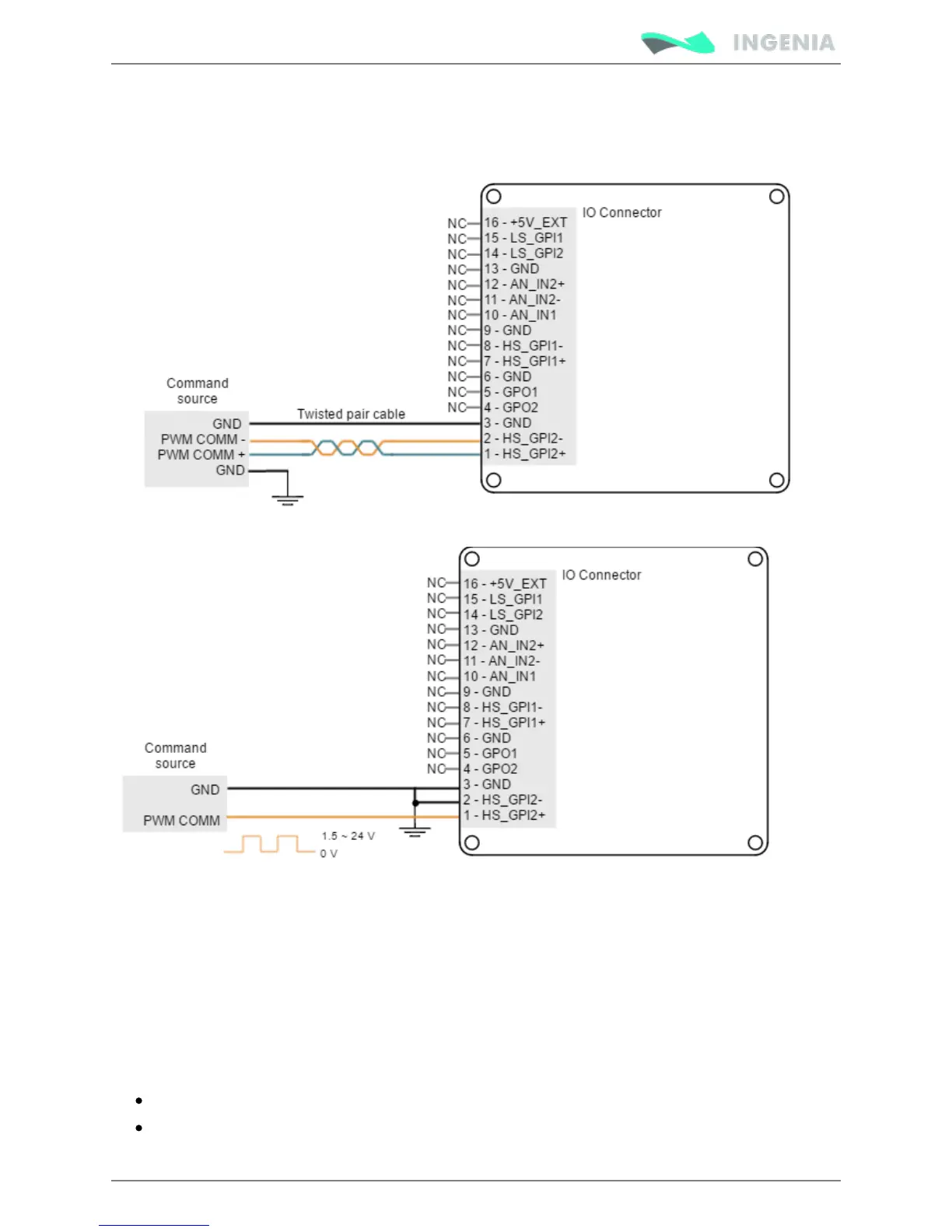
This mode uses High speed digital input 2.Refer to for information about connector´s position Connectors
and pinout, and see for more information about digital inputs. High-speed (HS) digital inputs interface
Next figure shows how to connect this input:
Dual input mode
For this mode two signals are used. Direction signal sets the direction of rotation (for example "logic 0" for
clockwise rotation and a "logic 1" for counter clockwise rotation). PWM command signal's duty cycle sets
the target position, velocity or torque.
For velocity mode, a 0% duty corresponds with 0 rpm, and a 100% duty corresponds with maximum
velocity. The direction of rotation depends on the value of the Direction signal. Position and torque modes
work in a similar way.
Dual input mode uses two general purpose inputs:
High speed digital input 2 for PWM Command
Low speed digital input 1 for Direction.
Refer to for information about connector´s position and pinout, and see Connectors position and pinout



 To Next Page