10 Chapter 1 Phone Basics
Display Screen
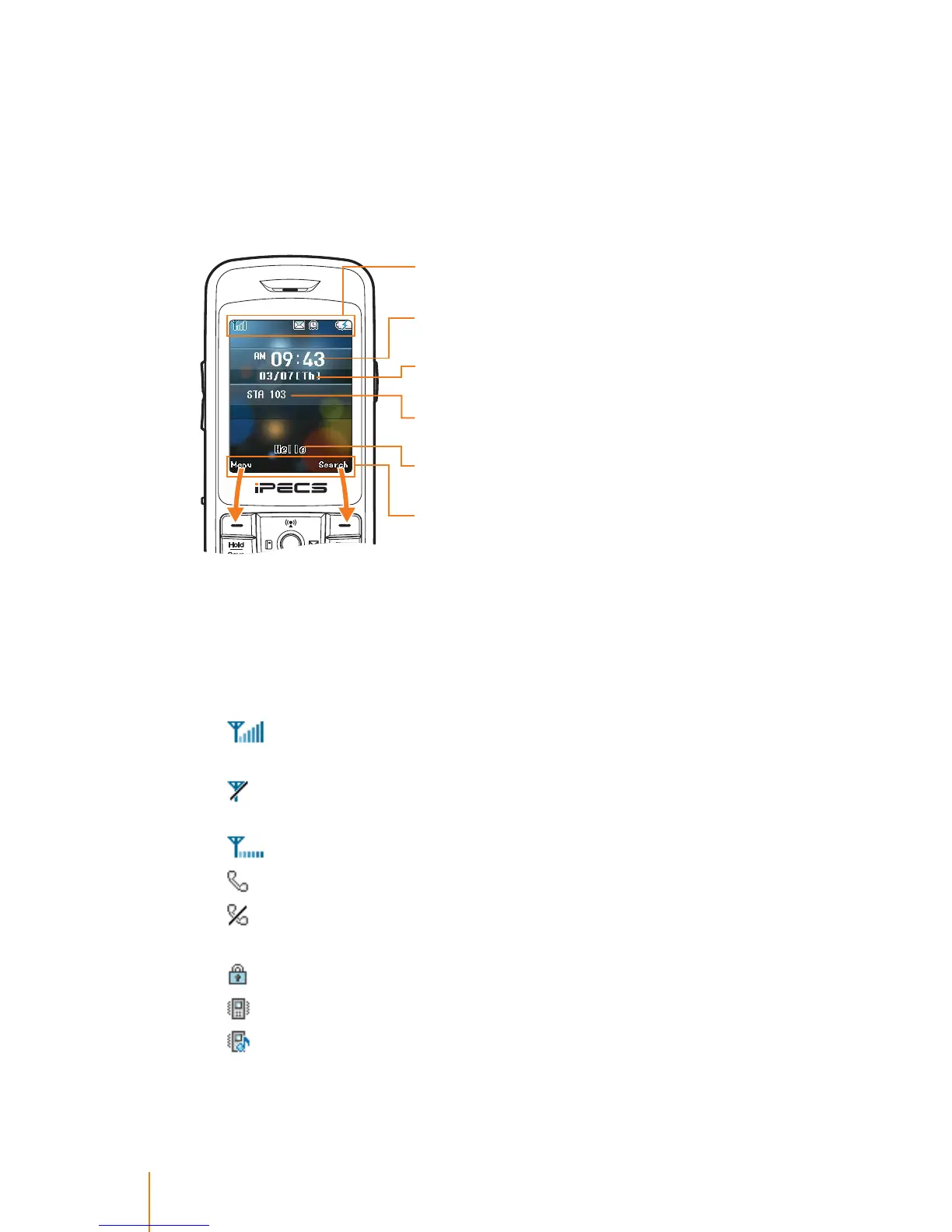
The display screen provides information about your phone’s status
and/or action of the functions shown after successful registration.
Display Informations
Status Icons
The following list gives a brief description of all showig status icons
of your phone. You will see this kind of icon at the top of the screen.
1.
shows your current signal RSSI level.
*1
The more lines you
have, the stronger your signal.
means your phone is not registered within the required AP
*2
or when your phone is out of range.
indicates your phone is trying to nd the AP.
2.
tells you a call is in progress or call is connected.
means your phone cannot nd a system signal or cannot
make a call.
3.
indicates phone lock is activated or keypad lock.
4.
indicates ringtone Vibration or Vibration Once.
indicates ringtone Ring after Vibration or Ring & Vibration.
Time displays the system time in the format
HH:MM with AM/PM.
Status Icons display at the top area of the display
screen.
Date and Day display current date, and the day
of the week in the format MM/DD.
Greeting Note appears when the greeting note
is set ON.
System Information displays the information,
such as station number, DND, Forward etc.
Menu Display Area oers a set of menus that
allow you to customize your phone. These
functions are accessed via the left and right soft
keys. The label on the bottom of the display (just
above each key) indicates its current function.



 To Next Page