22 Chapter 2 Getting Started
Phone Carrying
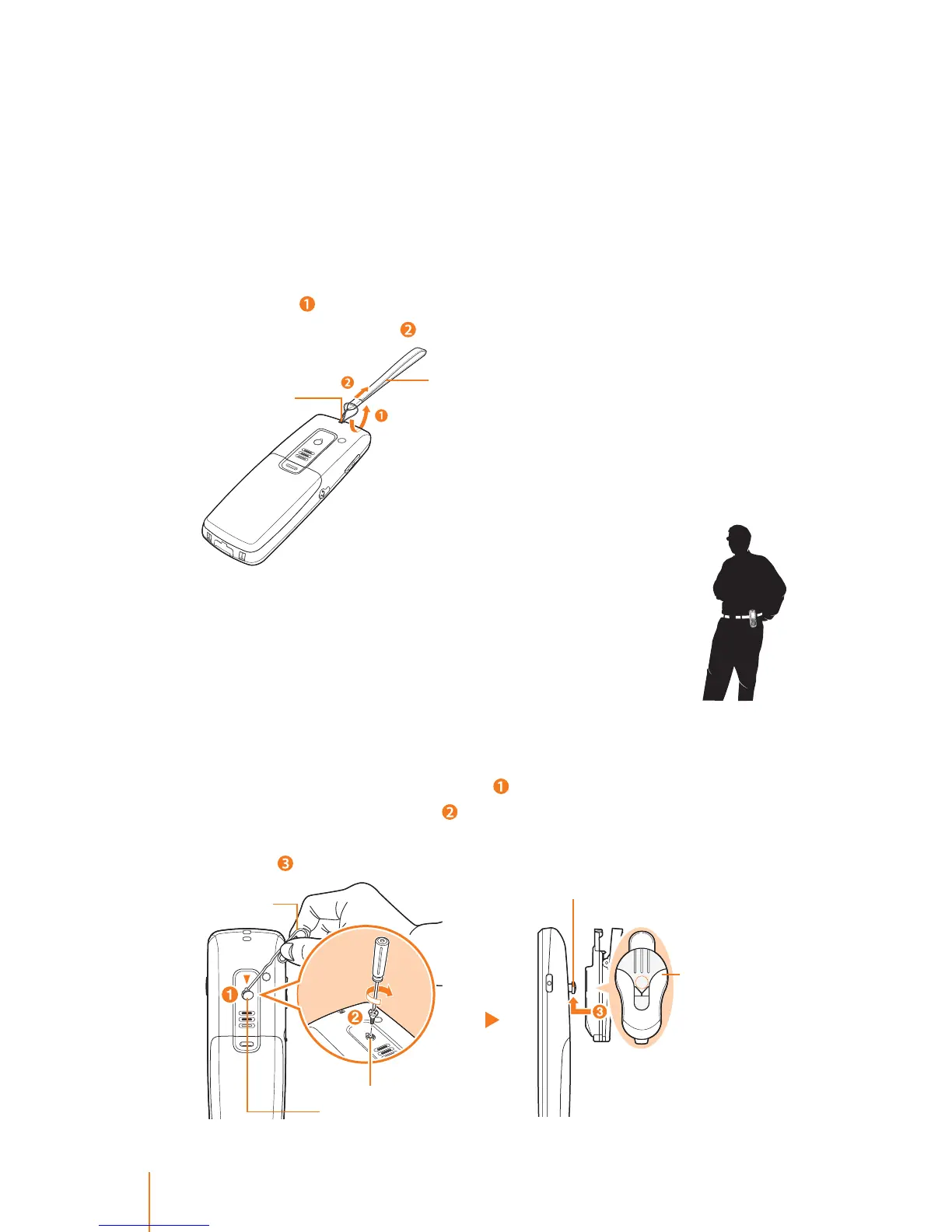
Using the Wrist Strap
Carry your phone with the wrist strap that included in your package.
This polyester carrying strap attaches easily to your phone.
To connect the wrist strap:
Ź Thread the small loop of the wrist strap through the strap hole on
the phone (
) and pull the strap through the small loop until the
strap is rmly secured (
).
Using the Belt Clip (User Opinions)
The phone belt clip allows you to clip your phone to your
belt or porket when you work around the oce.
Note: This belt clip is not included in your package.
To attach the belt clip:
Ź To attache the belt clip remove the protective cover from the back
of the phone as indicated below (
) then tighten the screw that
provided with the belt clip (
). Place the belt clip, align the screw on
the back of the phone and push it up hard until the belt clip is rmly
secured (
).
Wrist strap
Strap eyelet
Belt clip (option)
Screw
Screw hole
Protective cover
Paper clip



 To Next Page