56 Chapter 7 Call History
Call History Options
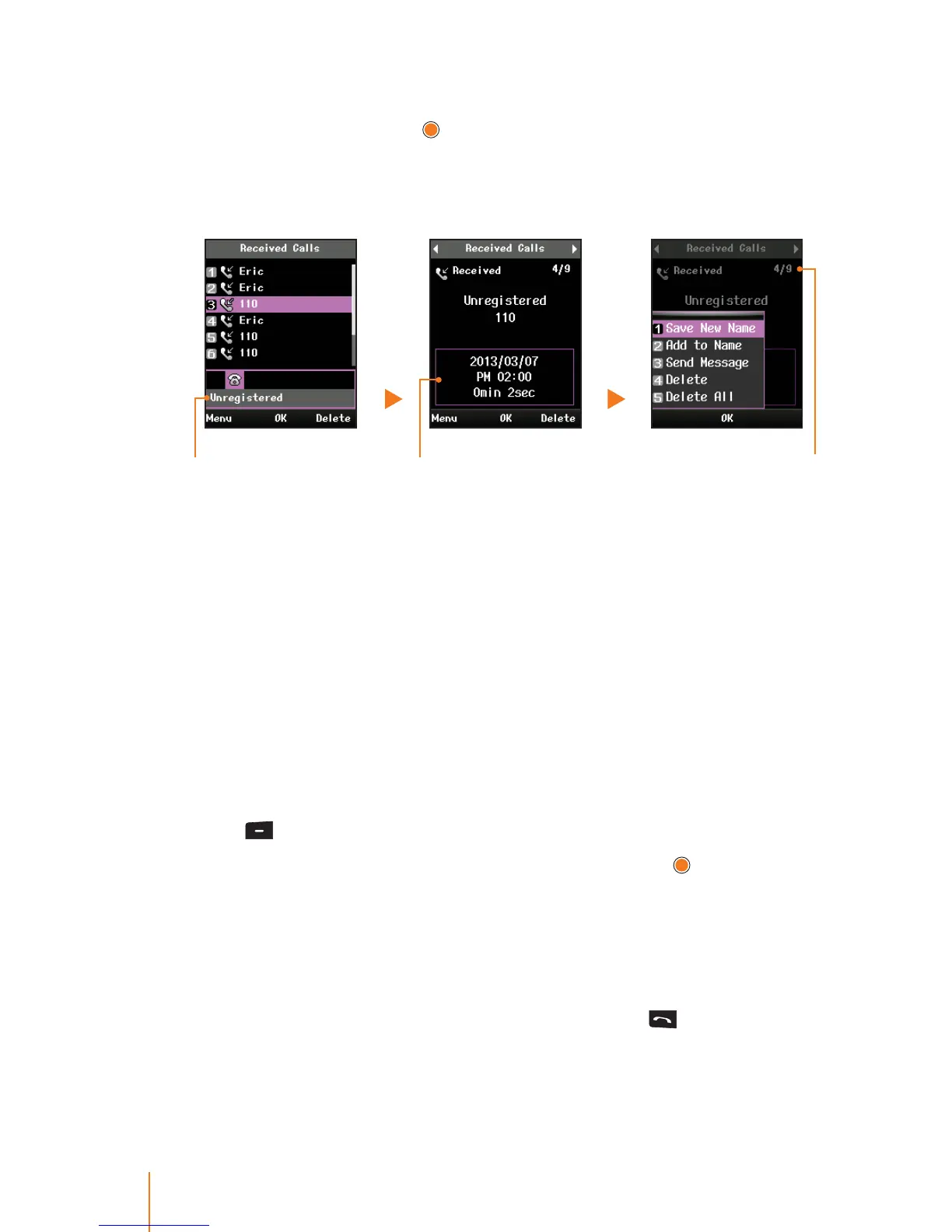
Select an entry and press to display the date and time of the call,
the phone number, and the caller’s name (if the number is already in
your phonebook). Press Menu (left softkey) to display the following
options:
Call’s detail informationNot saved number Number of received call
Save New Name to save the number to the phone book. (It could
be visible if it is not already in your phone book.)
Add to Name to add the number to an existing phone book.
Send Message to send a message to the selected entry.
Delete to delete the entry.
DeleteAll to delete all calls entries.
Note: You can also view the next or previous call history entry by
pressing the navigation key left or right.
Making a Call From Call History
If you need to make a call from the calls history.
1. Press
> Call History > Call History.
2. Select one of the following call history type and press
.
Missed Calls contain any missed calls.
Received Calls contain any received calls that were answered.
Dialed Calls contain all outgoing calls made from your phone.
All Calls contain all type of the call.
3. Select an entry to make a call its number and press
.



 To Next Page