85Chapter 10 System
Deleting a Speed Dial
You can delete an existing Speed Dial in the phone.
1. Press
to access programing mode.
2. Press navigation key left to select System > System Speed and press
.
3. Enter the Speed Dial location with the number you want to delete.
For example, if you want to delete Speed Dial 01, Press "0" and "1"
using the keypad.
4. When displaying the number of Speed Dial, press navigation key left
to select System > System Speed and press
.
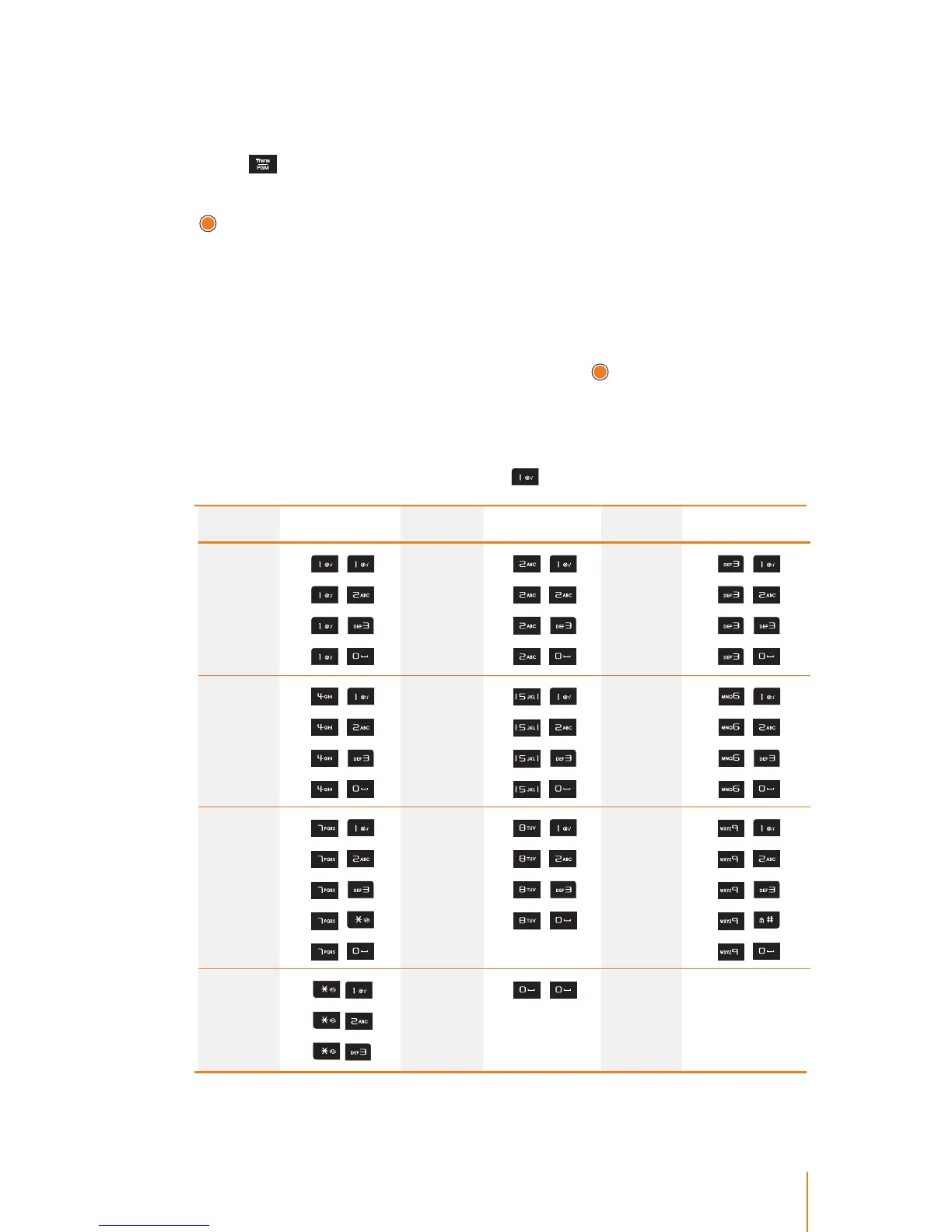
Character Input Table
The following table describes how to enter each letter and number.
For example, to enter the "Q" press
twice.
Letter Keypad Letter Keypad Letter Keypad
Q
Z
.
1
,
,
,
,
A
B
C
2
,
,
,
,
D
E
F
3
,
,
,
,
G
H
I
4
,
,
,
,
J
K
L
5
,
,
,
,
M
N
O
6
,
,
,
,
P
R
S
Q
7
,
,
,
,
,
T
U
V
8
,
,
,
,
W
X
Y
Z
9
,
,
,
,
,
Blank
:
,
,
,
,
0
,



 To Next Page