16 Chapter 2 Getting Started
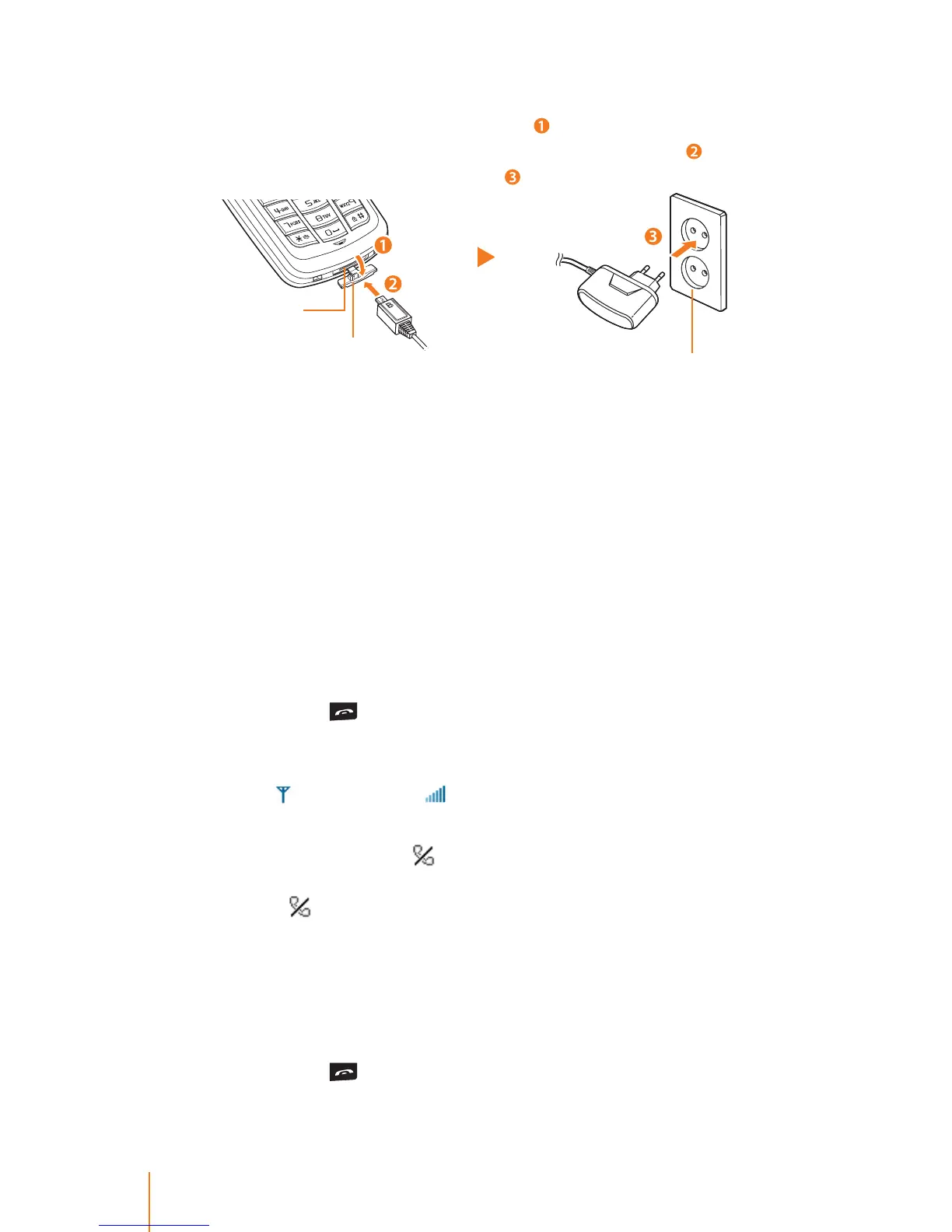
To install the travel adapter:
Ź Open the external charger jack cover ( ) of the phone. Plug the at
end of the travel charger into the phone’s charger jack (
) and the
other end into an electrical outlet (
).
Replacing the Battery
Rechargeable battery has a limited number of charge cycles and
may eventually need to be replaced.
The charging time may dier depending on the condition of your
battery, purchases a new battery when the battery run time gets
shortened.
Use only the Li-Ion battery supplied with your phone. New batter-
ies are available from Ericsson-LG.
Turning Your Phone On and O
Turning Your Phone On
Ź Press and hold for approximately two seconds.
After the powering on animation, the phone tries to lock the ac-
cess point. As your phone connects to the access point, you see an
Antenna
and RSSI level icon on the display screen, it means all
procedures for initial setup are completed.
Your screen still remains
icon, the phone searchs for and sends
a registration message to system. If the phone receives Register
Response,
icon disappears from the display screen.
Setup and registration is completed, your phone automatically goes
to standby mode, you can make or receive any type of call. If not, see
"Registration" on page 25.
Turning Your Phone O
Ź Press and hold for three seconds until you see the powering
down animation on the display screen.
Cover
Charger jack
Electrical outlet



 To Next Page