CHAPTER 2
Chassis Description
•
SRX300 Services Gateway Chassis Overview on page 5
•
Understanding the SRX300 Services Gateway Front Panel on page 5
•
Understanding the SRX300 Services Gateway Back Panel on page 7
SRX300 Services Gateway Chassis Overview
The SRX300 Services Gateway chassis weighs 4.38 lb. and measures 1.37 in. high, 12.63
in. wide, and 7.52 in. deep.
CAUTION: Before removingor installing componentsof a functioning services
gateway, attach an electrostatic discharge (ESD) strap to an ESD point and
place the other end of the strap around your bare wrist. Failure to use an ESD
strap could result in damage to the device.
The services gateway must be connected to earth ground during normal operation. The
protective earthing terminal on the rear of the chassis is provided to connect the services
gateway to ground.
Related
Documentation
Understanding the SRX300 Services Gateway Front Panel on page 5•
• Understanding the SRX300 Services Gateway Back Panel on page 7
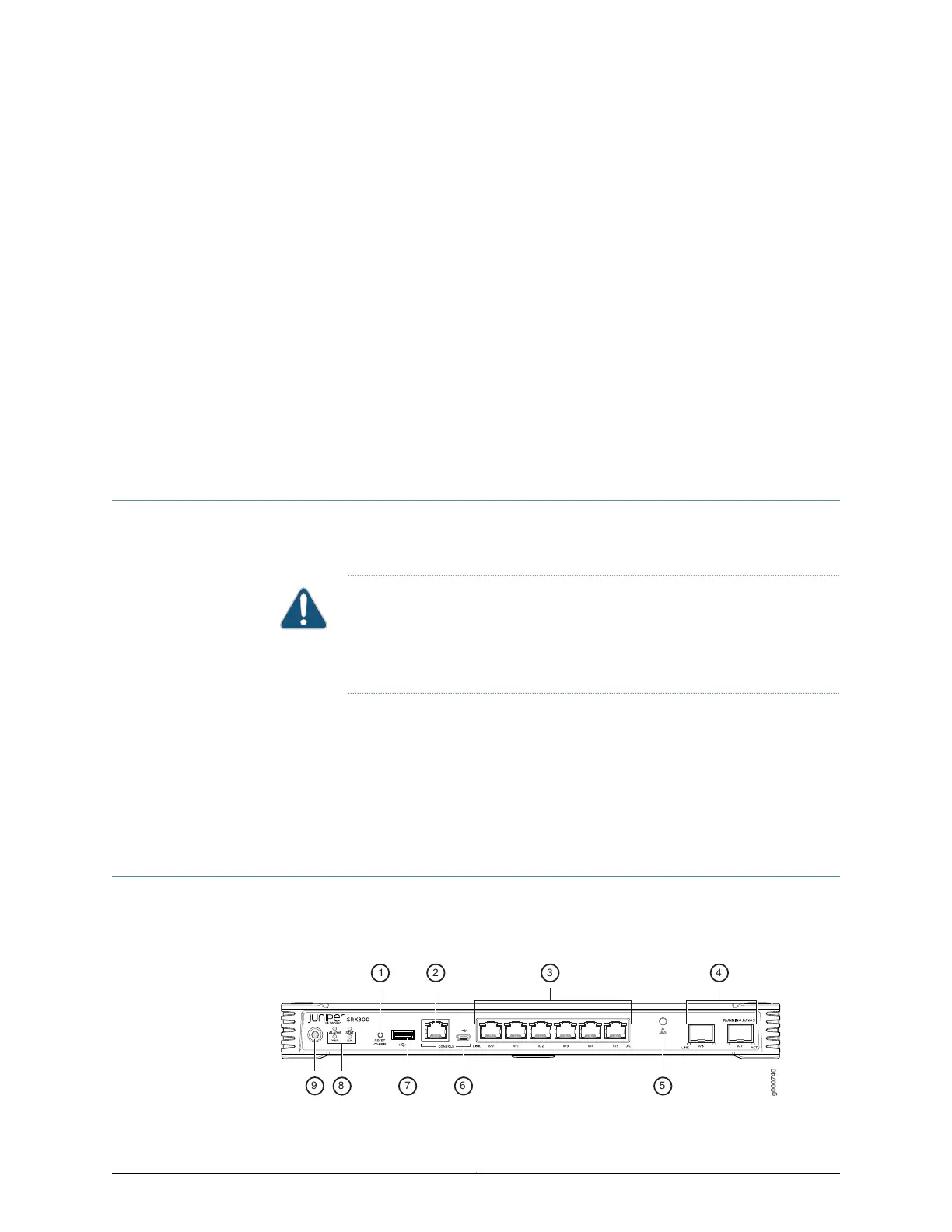
Understanding the SRX300 Services Gateway Front Panel
Figure 1 on page 5 shows the front panel of the SRX300 Services Gateway.
Figure 1: SRX300 Services Gateway Front Panel
5Copyright © 2016, Juniper Networks, Inc.



 To Next Page
 Loading...













