64
01/13424999386
SP
O
Reset
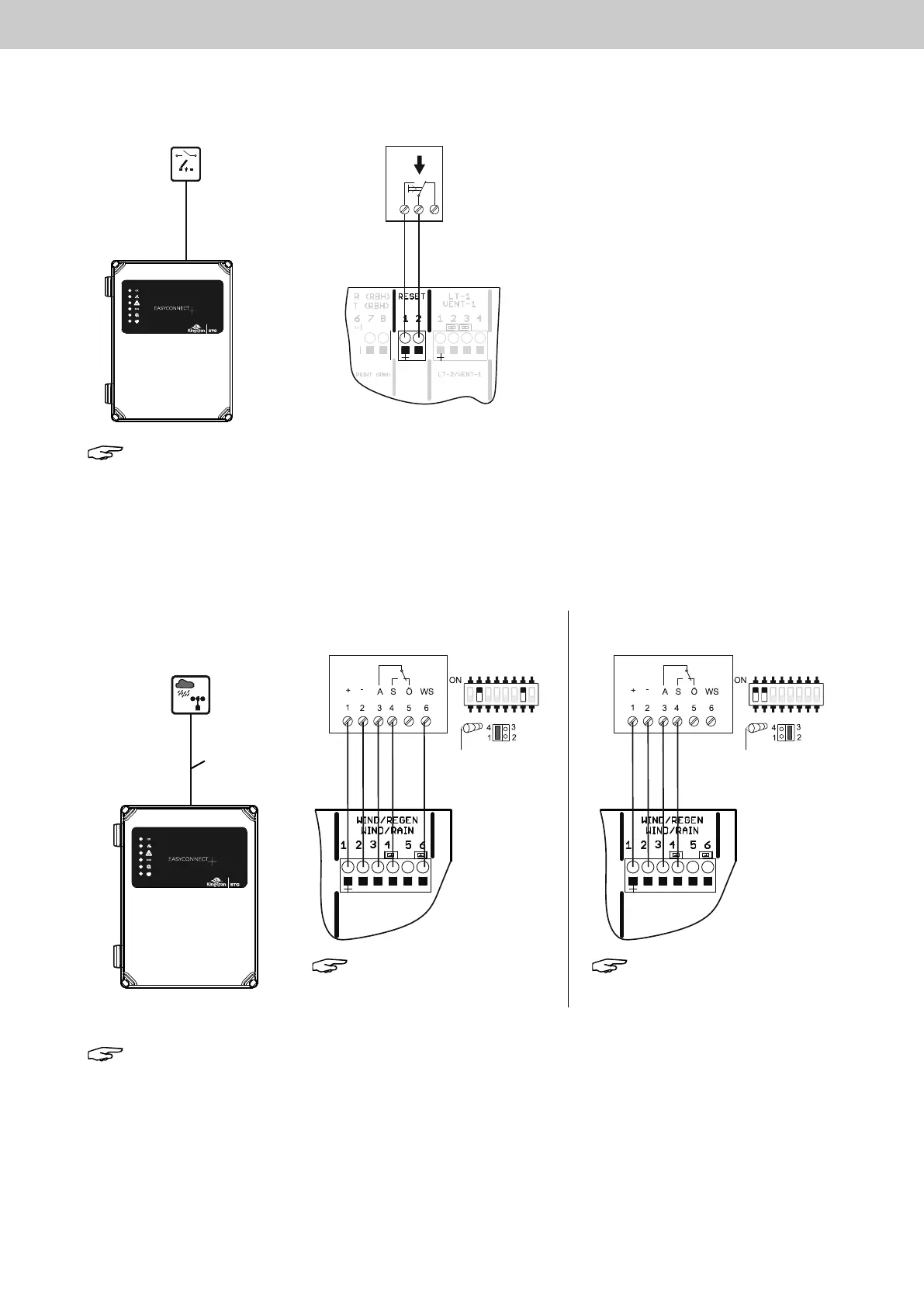
8.7 Connectionofexternalresetbuttons
8.8 Connectionofwind/rainsensorTypeWRM/224VandrainsensorTypeRM/224V
Note: Pressing the button resets the SHE trip and the automatic detectors of
bothchannels.Thewindows/apsmovetotheCLOSEDposition.
The ventilation function is enabled after 3 minutes.
Note: The wind and rain signals act on both internal channels 1 + 2.
External
reset button
4 (5)
Connection and DIP switch position
with combined signal
Types WRM/2 24V, RM/2 24V
DIP switch position
DIP switch position
Jumper position
Type WRM/2 24V
Jumper position
Type WRM/2 24V
Connection and DIP switch position
with separate signal
Type WRM/2 24V
Note: Setting of the
wind speed in the
EasyConnect +
Note: Setting of the
wind speed at the
WRM/2
EasyConnect+
EasyConnect+
EasyConnect+



 To Next Page