88
01/13424999386
17 Service
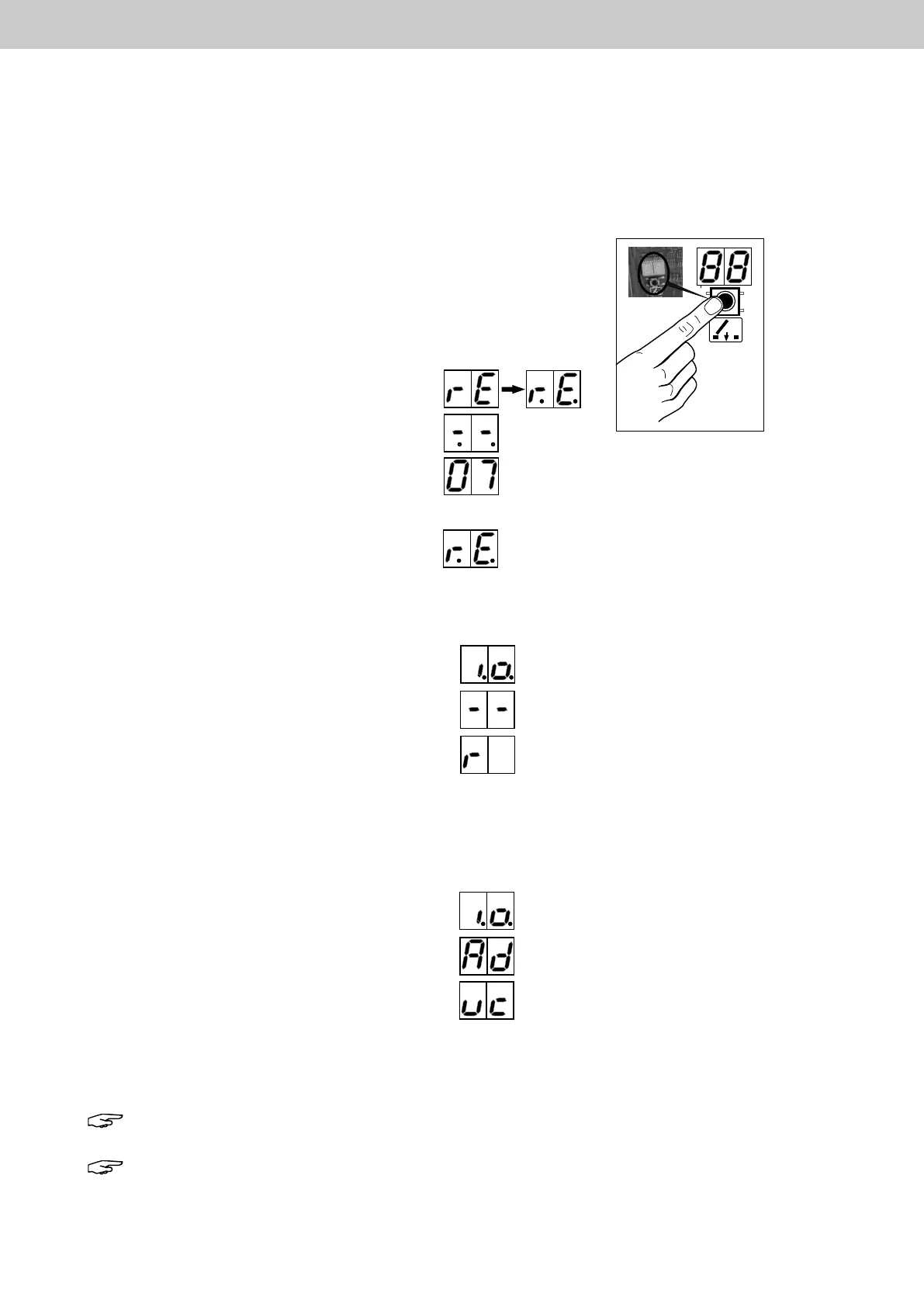
17.1 Operating the EasyConnect+ reset button
17.1.1 Resettofactorysettings
► Disconnect mains voltage and battery voltage (e.g. pull fuses).
► Reconnect the mains or battery voltage. and press
at the same time the button. After 8s, "rE" then
"r.E." appears.
► Wait until "-.-." appears, then release the
reset button.
A countdown 9 to 1 appears.
► During the Countdown, press the reset button again.
"r.E." appears again and the factory settings are
restored.
The Easy Connect+ restarts and is reset to factory settings.
17.1.2 Reset SHE- and FAS activating
The control panel works without errors and shows "i.o."
► Press the reset button for between one and four
seconds then release it. The message "-.-." appears
on the 2 x 7-segment display.
Afterwards, "r" appears and the EasyConnect resets
the SHE and FAS activating.
Dependingontheconguration,theactivatingisalsocancelledortheaps/windowsareclosed.
If a network consisting of several EasyConnect+ is active and external errors are present, these are reset.
17.1.3 Show / change address
The control panel works without errors and shows "i.o."
► Press the reset button until "A d" appears,
then release.
The current address is displayed (e.g. 03).
If "uc" appears, the EasyConnect+ does not have an
address and is not integrated into the EasyConnect+ network.
If the reset button is pressed again during the address display, the address is changed.
The address is incremented (up to max. 26) as long as the button is pressed.
The last address displayed is entered as the current address.
Note: To integrate an existing EasyConnect+ into an existing EasyConnect+ network,
it should be set to "uc".
Note: If the address of an already integrated central unit is changed, the button A on the network
board must be pressed for between 1 and 4 seconds.
IfthenetworkmustbeswitchedoorifthenetworkboardisremovedfromanEasyConnect+controlpanel,all
area DIP switches must be set to "OFF" and the address "0" (see item 17.1.3).
16.6 Switchothenetwork
EasyConnect+



 To Next Page