70
01/13424999386
++
+
++
+
+++++
+
++
BBMMAA
BBMMAA
M
M
++
1 21 2
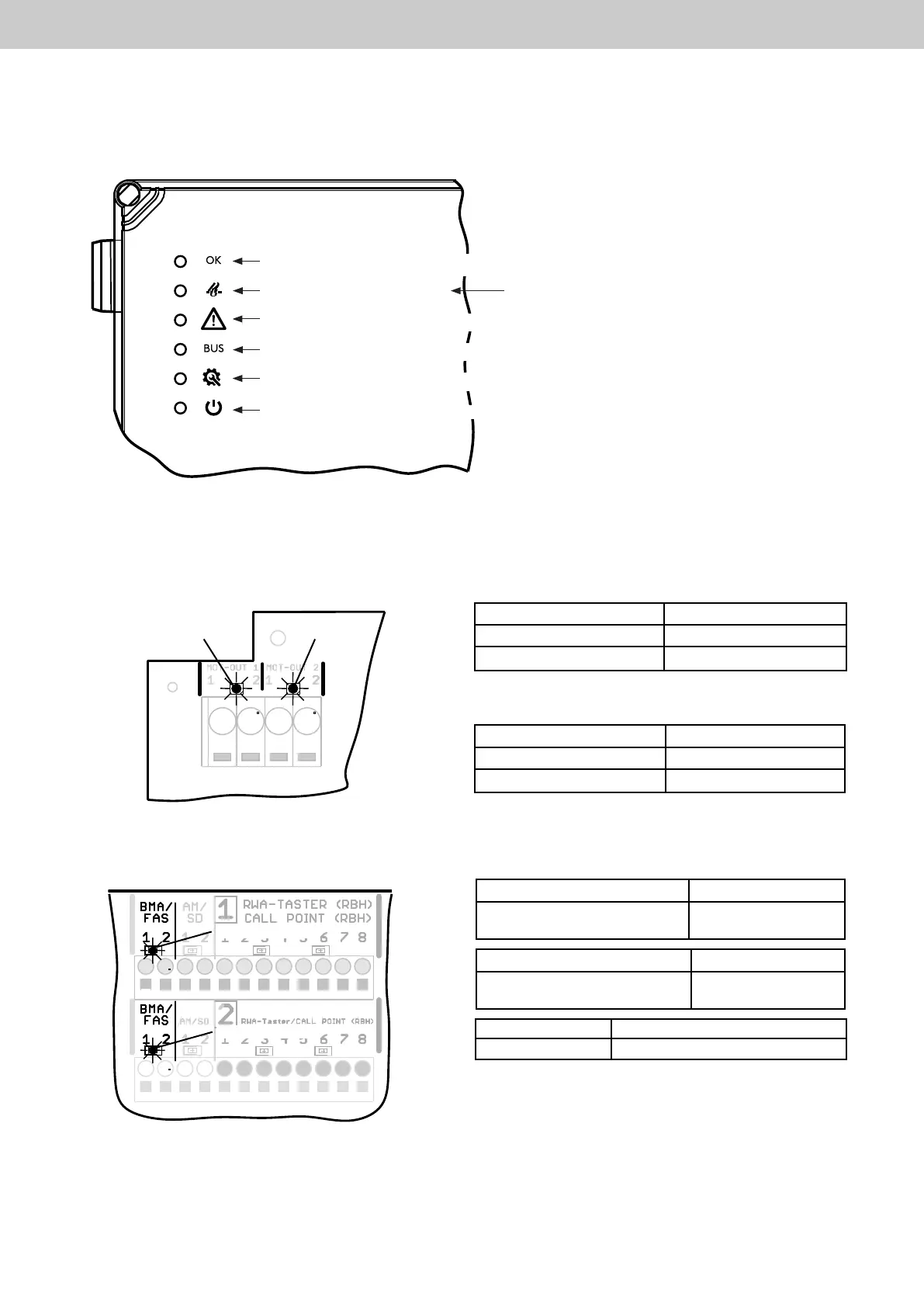
LEDdisplayfordriveline1 Meaning
Lit green Drive moves to “OPEN”
Lit red Drive moves to “CLOSED”
LEDdisplayforFASchannel1 Meaning
Lit green FAS contact closed
LEDdisplayforFASchannel2 Meaning
Lit green FAS contact closed
LEDdisplayfordriveline2 Meaning
Lit green Drive moves to “OPEN”
Lit red Drive moves to “CLOSED”
11.2 LED displays on the motherboard
11.2.1 LEDdisplaysfordrivesofdrivelines1+2
11 LED displays
11.1 LED displays on the housing door
11.2.2LEDdisplayforFASchannels1+2
LED drive line 1
LED drive line 2
LED FAS channel 1
LED FAS channel 2
Door display mains 230 V (white)
Door display activation (red)
Door display malfunktion (yellow)
Door display networking (blue)
Door display maintenance (orange)
Door display ready for operation (green)
Extrainformation Meaning
LED display flash Signal from active end module ok
Redashing:Detectorpre-alarm(anautomatic
detector has triggered)
EasyConnect+



 To Next Page