69
01/13424999386
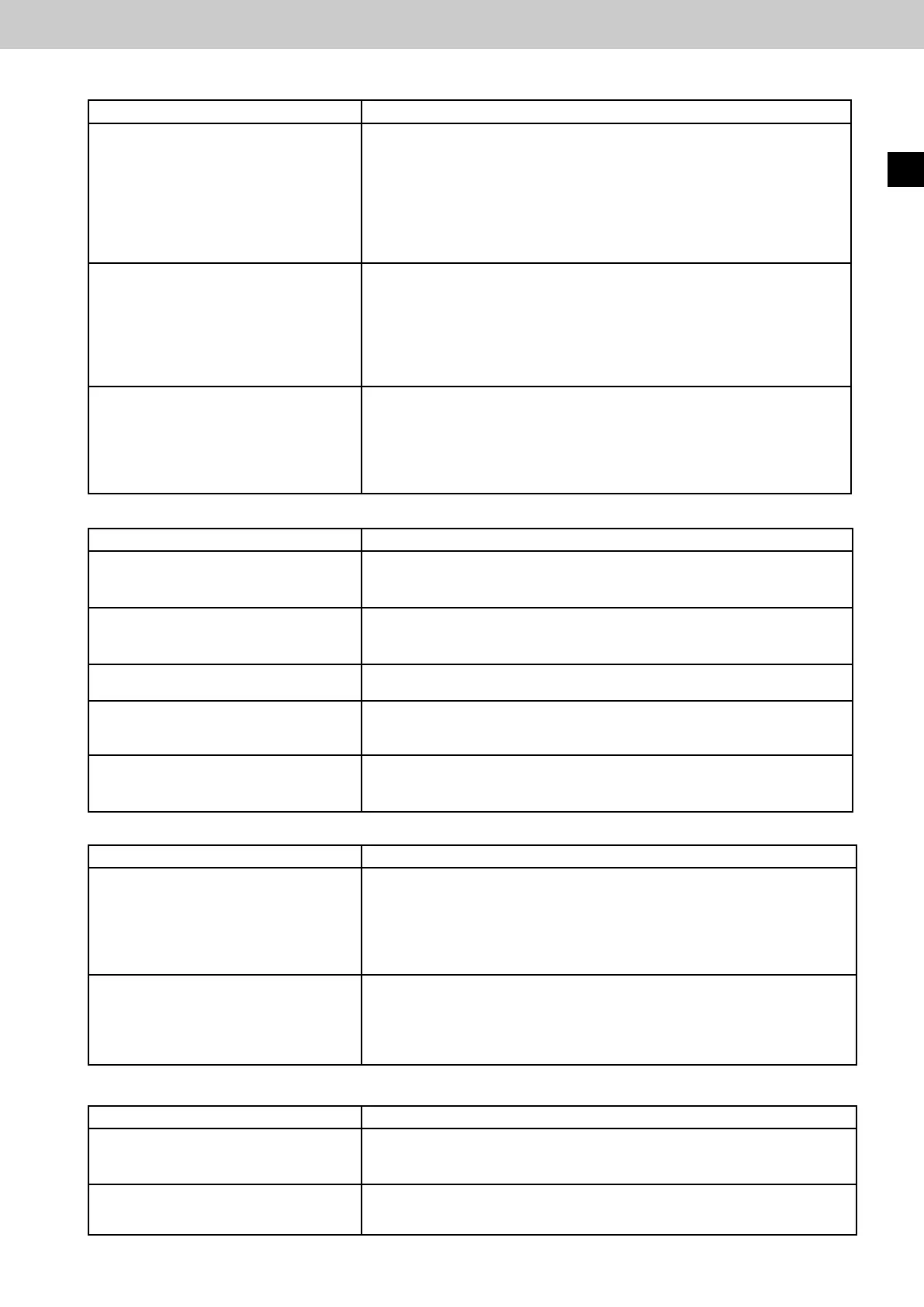
Testofautomaticdetectors
Actuation Eect
► Trip automatic detector (e.g. with
test aerosol)
SHE trip: Display F A on the 7-segment display of the motherboard.
The red LED on the SHE manual call point and in the housing door of
the control panel lights up. The green LED (operation OK) on the SHE
manual call point and in the housing door of the control panel lights up.
The drive output is switched (green LED above the drive terminals lights
up). Drives move to completely OPEN. Signalling contact 2 (trip) closed.
Green
LEDonventilationpushbutton(LTA25)ashesfast(ventilation
function barred).
►BrieypresstheReset/CLOSE
button (black) on the SHE manual call
point
Reset of the SHE trip.
Drives move to completely CLOSED (red LED above the drive terminals
lights up). The red LED on the SHE manual call point and in the housing
door of the control panel goes out. The yellow LED (fault) on the SHE
manualcallpointandinthehousingdoorofthecontrolpanelashes
4x. Signalling contact 1 (fault) closed.
Display E4C1 (E4C2) on the 7-segment display of the motherboard.
►BrieypresstheResetbuttononthe
motherboard of the control panel
Reset of the SHE trip. Yellow LED (fault) not lit.
The green LED (operation OK) on the SHE manual call point and in the
housing door of the control panel lights up. Detector contacts 1 and 2
open.
After approx. 180 s, display I.O. on the 7-segment display of the mo-
therboard.
Test Closing with wind/rain sensor
Actuation Eect
►BrieypressbuttonOPENonthe
ventilation push button.
The drive output is switched (green LED above the drive terminals lights
up). Drives move to OPEN. The display “Ventilation OPEN” (Type LTA
25 only) lights up.
► Wet the rain surface of the rain
sensor with water and keep damp.
The drive output is switched (red LED above the drive terminals lights
up). Drives move to completely CLOSED. The display “Ventilation OPEN”
(TypeLTA25only)ashesfast(ventilationfunctionbarred).
►BrieypressbuttonOPENonthe
ventilation push button.
No reaction
► Dry the rain surface again.
►BrieypressbuttonOPENonthe
ventilation push button.
The drive output is switched (green LED lights up). Drives move to OPEN.
The display “Ventilation OPEN” (Type LTA 25 only) lights up.
► Blow wind against the wind sensor
(e.g. using a hair dryer).
The drive output is switched (red LED above the drive terminals lights
up). Drives move to completely CLOSED. The display “Ventilation OPEN”
(TypeLTA25only)ashesfast(ventilationfunctionbarred).
Test Emergency power
Actuation Eect
► Enable mains The white LED (mains) goes out. The yellow LED (fault) on the SHE
manualcallpointandinthehousingdoorofthecontrolpanelashes
1x. The green LED (operation OK) on the SHE manual call point and in
the housing door of the control panel goes out. Drives move to CLOSED.
Signalling contact 1 (fault) closed. Display E1 on the 7-segment display
of the motherboard.
► Connect mains voltage again Yellow LED (fault) not lit. White LED (mains) comes on again.
The green LED (operation OK) on the SHE manual call point and in the
housing door of the control panel lights up. Detector contacts 1 and 2
open.
Display I.O. on the 7-segment display of the motherboard.
Test Key-operated vent switch
Actuation Eect
►BrieypresskeyturnOPEN
►BrieypresskeyturnOPENagain
The drives move to OPEN
The drives stop.
►BrieypresskeyturnCLOSE
►BrieypresskeyturnCLOSEagain
The drives move to CLOSE
The drives stop.
EasyConnect+
EN



 To Next Page