7 COMMAND CENTER ADMINISTRATOR MODE
238 Registering From COMMAND CENTER
6
Click [Add].
The selected recipients are added to the Recipient List page.
You can remove contacts that you have added to the recipient list before saving the destination settings.
P.238 “Removing the contacts from the recipient list”
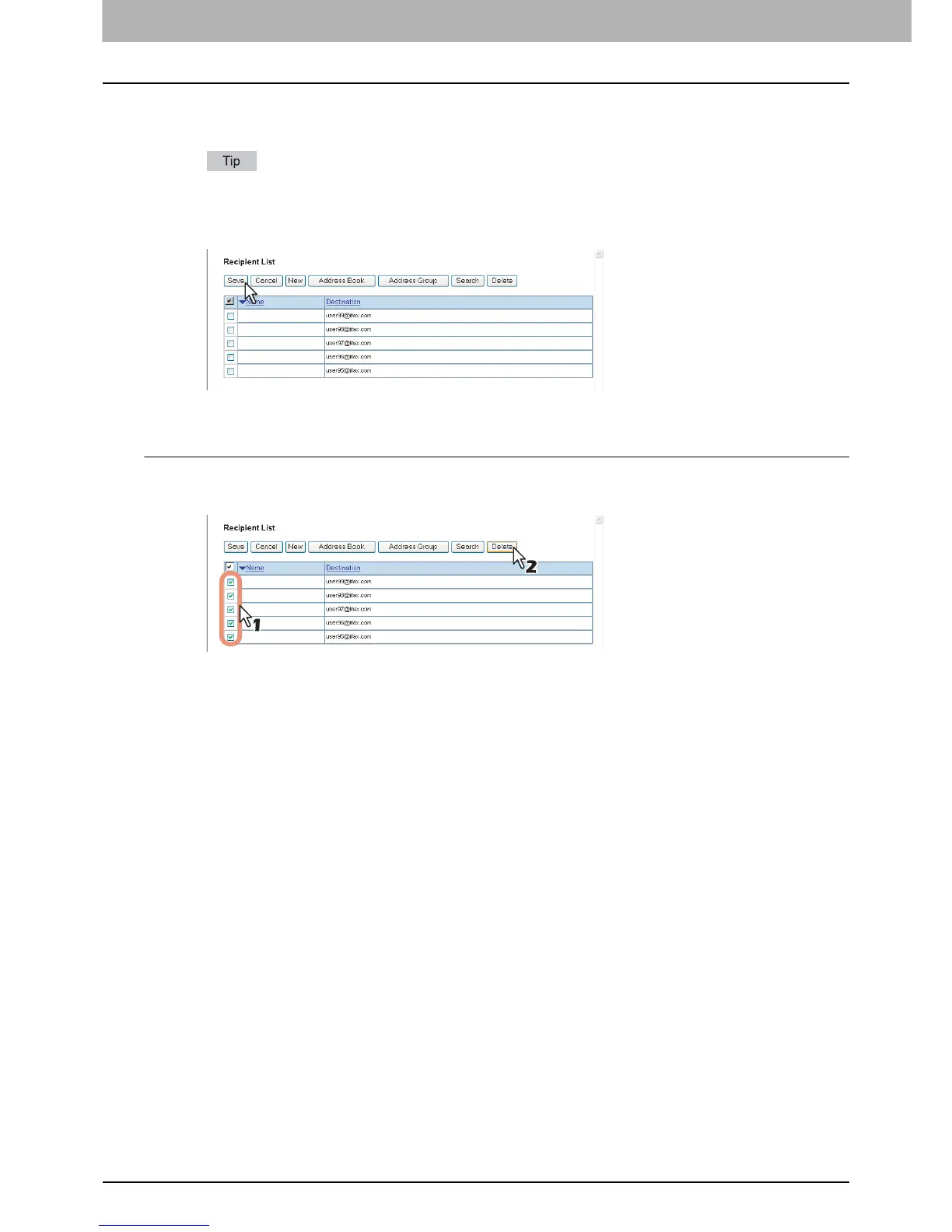
7
Click [Save].
The contacts are added as destinations.
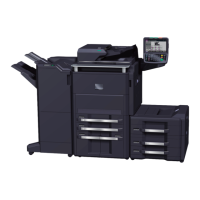
Removing the contacts from the recipient list
1
Select the check boxes of the contacts that you want to remove from the recipient list,
and click [Delete].
The selected contacts are removed from the recipient list.
2
Click [Save].
InternetFax Setting (Fax/Internet Fax Received Forward)
In the Internet Fax Setting page, you can specify the content of the Internet Fax to be sent.
Instructions on how to set the Internet Fax settings for the Fax or Internet Fax Received Forward are the same as for
setting the Internet Fax settings for private templates.
P.56 “InternetFax Setting (Private template)”













 To Next Page