7.COMMAND CENTER ADMINISTRATOR MODE
Registering From COMMAND CENTER 241
7 COMMAND CENTER ADMINISTRATOR MODE
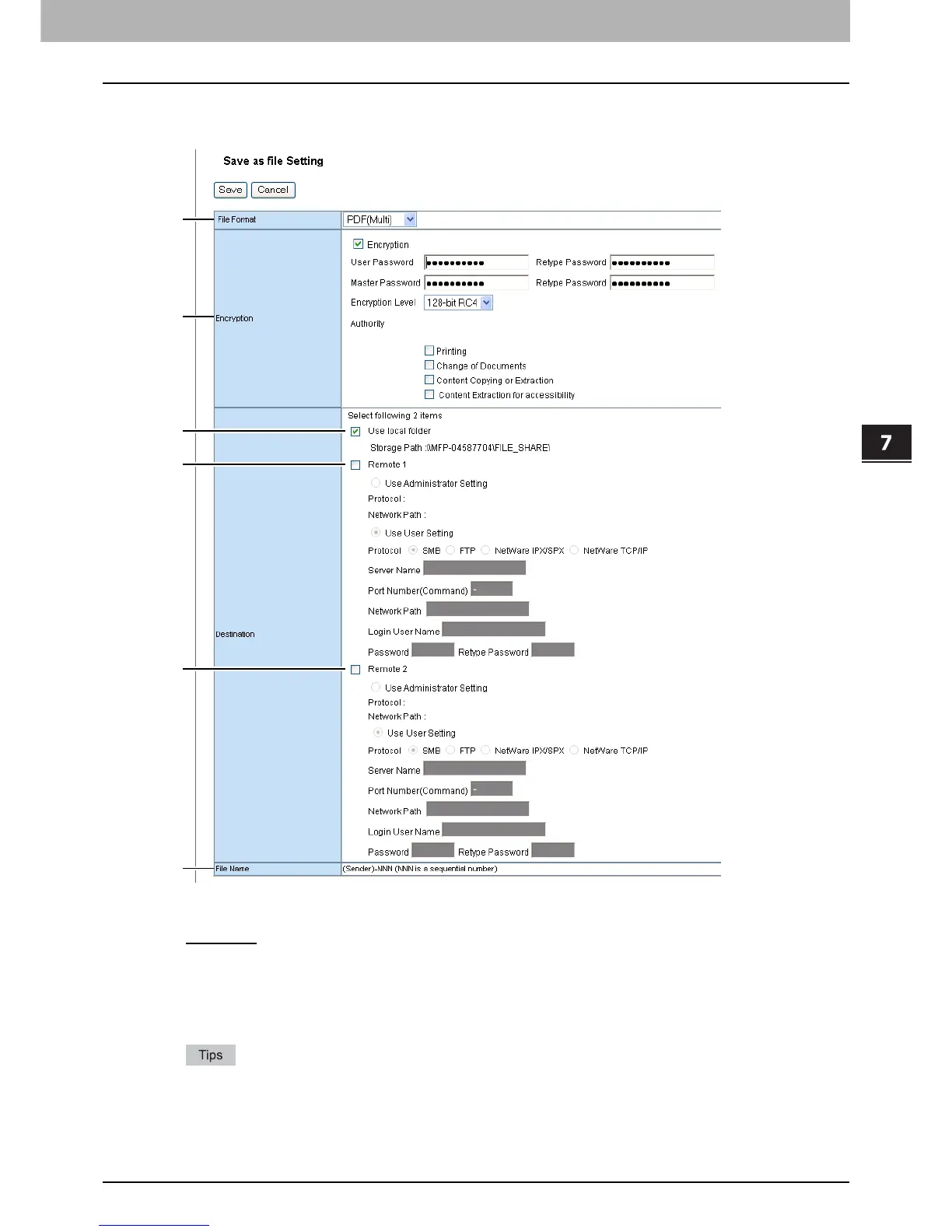
Save as file Setting (Fax/Internet Fax received forward)
In the Save as file Setting page, you can specify how and where a received document will be stored.
1) File Format
Select the file format to which the received document will be converted.
- TIFF (Multi)
— Select this to save scanned images as a Multi-page TIFF file.
- TIFF (Single) — Select this to save scanned images separately as Single-page TIFF files.
- PDF (Multi) — Select this to save scanned images as a Multi-page PDF file.
- PDF (Single) — Select this to save scanned images separately as Single-page PDF files.
- XPS (Multi) — Select this to save scanned images as a Multi-page XPS file.
- XPS (Single) — Select this to save scanned images separately as Single-page XPS files.
If the Forced Encryption setting is enabled, only the PDF (Multi) and the PDF (Single) are selectable for a file
format. For the Forced Encryption function, refer to the MFP Management Guide.
Files saved in an XPS format can be used in Windows Vista, or Windows XP SP2, Windows Server 2003 SP1
or later versions with Net Framework 3.0 installed.













 To Next Page