EasyManua.ls Logo

Lightware MX9x9DVI-Plus - Page 72

Lightware MX9x9DVI-Plus
89 pages
Print Icon
To Next Page IconTo Next Page
To Previous Page IconTo Previous Page
Loading...
Page 72 / 89 Section 9. Commands Quick summary
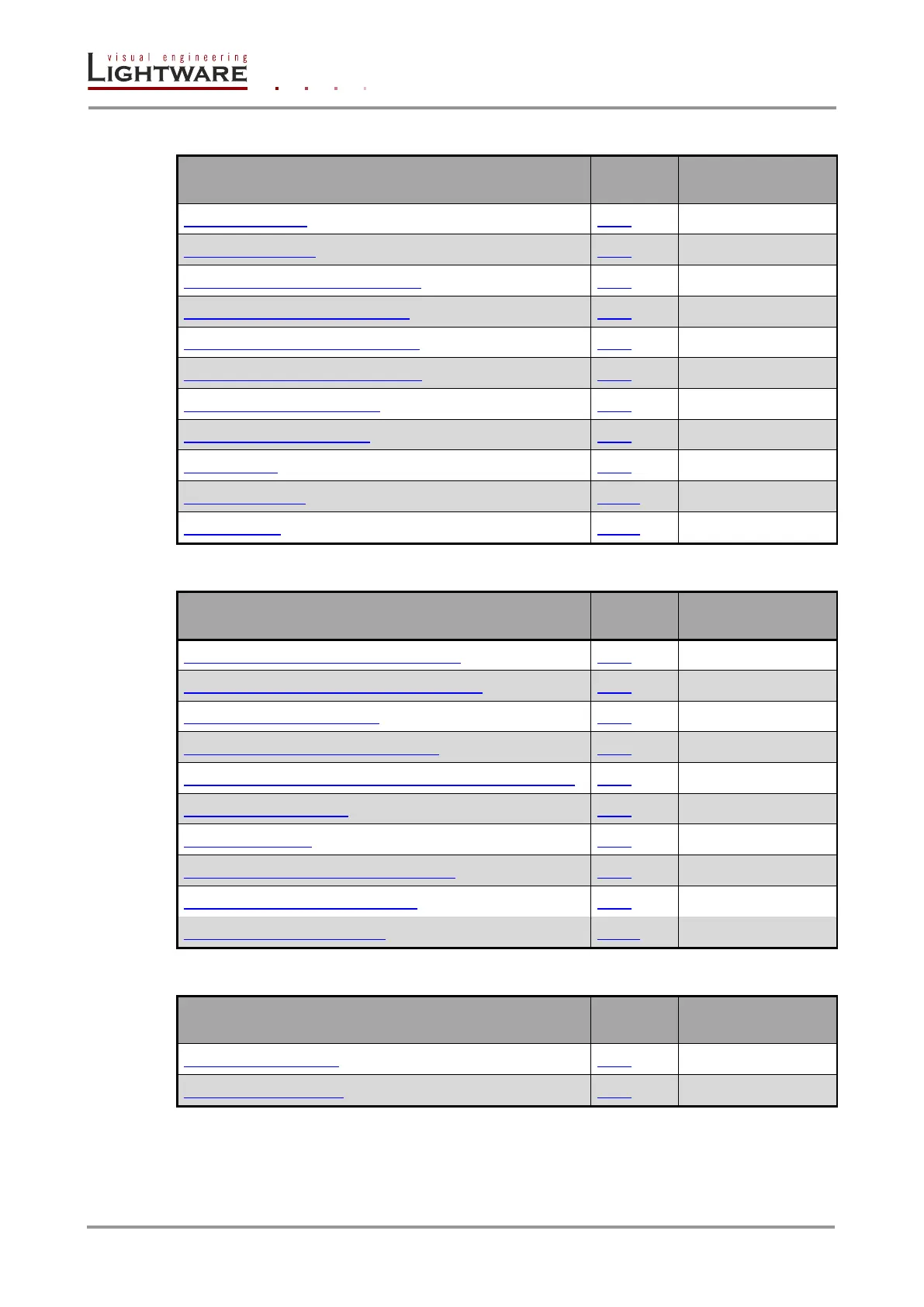
Router Status commands
Command description
See in
chapter
Command
View product type
8.6.1
{I}
View serial number
8.6.2
{S}
View Firmware version of the CPU
8.6.3
{F}
View CPU firmware compile time
8.6.4
{CT}
View Installed I/O cards’ hardware
8.6.5
{IS}
View installed controllers’ firmware
8.6.6
{FC}
View current control protocol
8.6.7
{P_?}
Set current control protocol
8.6.8
{P_x}
View error list
8.6.9
{ELIST=?}
View all error lists
8.6.10
{ELIST=A}
Clear error list
8.6.11
{ELIST=!}
EDID router commands
Command description
See in
chapter
Command
Route EDID to the selected input (static)
8.7.1
{<in>:<loc>}
Route EDID to the selected input (dynamic)
8.7.2
{<in>:<loc>}
Route one EDID to all inputs
8.7.3
{A:<loc>}
View EDID switch status on all inputs
8.7.4
{VEDID}
Save EDID from output to memory location (Learn EDID)
8.7.5
{<out>><loc>}
View EDID validity table
8.7.6
{WV}
View EDID header
8.7.7
{WH<loc>}
Download EDID content from the router
8.7.8
{WE<loc>}
Upload EDID content to the router
8.7.9
{WL#<loc>}
Delete all EDID from memory
8.7.10
{:CLREDID}
Router initiated commands
Command description
See in
chapter
Command
Restart CPU controller
8.8.1
{RST}
Restart EDID controller
8.8.2
{:RST}

Table of Contents

Other manuals for Lightware MX9x9DVI-Plus

Related product manuals