Operation 4
Special equipment
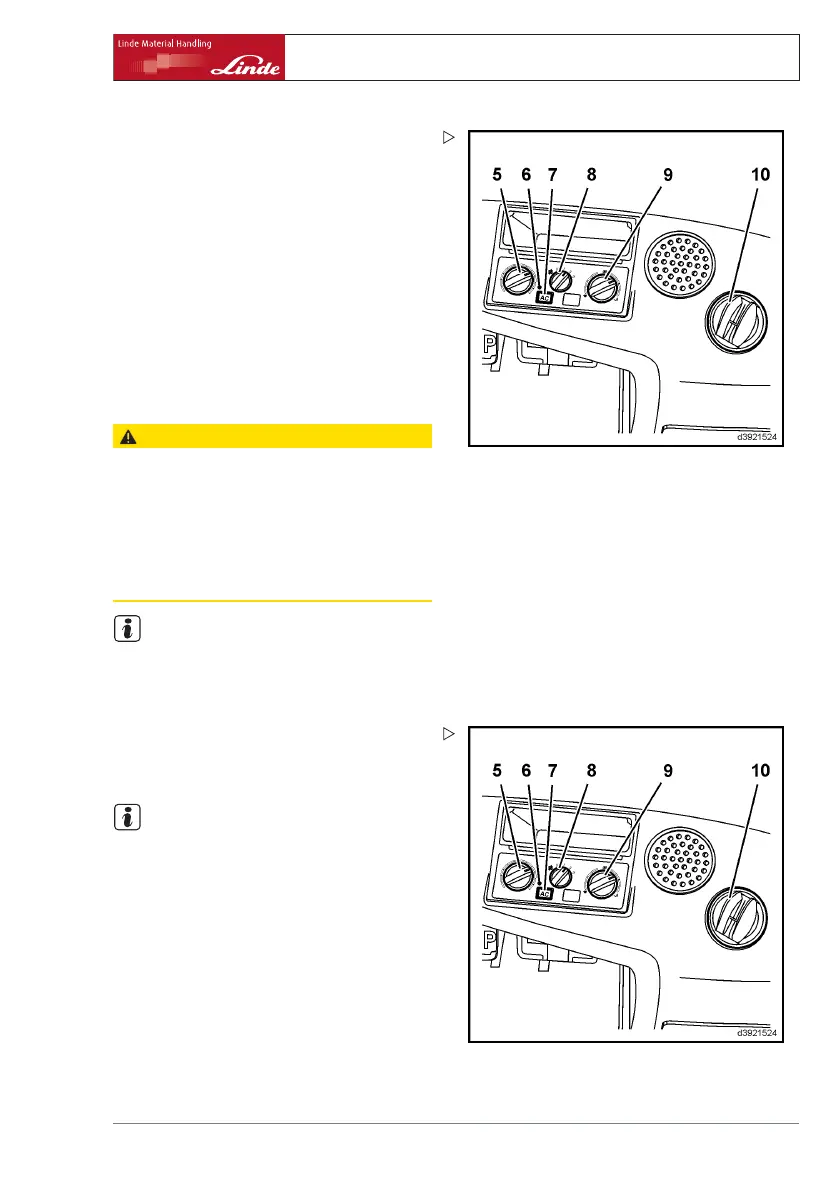
Air conditioning operating devices
• Turning knob (5) for temperature control
• Function display (6)
• Push-button (7) for switching the air condi-
tioning on
• Rotary switch (8) for setting the blower
positions
• Turning knob (9) for setting
the vent posi-
tions for windscreen defros
ting / footwell
ventilation
• Cab air vents (10)
Switching on the air conditioning
CAUTION
The moving parts must be lubricated and the
compressor prevented from seizing.
Therefore switch on the air conditioning briefly
every 3 months. In addition, the air conditioning
must be serviced once a year by your authorised
dealer, preferably before the season starts, and a
record must be kept of the servicing. Otherwise, the
warranty will be void.
NOTE
It is normal for condensation water to build up
in the hoses and under the truck when the air
conditioning is in operation.
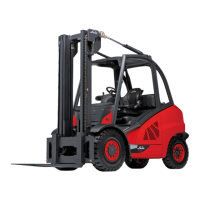
¾ Turn switch (8).
The blower is switched on and there are three
air flow settings.
NOTE
The air conditioning only works when the
engine is running and the blower switch is
switched on (setting 1, 2 or 3). The fans in
the roof switch on when necessary. They can
come to a standstill from time to time.
¾ Switch on push-button (7).
The function display (6) lights up green.
To raise the temperature in the cab:
¾ Rotate turning knob (5) clockwise and
reduce the blower speed using switch (8).
To lower the temperature in the cab:
Operating Instructions – 394 807 10 01 EN – 07/2011 79



 To Next Page