145
5.2 Screen saver and screen lock
If the screen goes dark during therapy, it can
be made visible again by simply touching it.
However, the editing function remains locked.
To make changes, unlock by pressing
until
appears.
5.3 Start screen
The start screen appears
forafew seconds when
theunit is switched on.
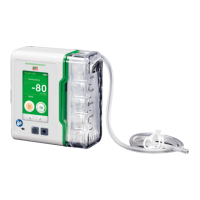
5.4 Preset therapy mode
The screen appears with the
preset parameters for your
therapy. Here is an example.
If the screen is orange,
thetherapy is paused.
5.5 Starting the therapy and
switching to Pause mode
WARNING
If bleeding occurs
The Suprasorb
®
CNP P3 was
designed to generate negative
pressure in the wound drainage
system and to suction exudate.
• The Suprasorb
®
CNP P3 was not
designed to detect heavy bleeding
or pooling of blood in the wound.
• For this reason, you should not
rely on the Suprasorb
®
CNP P3’s
alarm system alone. The therapy
must be regularly monitored and
the exudate regularly checked for
red discolouration so as to identify
any risk of severe deterioration in
the patient’s condition.
• Should you observe bright red
blood in the tubes or exudate
pouch, the therapy must be
discontinued immediately.
Leavethe wound dressing in place
at first, stem the bleeding and seek
medical assistance.


 To Next Page