3-11
OBTAINING INFORMATION ON THE SATELLITES
Some information on the satellites is available in the position displays.
More information can be obtained with the Satellite Status and the
Satellite Schedule functions.
Satellite Status
Satellite Status contains information on a satellites's health and current
status, and displays the elevation and azimuth of satellites that are
above the horizon.
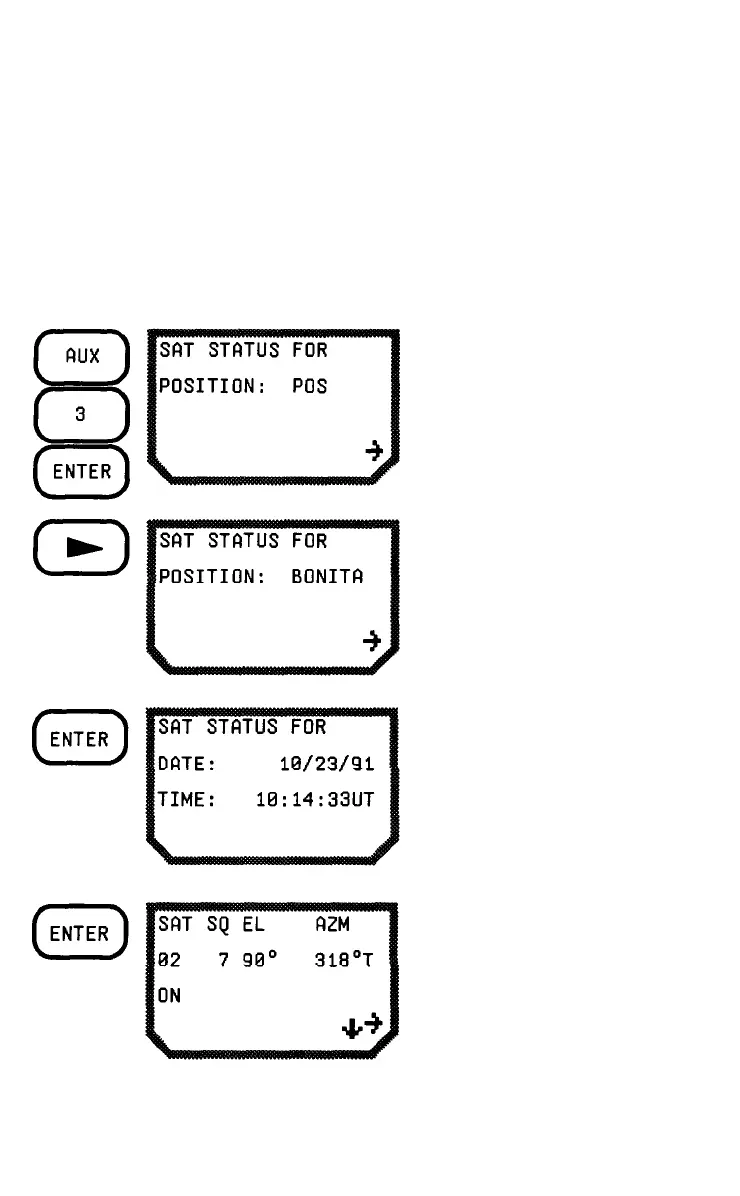
Press AUX, 3, and
ENTER.
Press the RIGHT ARROW
to select any saved
position.
Press ENTER. The current
date and time is displayed.
You may enter another
date and time, if you want.
Press ENTER. The display
shows information about
the first satellite. Press the
RIGHT ARROW to toggle
between on and off for this
satellite. Press the DOWN
ARROW to go to the next
satellite. There is a value
for SQ when the satellite



 To Next Page
 Loading...