S
ection
5
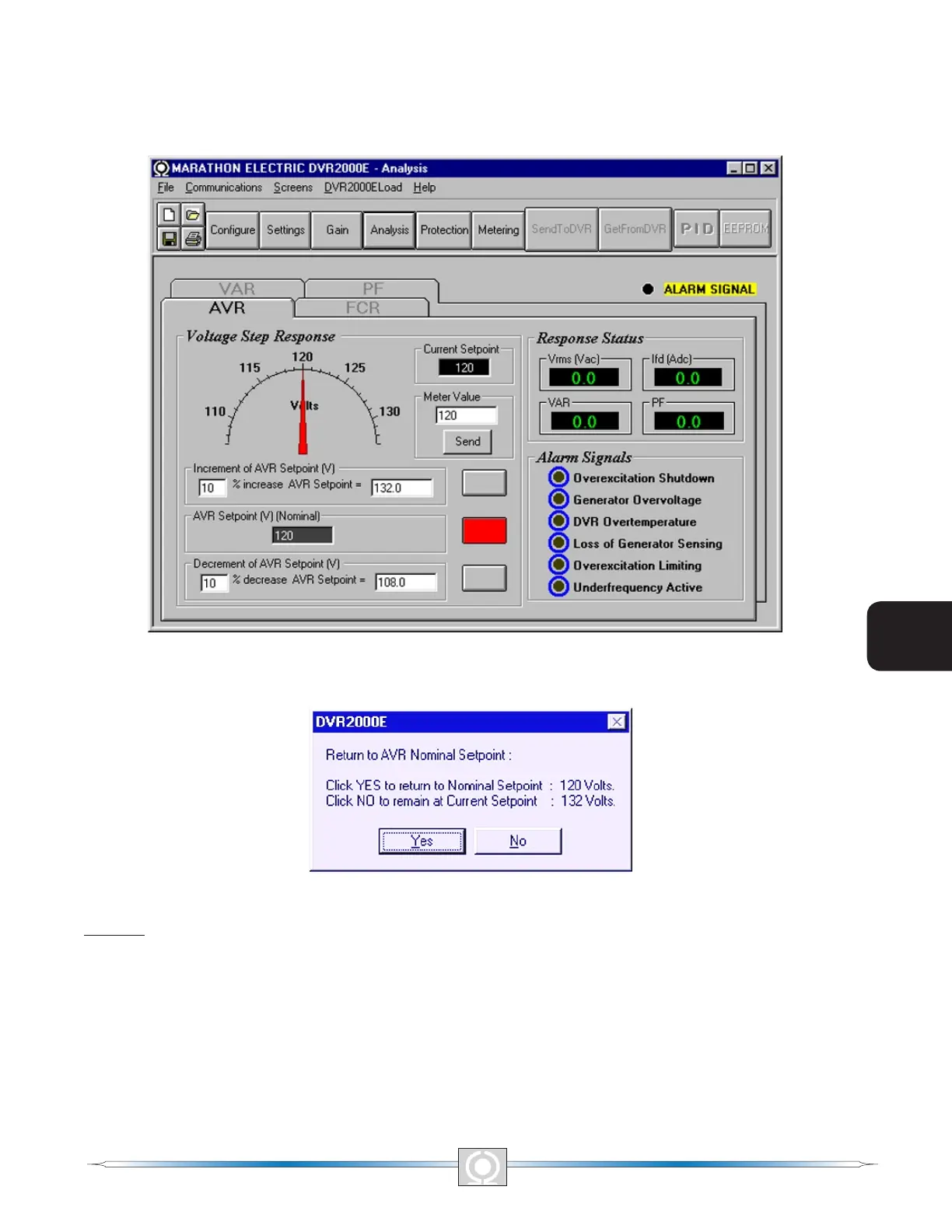
The setpoint value currently set in the unit by any of the above methods is displayed in the current setpoint textbox.
To return to the nominal setting the button adjacent to AVR Setpoint (V) (Nominal) should be pressed. If the AVR
analysis screen is left without returning to nominal setpoint, a message box (Figure 5-14) is shown which allows
the user to return to nominal setpoint by pressing YES or remain at the current setpoint by pressing NO.
Figure 5-13. Analysis Screen, AVR Tab
Figure 5-14. Message Box - Return to AVR Nominal Setpoint
FCR Tab
Figure 5-15 illustrates the settings, sensing values, and alarm signal indicators of the FCR tab. The settings of the
FCR tab make it possible to increment and decrement the FCR setpoint of the DVR2000E. The sensing values
and alarm signal indicators of the FCR tab are also displayed by the other tabs of the Analysis screen.
Field Current Step Response - FCR Setpoint (A). This read-only eld indicates the FCR setpoint. (The FCR
setpoint is set by using the Setpoint tab of the Setting Adjustments screen). The current displayed in the FCR
Setpoint eld is selected by clicking the adjacent pushbutton. Clicking this button sends the FCR Setpoint value
to the DVR2000E and changes the color of the pushbutton from gray to red.
50
3
Main Index
5
Section 5 Index
51
3
Main Index
5
Section 5 Index



 To Next Page