S
ection
5
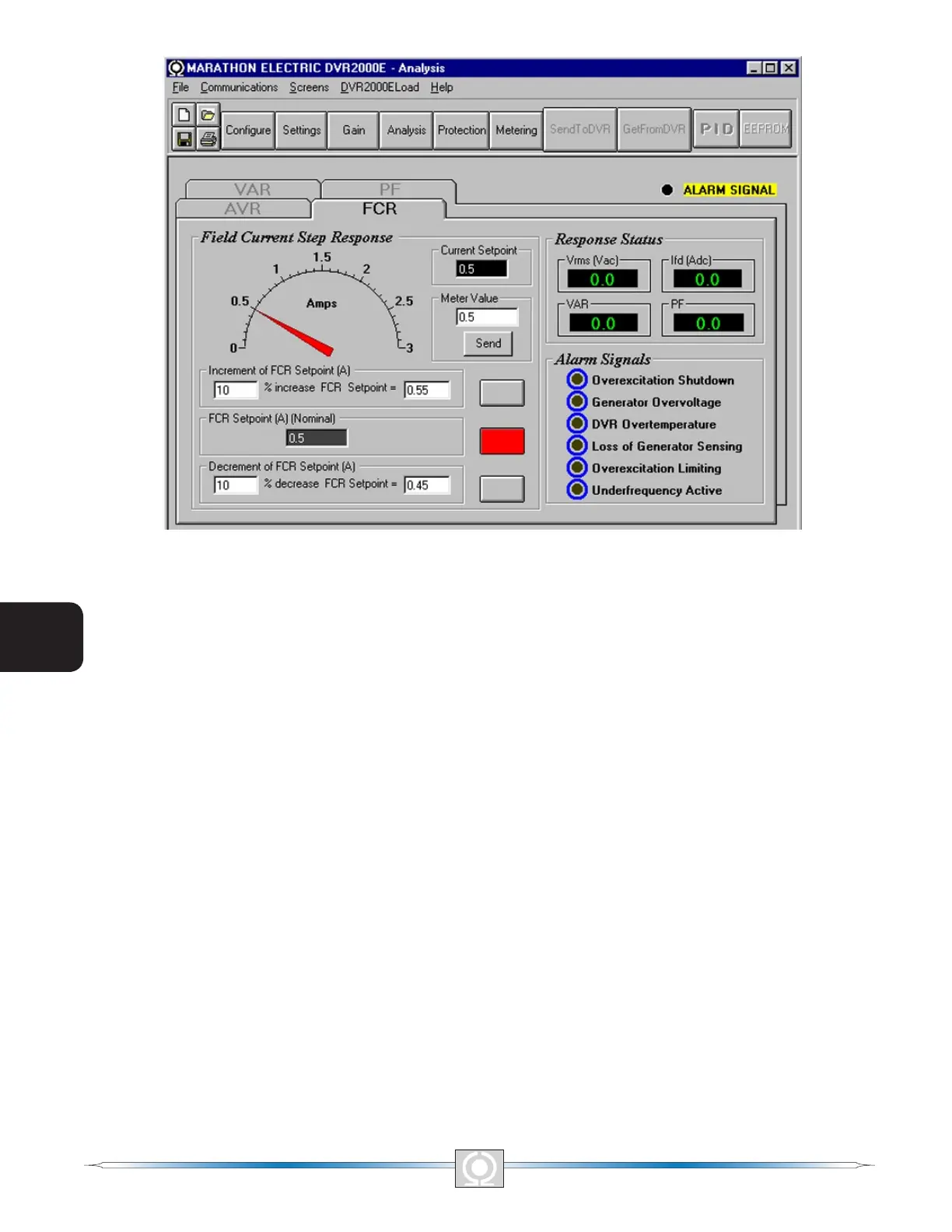
Figure 5-15. Analysis Screen, FCR Tab
Field Current Step Response - Increment of FCR Setpoint (A). These two elds indicate the increase that occurs
to the FCR setpoint when the corresponding Increment button is clicked. The “% increase” eld is used to set
and indicate the percentage that the FCR setpoint is increased when the Increment button is clicked. The “FCR
Setpoint =” eld indicates the value of current that corresponds to the “% increase” eld. Any setpoint value within
range and higher than setpoint value can also be typed into The “FCR Setpoint =” eld which updates the “%
increase” eld also. The FCR setpoint changes to this value when the adjacent button is clicked. When clicked,
the Increment button changes from gray to red to indicate that the FCR setpoint has increased to the value in the
“FCR Setpoint =” eld.
Field Current Step Response - Decrement of FCR Setpoint (A). These two elds indicate the change that will
occur to the FCR setpoint when the corresponding Decrement button is clicked. The “% decrease” eld is used
to set and indicate the percentage that the FCR setpoint is decreased when the decrement button is clicked. The
“FCR Setpoint =” indicates the value of current that corresponds to the “% decrease” eld. Any setpoint value
within range and lower than setpoint value can also be typed into The “FCR Setpoint =” eld which updates the “%
decrease” eld also. The FCR setpoint changes to this value when the adjacent button is clicked. When clicked,
the Decrement button changes from gray to red to indicate that the FCR setpoint has decreased to the value in
the “FCR Setpoint =” eld.
Field Current Step Response - Meter. The meter in the FCR tab shows the value selected. If an FCR setpoint
value is sent by increase, decrease or setpoint button the meter shows the corresponding value and meter value
text box also displays it. Any value within the range can either be input to meter value text box or selected by
dragging the pointer in the meter, using mouse. This value can then be sent to the unit by pressing Send button.
The setpoint value currently set in the unit by any of the above methods is displayed in the current setpoint textbox.
To return to the nominal setting the button adjacent to FCR Setpoint (I) (Nominal) should be pressed. If the FCR
analysis screen is left without returning to nominal setpoint a message box is shown (Figure 5-16) which allows
the user to return to nominal setpoint by pressing YES or remain at the current setpoint by pressing NO.
52
3
Main Index
5
Section 5 Index
53
3
Main Index
5
Section 5 Index



 To Next Page