Chapter 6 Chassis section 3 Front and rear brakes
6—7
Replacement of friction plate
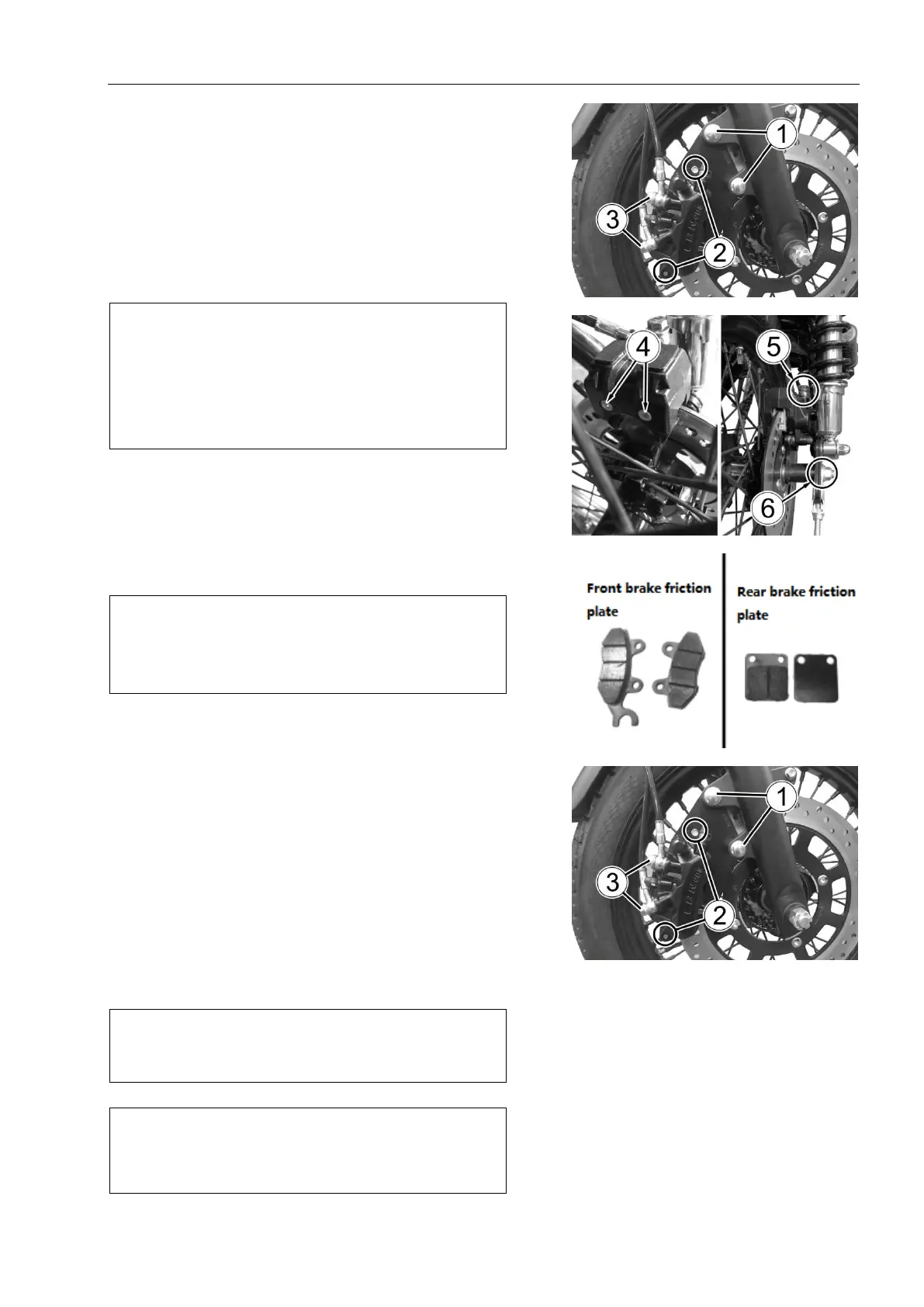
Loosen the front brake friction disc mounting bolt
②and rear brake friction disc mounting bolt ④.
Remove the front caliper mounting bolts ① and rear
caliper mounting bolts⑥
As in Fig.5.3.1 and Fig.5.3.2.
Remove the friction plate mounting bolts.
Remove the friction plate.As Fig. 5.3.3.
Note:
Do not operate the brake lever after removing the
friction disc or removing the disc.
The friction plate should be replaced in a
complete set, otherwise the braking performance will
be adversely affected.
Install new friction plate and friction plate mounting
bolt.
Tighten the caliper mounting bolt② and friction
plate mounting bolt①according to the specified torque.
Caliper mounting bolt: 39 N · m (3.9 kg · m)
Friction plate mounting bolt: 18 N· m (1.8 kg · m)
Note: After the friction plate is replaced, operate
the main pump several times with the brake lever
to make the braking operation normal.Then check
the brake level.
Front and rear brake fluid replacement
Front brake calipers removed and disassembled
Remove the brake hose connection bolts , remove ③
the hose from the brake caliper, and drain the remaining
brake fluid into the appropriate container.
Loosen the valve and operate the brake lever until
the old brake fluid is fully discharged from the brake
system.
Loosen friction plate mounting bolt .②
Remove the mounting bolts and remove① the front
brake calipers.As in Fig.5.3.4.
Note: do not reuse the residual brake fluid after
maintenance and the brake fluid stored for a long
time.
Note: do not reuse the residual brake fluid after
maintenance and the brake fluid stored for a long
time.
Fig.5.3.1
Fig.5.3.2
Fig.5.3.3
Fig.5.3.4



 To Next Page