280
Controls in detail
Useful features
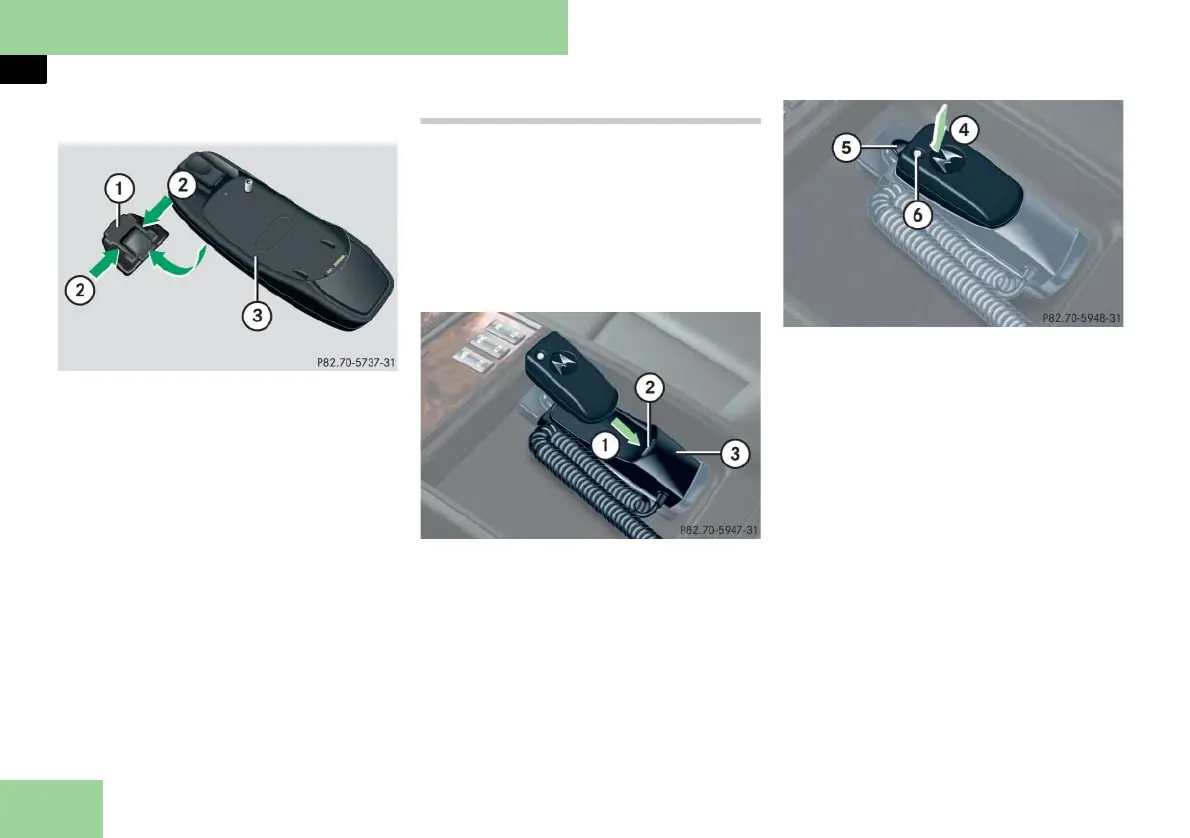
Installing a different mobile phone cra-
dle:
1 Contact plate
2 Recesses
3 Mobile phone cradle
왘 Insert mobile phone cradle 3 into
recesses 2 of contact plate 1.
왘 Push mobile phone cradle 3 forward
until it engages.
Mobile phone in the rear
Your vehicle is equipped with
Bluetooth
®
. The Bluetooth
®
interface is
located in the rear armrest.
왘 Open the storage compartment in
the rear center armrest (
컄 page 255).
Inserting the Bluetooth
®
interface into
cradle
1 Insert the Bluetooth
®
interface
2 Contact
3 Cradle
왘 Slide the lower end of the Bluetooth
®
interface into contact 2 on
cradle 3.
4 Engage the Bluetooth
®
interface into
cradle
5 Release button
6 Button with indicator lamp
왘 Push the top of the Bluetooth
®
inter-
face in direction of arrow 4, until
the release button 5 engages.
The indicator lamp in the button 6
will flash slowly in blue, to indicate
that the interface is ready for pairing
with a Bluetooth
®
compatible mobile
phone.



 To Next Page