13.5.1 Functions for a digital input
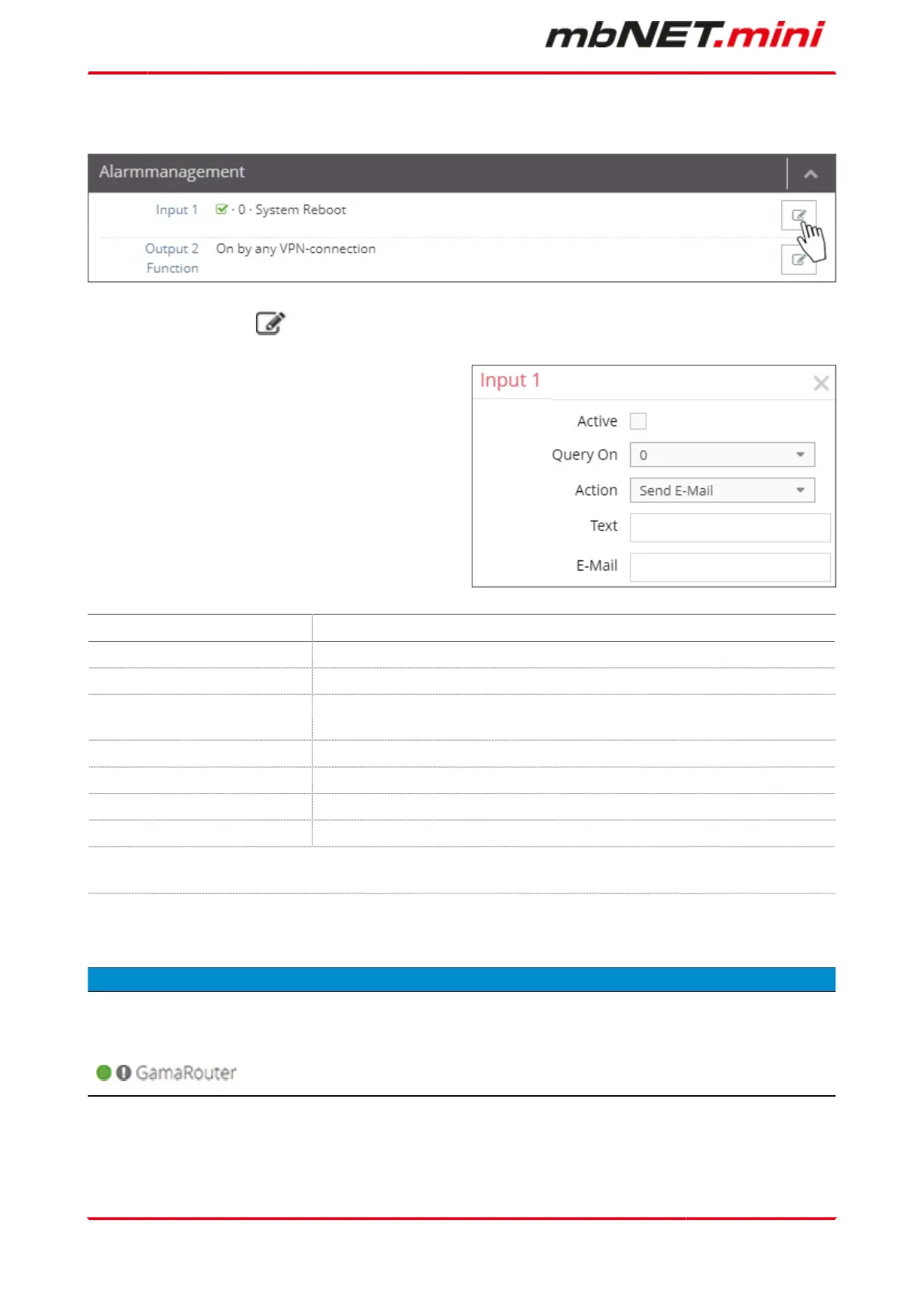
Click on the edit symbol to configure the function of a digital input.
•
Send E-Mail
•
System Reboot
•
SMS/Internet-SMS
Designation Description
Active Checkbox to activate / deactivate the function.
Query On Here, set the query state (0 or 1) at which an action should be taken.
Action Select an action from the drop-down list (Send E-Mail, System Reboot, SMS or In-
ternet SMS).
Text Enter a message text here.
E-Mail In the action selection "Send E-Mail" enter the recipient's e-mail address here.
SMS* In the "SMS" action option, enter the number of the recipient here.
Internet-SMS* In the "Internet-SMS" action option, enter the number of the recipient here.
* with the SMS action up to 5 numbers can be stored. Multiple numbers are entered
without spaces but separated by commas (123456,234567,345678).
NOTICE
Changes in the portal, which concern the device, will take effect after the Portal configuration has been
transferred to the device.
If the device configuration is out of date, this is indicated by a gray LED symbol before the device name
.
Page 100 von 131 | Version: 2.2.1 - EN | Mar 28
th
, 2022 |


 To Next Page
 Loading...


