3.11 Configuration and Operating Mode of the LED Indicators
(Function Group LED)
The P631 has 23 LED indicators for the indication of binary signals. Some of the
LED indicators are permanently assigned to fixed functions. The other LED
indicators are freely configurable. These freely configurable LEDs will emit either
red or green or amber light (amber is made up of red and green light and may
not be configured independently).
3.11.1 Configuring the LED Indicators
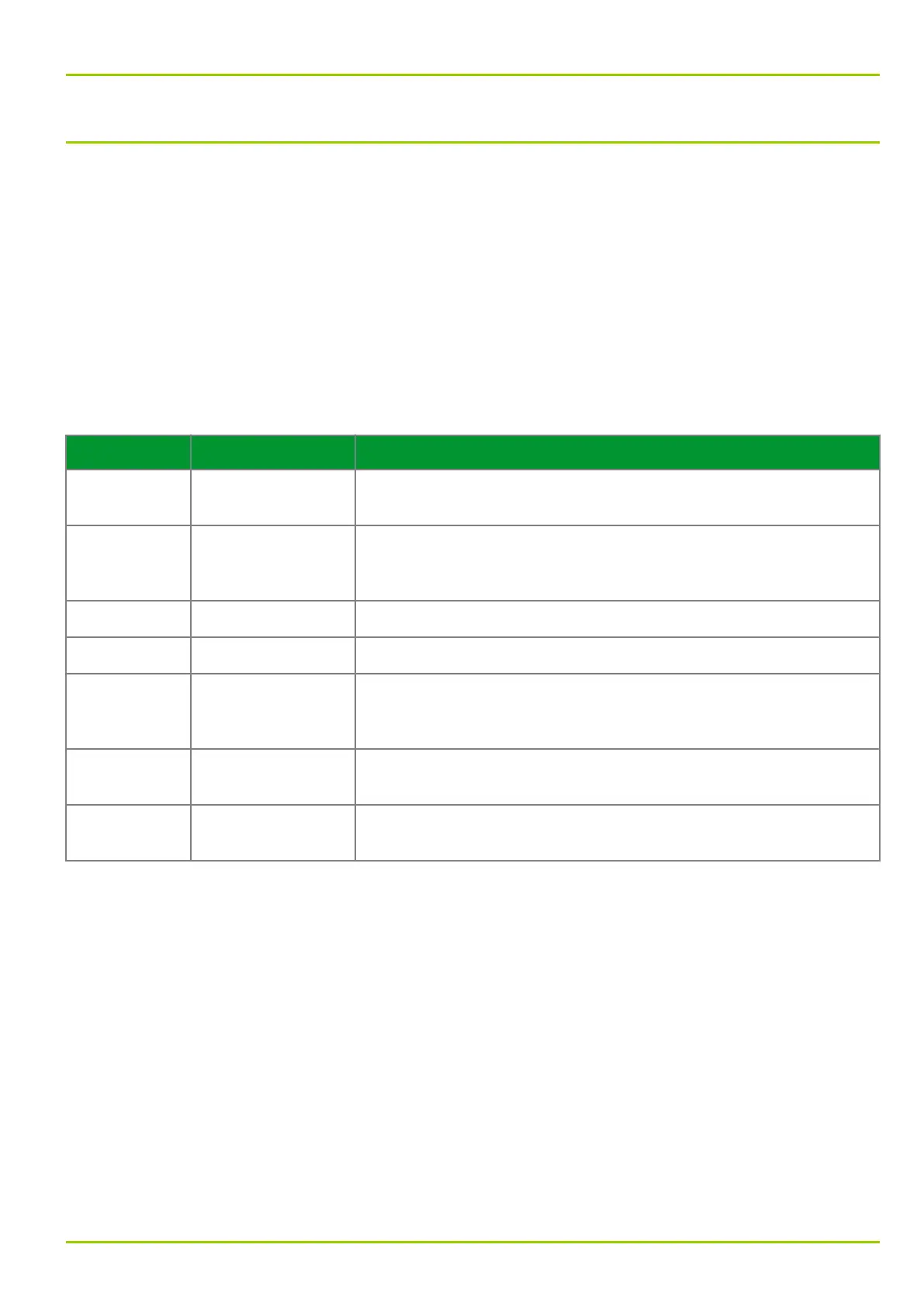
One binary signal can be assigned to each of the red and green LED color
indications. The same binary signal can be assigned to several LED indicators (or
colors), if required.
LED indicator Label Configuration
H 1 (green) HEALTHY Not configurable. H 1 indicates the operational readiness of the
P631 (supply voltage is present).
H 17 (red) EDIT MODE Not configurable. H 17 indicates the input (edit) mode. Only when
the P631 is in this mode, can parameter settings be changed by
pressing the “Up” and “Down” keys. (See Section 6.2, (p. 6-2))
H 2 (amber) OUT OF SERVICE Permanently configured with function MAIN: Blocked/faulty.
H 3 (amber) ALARM Permanently configured with function SFMON: Warning (LED).
H 4 (red) TRIP With the P631 this LED indicator is customarily configured with
function MAIN: Gen. trip signal, but the configuration may be
modified.
H 4 (green) ― Function assignment to this green LED indicator is freely
configurable.
H 5 to H 16 ― For each of these LED indicators both colors (red & green) may
be configured freely and independently.
3.11.2 Layout of the LED Indicators
The following figure illustrates the layout of LED indicators situated on the local
control panel.
3 Operation
P631
P631/EN M/R-11-C // P631-310-650 3-59



 To Next Page