Version 1.10 Page 131 of 203
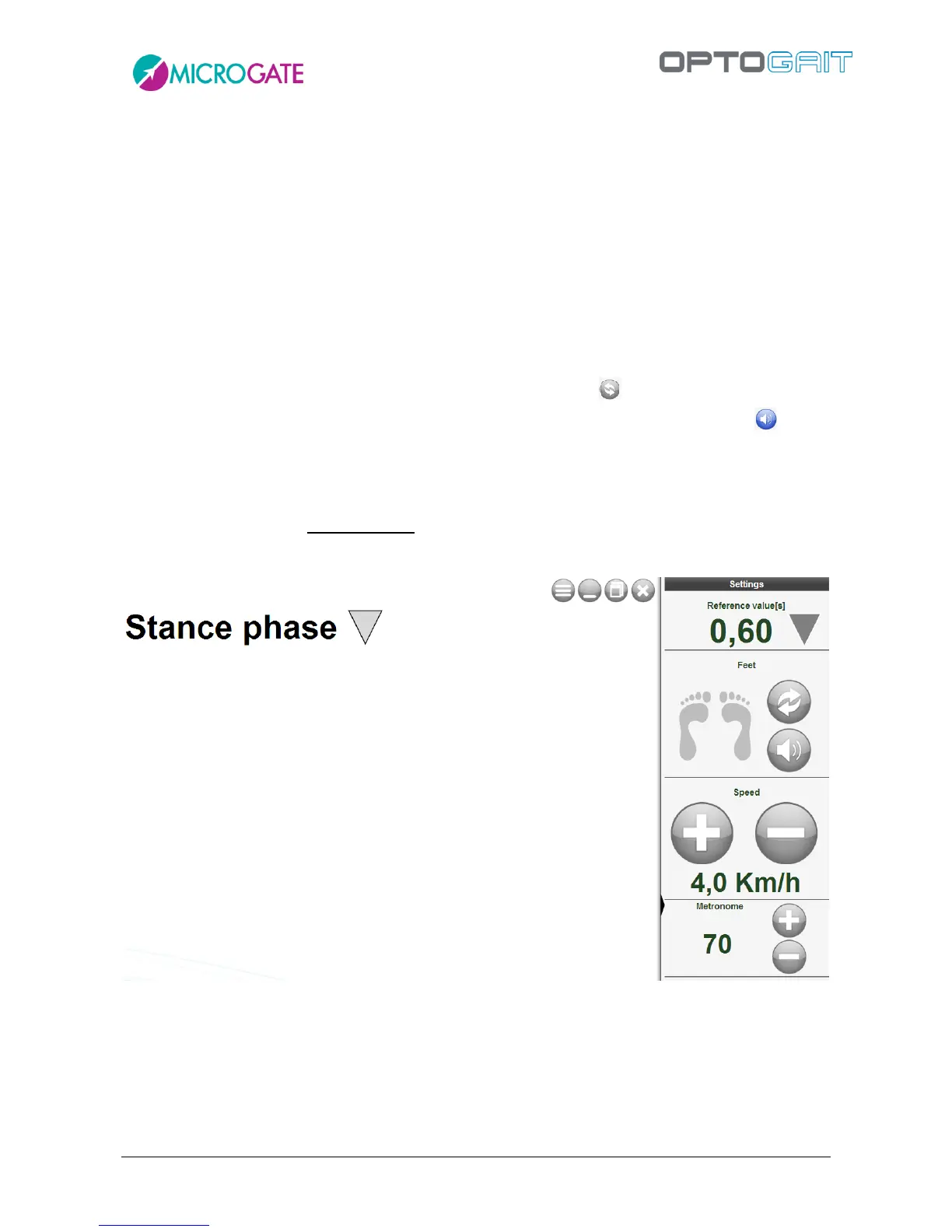
Whereas, clicking on the black triangle to the right opens another panel with which we can set
other parameters. From top to bottom, we have:
If we have chosen "Absolute Value" mode, here we can set the "Reference Value" that we
need to follow. Obviously its should be set in line with the type of measurement selected
(e.g. 30 cm for height, 0.5 s for flight time, 70 cm for step length, etc.).
Feet: since, as in normal tests, you are not asked for the starting foot, with this mini-tool
we can easily pair the correct foot that is walking, running or marching in place. You can act
in two ways: during this test you will see the right or left foot icon which will illuminate
according to the pulse that comes from the Optogait bars; if it matches what the patient is
actually doing you do not have to do anything, but if the wrong foot lights up (right instead
of left or vice versa) then just click on the "Swap Feet" icon .
A second alternative way is to turn on an audible flag with the specific command ; the
PC will emit a sound when the patient has to put down the RIGHT foot.
Treadmill Speed: set the same speed that we set on the treadmill on which we are running
or walking.
Metronome: click on the number of beats per minute (bpm) to turn the virtual metronome
on/off; click on the + and – icons to change the value of bpm in steps of 5 beats.



 To Next Page