Version 1.10 Page 26 of 203
3 OPTOJUMP NEXT DRIVER AND HARDWARE INSTALLATION
3.1 DRIVER INSTALLATION
For correct functioning of the program, the respective drivers for the OptoJump Next hardware and
the webcam must be installed.
The OptoJump Next software installation file already contains the required drivers.
In the case of the Vista operating system it has been found that if the installation program is not run
as ‘Administrator’, the drivers are not installed. In this case install the two drivers separately. These
are available on the Microgate USB key supplied with the hardware or on the site
www.optojump.com in the 'Support' section.
To check that the drivers have in fact been installed, connect the two devices (OptoJump Next
hardware and webcam). If installation has not taken place, the operating system will signal an error.
In this case disconnect the hardware, install the drivers again and reconnect the hardware.
3.2 OPTOJUMP NEXT HARDWARE INSTALLATION
Attention must be paid when installing the OptoJump Next bars, particularly when inserting the caps
for connecting the bars.
The distinctions to be made between the bars are between Tx and Rx and additionally between bars
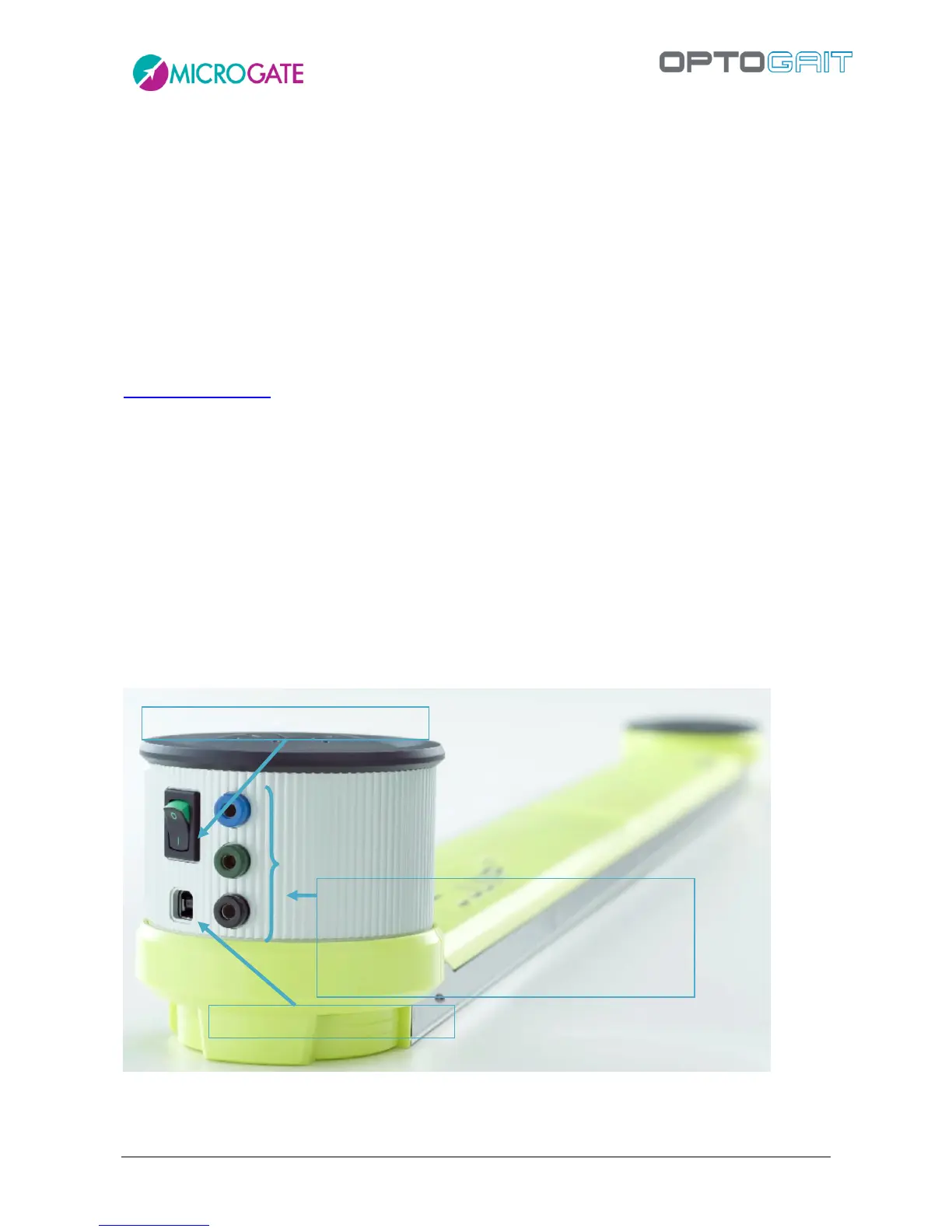
with interface (silver drum at start of bar) and without interface. Only the interfaces have an OFF
switch.
Figure 10 – Bar with interface
Jack sockets for external event
Normally closed (blue socket)
Normally open (green socket)
Grounding (black socket)



 To Next Page