Version 1.10 Page 73 of 203
4.2.3 DEFINE / EDIT PROTOCOLS
In this section the protocols to be performed can be defined or edited. The protocols can be
considered as a pre-defined series of tests to be performed in sequence (e.g. one ‘Squat jump’ +
one ‘CMJ’ + one ‘Jumps 15 sec.’).
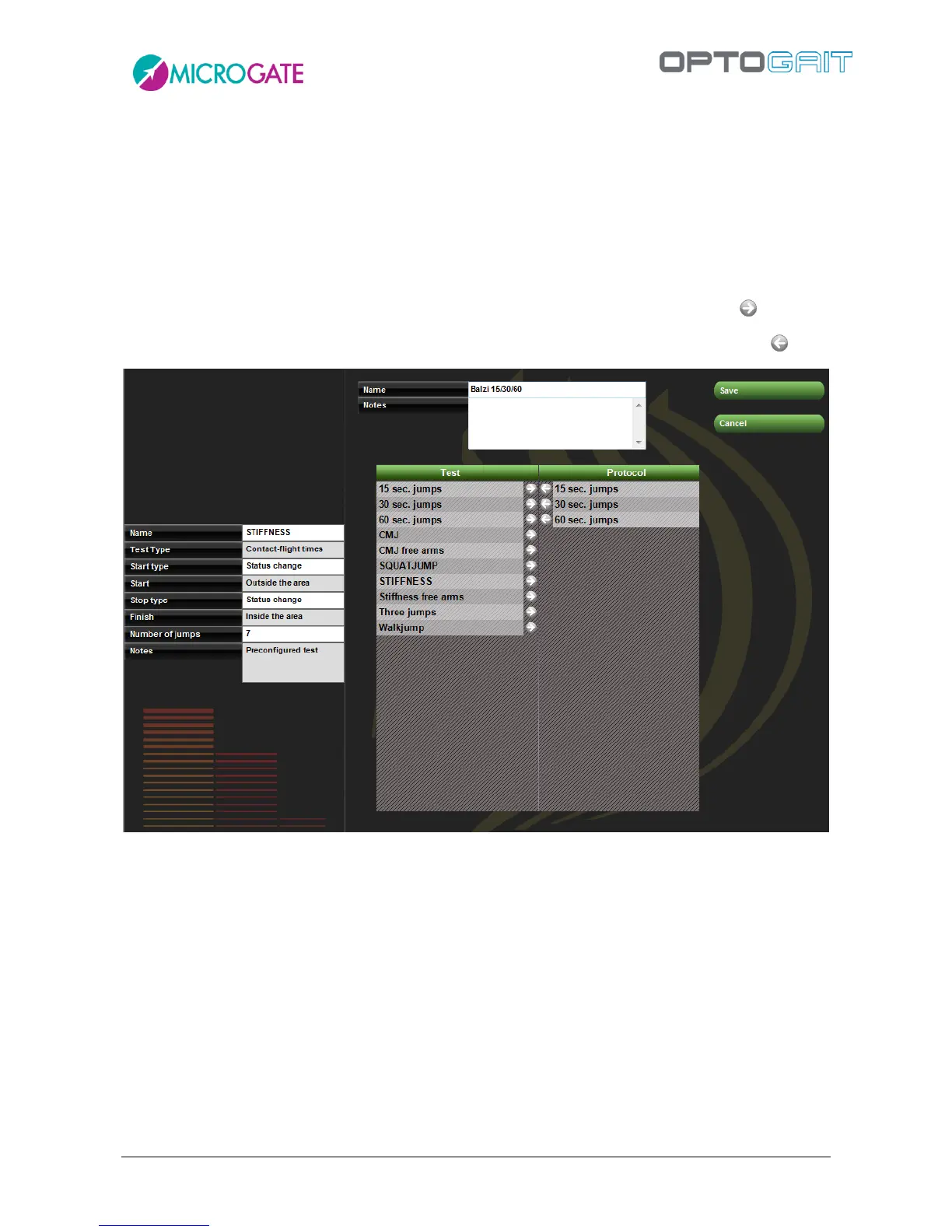
To create a new protocol, select one of the three test macro-typologies (Performance, Gait Analysis,
Rehab) and press <New Protocol>. Insert a mnemonic name and optionally general notes.
Select the tests (in the desired order) that will make up this protocol using the symbol
If a mistake has been made or a test has to be removed from the protocol, use the symbol
Figure 49 – Creation of a protocol
If you do not remember the parameters of a test definition, place the mouse cursor on it and its
characteristics will be displayed.
After inserting the data, press <Save> to save and return to the previous section.
The command <Edit Protocol> allows to edit its name and notes and to change its composition,
while <Delete Protocol> deletes its definition. Unlike the deletion of a test definition, the deletion
of a protocol does not cause the chain-effect deletion of all correlated tests but only the connection
they had with the protocol. After its deletion, the tests performed by the athletes will be found
again as ‘single tests’ no longer related to the protocol.



 To Next Page