© Microhard Systems Inc. 42
4.0 Configuration
4.2.2 Network > LAN
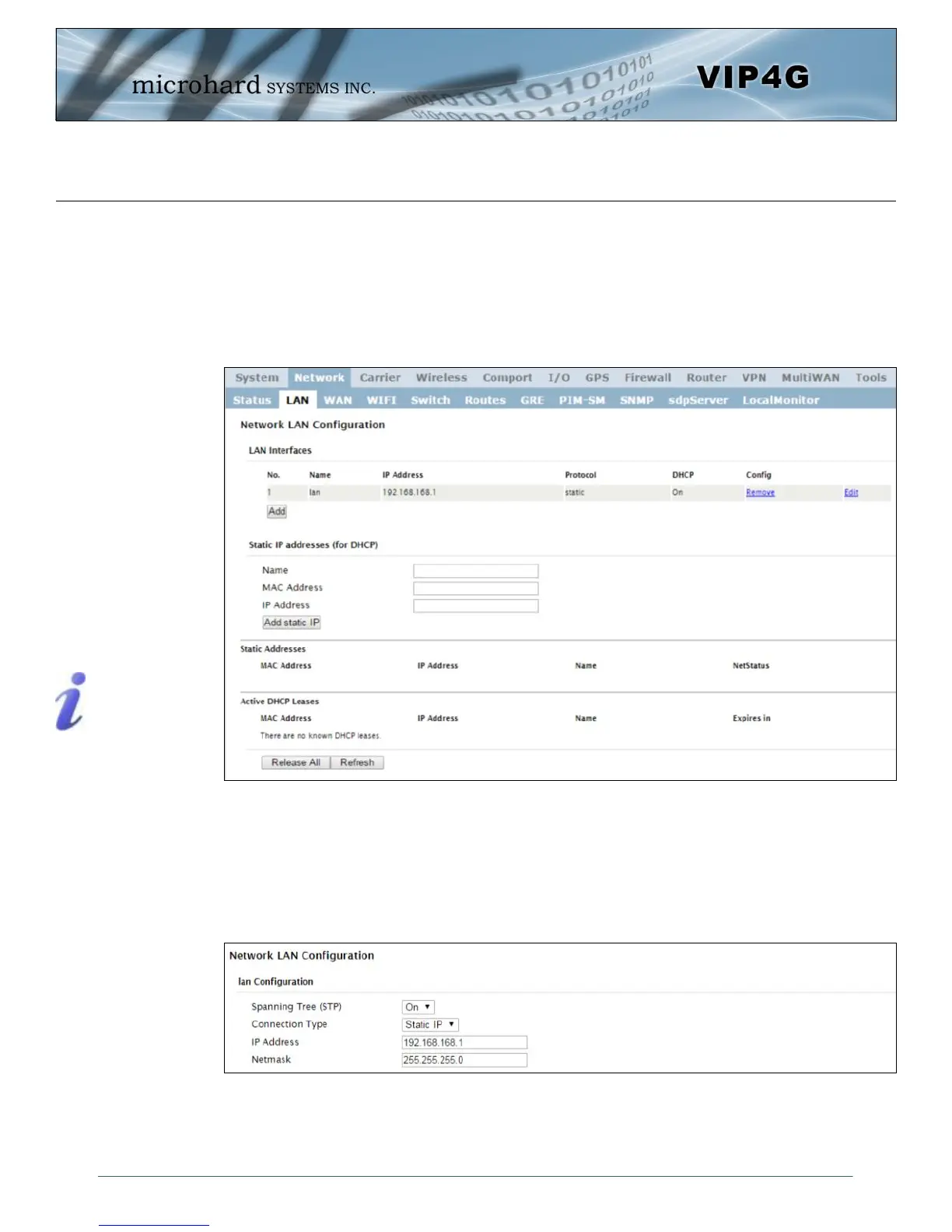
Network LAN Configuration
The Ethernet port (RJ45) on the back of the VIP4G is the LAN port, used for connection of devices on a
local network. By default, this port has a static IP Address of 192.168.168.1. It also, by default is running a
DHCP server to provide IP Addresses to devices that are connected to the physical port, and devices
connected by a WiFi connection (if equipped).
Image 4-2-2: Network > LAN Configuration
DHCP: Dynamic Host
Configuration Protocol may
be used by networked
devices (Clients) to obtain
unique network addresses
from a DHCP server.
Advantage:
Ensures unique IP addresses
are assigned, from a central
point (DHCP server) within a
network.
Disadvantage:
The address of a particular
device is not ‘known’ and is
also subject to change.
STATIC addresses must be
tracked (to avoid duplicate
use), yet they may be
permanently assigned to a
device.
Image 4-2-3: Network > Add/Edit LAN Interface
LAN Add/Edit Interface
The VIP4G has the capability to have multiple SSID’s for the WiFi radio (optional). New Interfaces can be
added for additional SSID’s, providing, if required, separate subnets for each SSID. By default any
additional interfaces added will automatically assign IP addresses to connecting devices via DHCP.
Additional interfaces can only be used by additional WIFI SSID’s (virtual interfaces).



 To Next Page