© Microhard Systems Inc. 67
4.0 Configuration
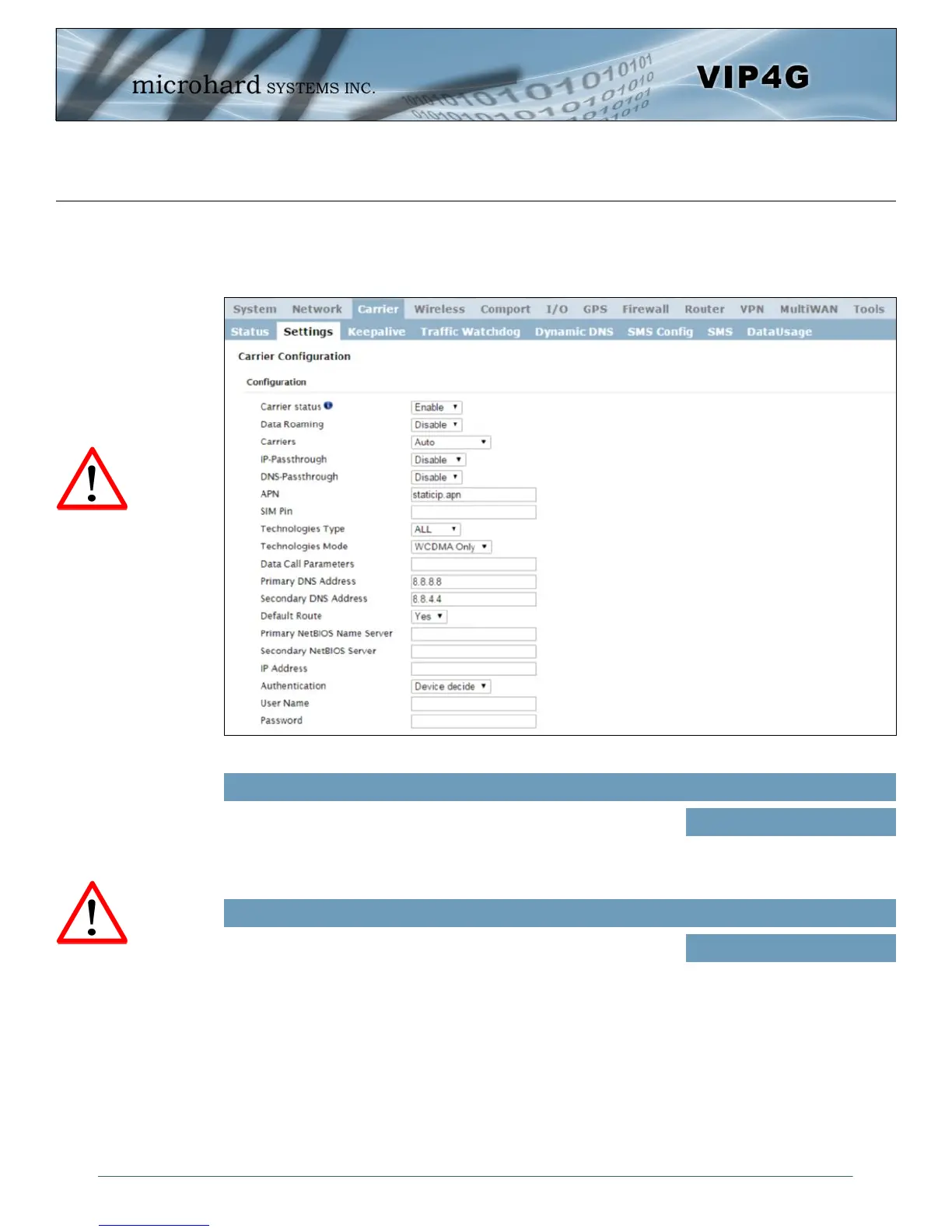
Image 4-3-2: Carrier > Settings
4.3.2 Carrier > Settings
The parameters within the Carrier Configuration menu must be input properly; they are the most basic
requirement required by your cellular provider for network connectivity.
Carrier Status is used to Enable or Disable the connection to the
Cellular Carrier. By default this option is enabled. If disabled the
cellular module is disabled and the modem will not even attempt to
connect to the cellular carrier.
Carrier Status
Values (Selection)
Enable
Disable
Enable or disable Data Roaming. If enabled the modem will be allowed
to roam on another carriers’ network if their home carrier is not
available. In most cases the data roaming usage data charges are
much higher than home service areas. Roaming is Disabled by default.
Data Roaming
Values (Selection)
Enable
Disable
Enabling Data Roaming
may result in increased
data charges from the
Carrier. In some cases this
could be an excessive,
and unexpected amount. It
is important to understand
the data plan with the
Cellular Carrier.
For best practices and to
control data usage it is
critical that the firewall be
configured properly.
It is recommended to block
all incoming 4G/Cellular
traffic and create rules to
open specific ports and/or
use ACL lists to limit
incoming connections.



 To Next Page