© Microhard Systems Inc. 84
4.0 Configuration
Once the RTS Threshold defined packet size is reached, the system
will invoke RTS/CTS flow control. A large RTS Threshold will improve
bandwidth, while a smaller RTS Threshold will help the system recover
from interference or collisions caused by obstructions.
RTS Thr (256 ~ 2346)
Values (selection)
On / OFF
The Fragmentation Threshold allows the system to change the
maximum RF packet size. Increasing the RF packet size reduces the
need to break packets into smaller fragments. Increasing the
fragmentation threshold slightly may improve performance if a high
packet error rate is experienced.
Fragment Thr (256 ~ 2346)
Values (selection)
On / OFF
Image 4-4-3: Wireless > Radio Configuration
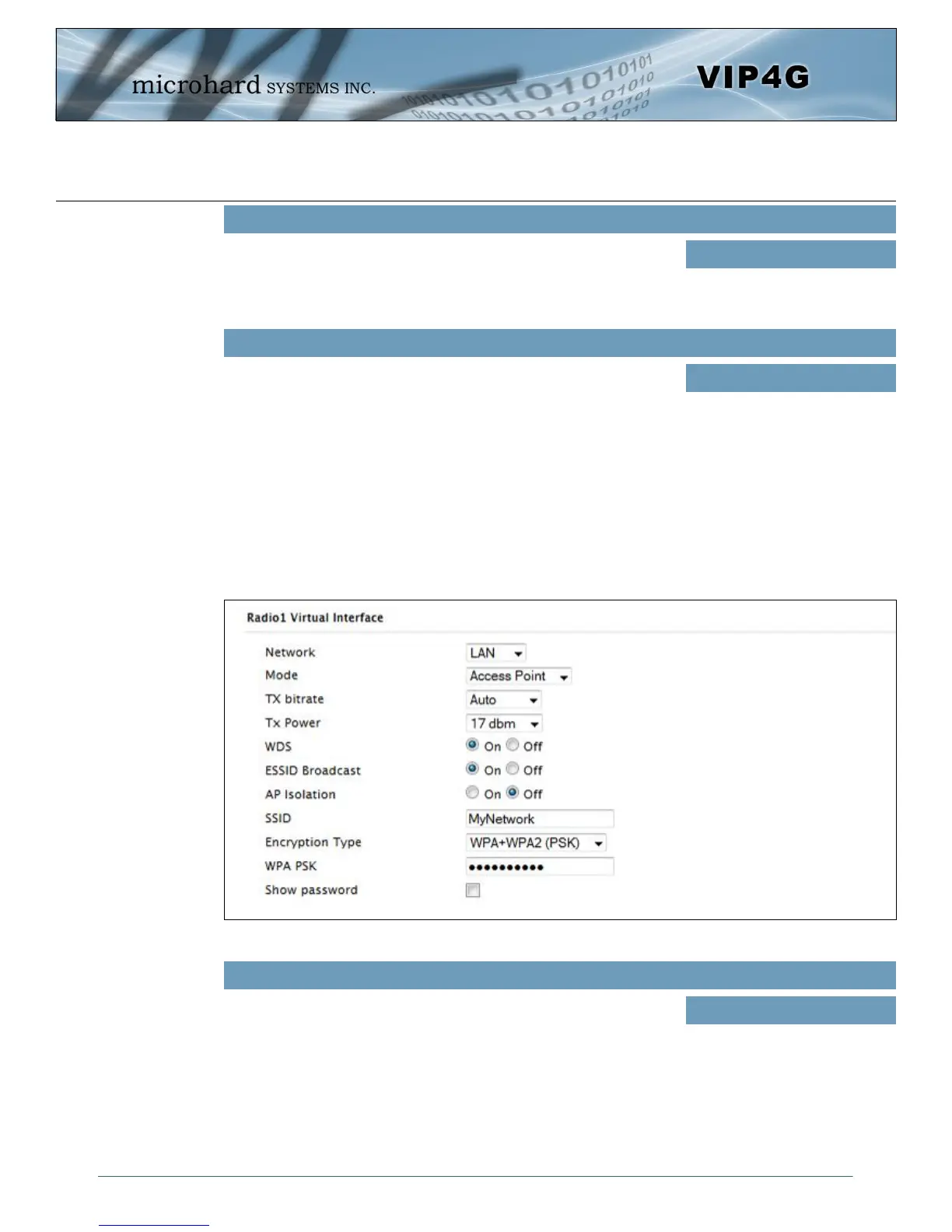
Radio1 Virtual Interface
The bottom section of the Wireless Configuration provides for the configuration of the Operating Mode of
the Wireless Interface, the TX power, Wireless Network information, and Wireless Encryption. The VIP4G
can support multiple virtual interfaces. These interfaces provide different SSID’s for different users, and
can also be assigned to separate subnets (Network Interfaces) to prevent groups from interacting.
Choose between LAN or WIFI for the Virtual Interface. If additional
Network Interfaces have been defined in the Network > LAN section,
the Interface name will also appear here.
Network
Values (selection)
LAN
WIFI
(Additional Interfaces…)



 To Next Page