MSB780(X) - User’s Guide
4.4 Compensation sensor exchange procedure
4.4.1 Compensation sensor - maintenance
To check the compensation sensor for correct function, follow the procedure below. A relative
humidity measuring instrument is required for this procedure.
• Open the barometer lid. If you have version MSB780X with display, disconnect the display
cable from the connector.
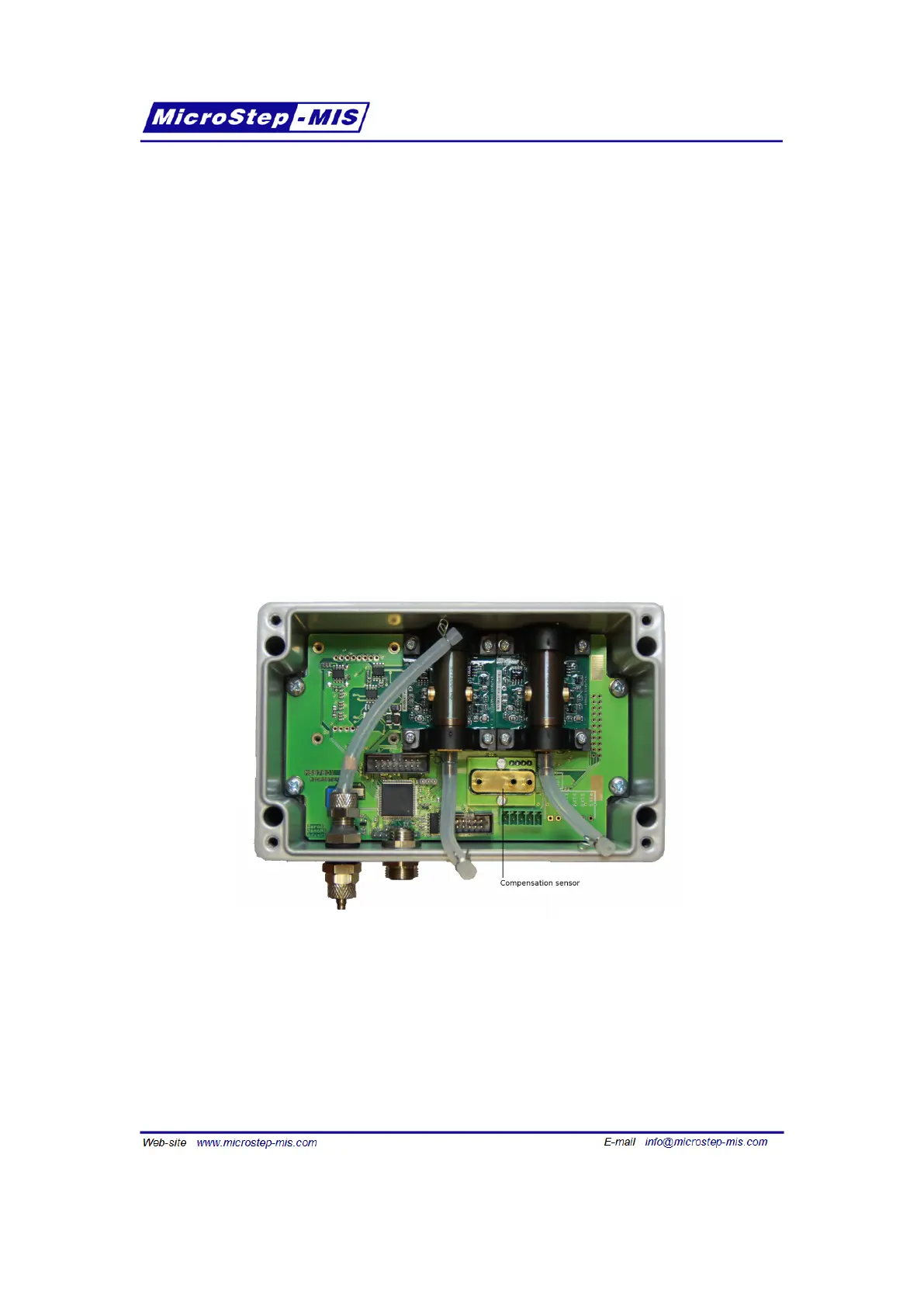
• Disconnect the hoses from the compensation sensor, see figure 16.
• Wait several minutes until the ambient air diffuses into the compensation sensor.
• Check the reading of the humidity sensor through display (Menu->System->Diagnostics
(allQ)->iRH) or using "d" command, as described in section 6.4 on page 33.
If the reading comes close to the ambient relative humidity, the sensor is OK and needs no
change.
Figure 16: MSB780X - checking / exchanging compensation sensor
If you suspect, that the sensor is not working correctly, it is possible to exchange the compen-
sation sensor by the following procedure:
• Open the barometer lid. If you have version MSB780X with display, disconnect the display
cable from the connector.
• Disconnect the hoses from the compensation sensor, see figure 16.
25



 To Next Page