Note: If you choose not to enter a BG value, three dashes appear
on the screen in place of the BG value.
4. For a food bolus, select Carbs to enter the carb count of your meal. For a
correction bolus where no food was eaten, leave the Carbs value as 0.
5. Review your calculated Bolus amount. If you want to change the amount,
select Bolus and make your desired change.
Note: If you change your bolus amount, the word “Modified”
appears next to the new bolus amount.
6. Select Next to review your bolus information.
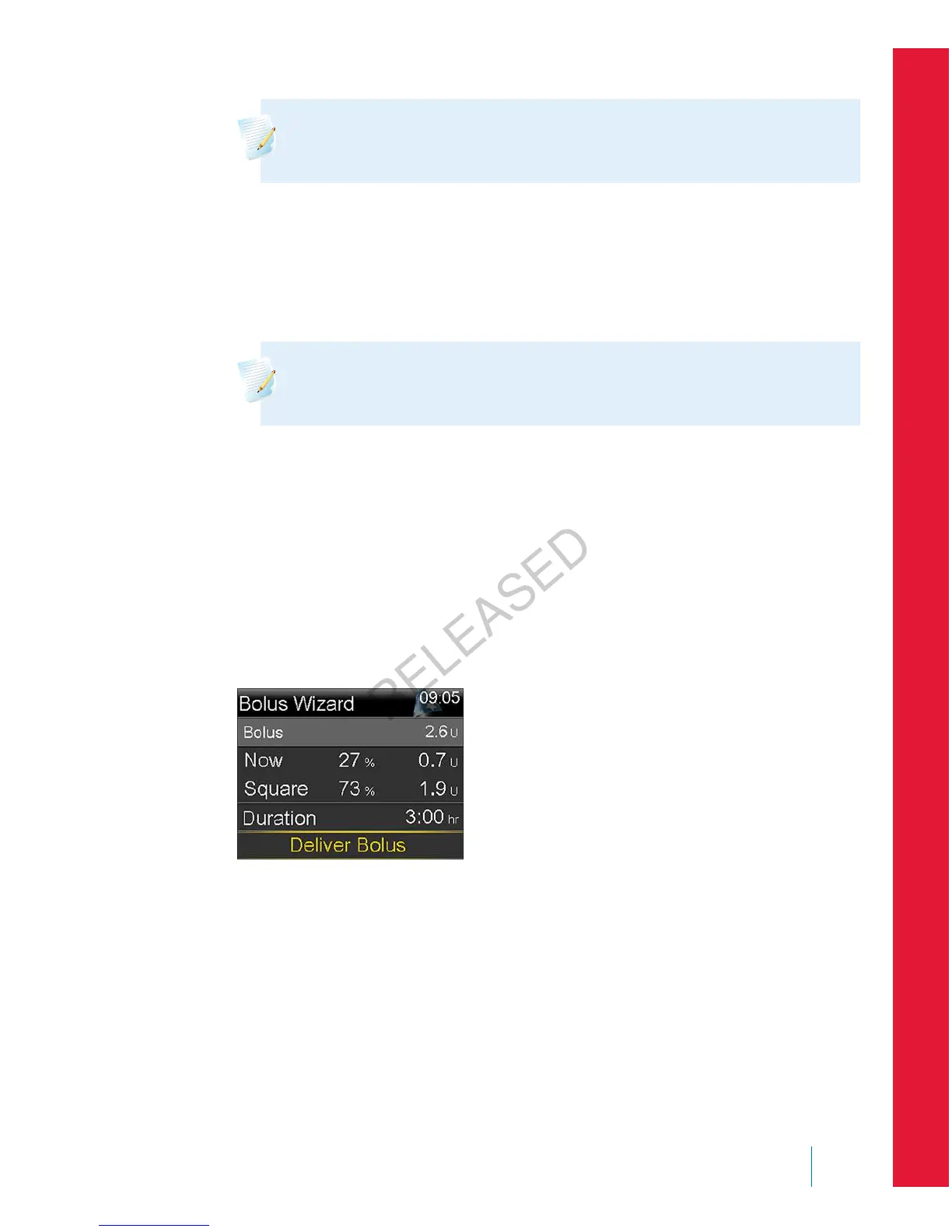
7. Select Dual.
The Bolus Wizard screen appears, with the food amount split evenly between
the Now and Square portions.
8. If you need to change the amounts, select the area of the screen with the
Now value and adjust the Now amount.
When you adjust the Now amount, the Square amount adjusts automatically.
9. Adjust the Duration over which you want the Square Wave portion to be
delivered. The duration can be from 30 minutes to 8 hours.
10. Select Deliver Bolus to start your bolus.
During a Dual Wave delivery, the Home screen shows the progress of the
Now portion of your delivery. When the Now portion is complete, the Bolus
button on your Home screen appears as Bolus (D). You can select Bolus (D)
■
bolus
Bolus 81
MP6025957-024 / A
RELEASED



 To Next Page