106
T26 System Manual Part 1: Installation
Preparing the Cavity Socket (Cavity Wall)
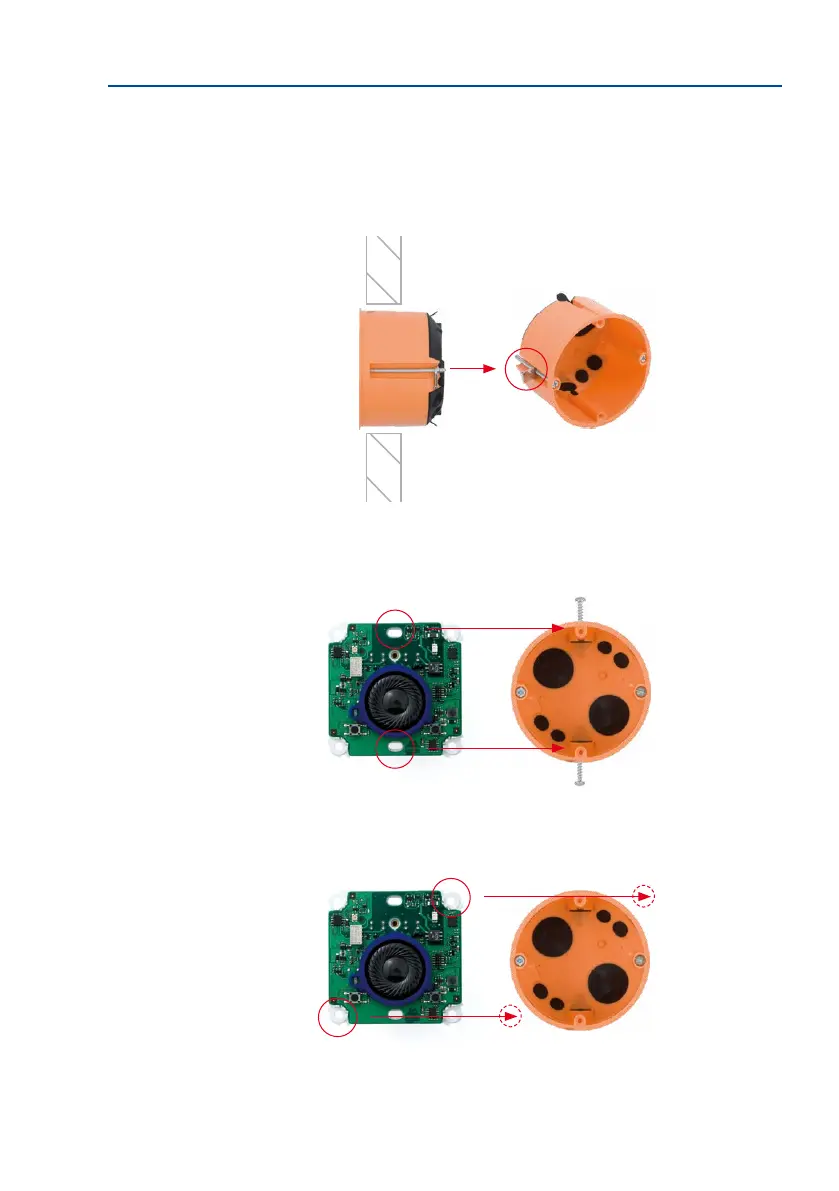
The MX-DoorMaster can be mounted to a cavity wall (for example, plasterboard up to a
thickness of 35 mm) using either the supplied cavity socket or an existing socket. Push the
cavity socket into the prepared drill hole (68 mm) in the cavity wall and secure it by tight
-
ening the clamp screws. The metal claws automatically pop out and clamp the socket rmly.
Aer connecting the cables, secure the housing and board directly to the cavity socket by
fastening two small screws in the a and b positions (see g.) This requires that the socket is
properly installed in the wall.
As in the case of the in-wall socket, you can also use four or two screws/screw anchors (diagonally
opposite one another) to tightly screw the housing to the wall.
Hint: Use a cavity socket cut-
ter (countersink hole cutter)
When the screws are
tightened, the metal claws
automatically pop out and
clamp the socket to the
cavity wall (made of wood or
plasterboard, for example)
a



 To Next Page