76
T26 System Manual Part 1: Installation
2.3.5 Mounting the Terminal Board and Fitting the Network Cable
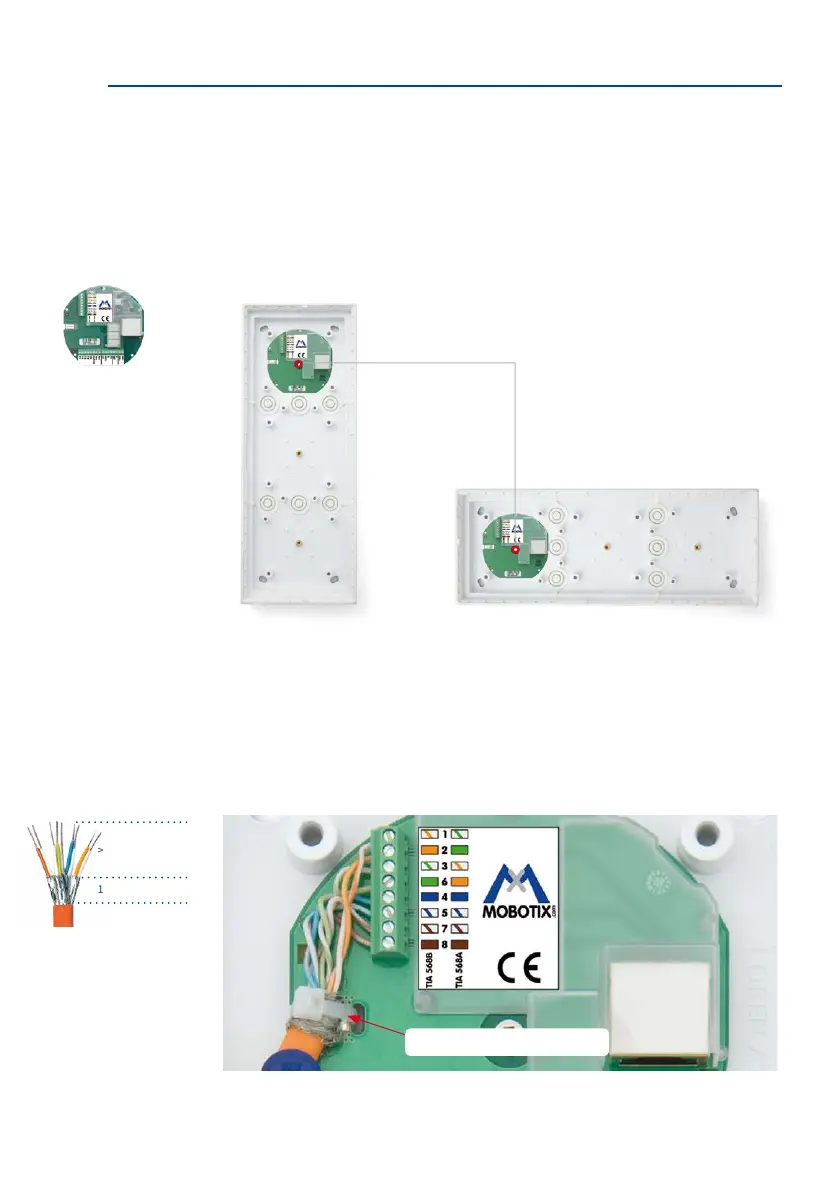
Mounting the Ethernet Terminal Board
Screw the board into the housing (attened side is at the bottom). The terminal board must
be placed behind the camera module. This step is not necessary for the T26 version with
Mx2wire+ technology (two-wire cable replaces Ethernet cable), as an Ethernet terminal board
is not required.
Stripping and Fitting the Network Cable
The Ethernet terminal board provides a link from the network installation cable to the special
patch cable of the camera module mounted directly above.
Connect the eight wires of the installation cable (with stripped ends) to the corresponding
contacts on the terminal board in accordance with the sticker (g. standardized color coding
according to TIA-568B). Fasten the network cable so that its shielding rests on the terminal
board contact eld (using the enclosed cable tie).
For connecting external
devices, an expanded
terminal board (IO Module)
can be mounted in place
of the Ethernet terminal
board (see Section 2.7.2)
Attachment of board for vertical
and horizontal installation
Check whether the net-
work cable at the other
end (e.g., PoE switch) is
wired according to 568 A
or 568B (see sticker)
Follow these measurements
when stripping the cable
Network cable retainer
> 25 mm/0.98 in
10 mm/0.39 in



 To Next Page