70
T26 System Manual Part 1: Installation
2.3.2 Inserting the Cables
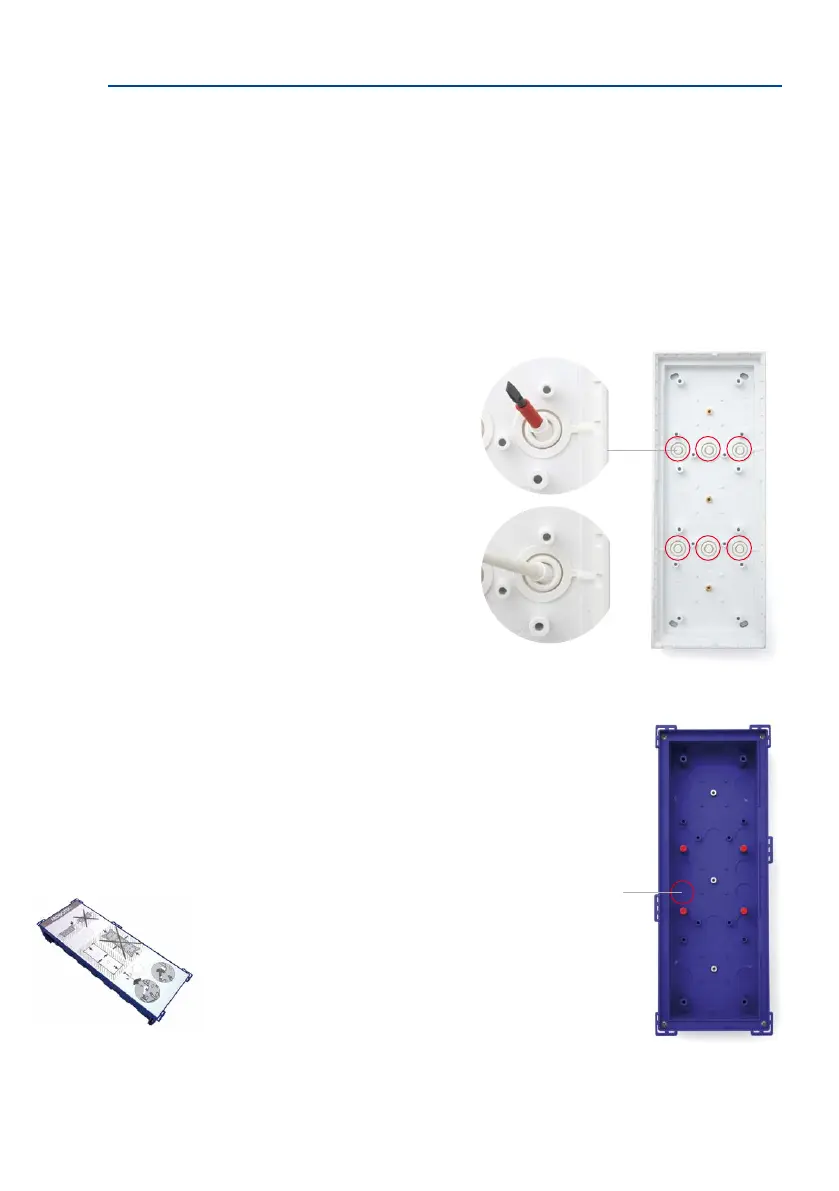
On-Wall Housing
The housing has cable guides made of elastic rubber to ensure the cable entry points are
waterproof.
Use only one cable guide for each cable. Pierce the cable guide you require using a screw
-
driver or other similar tool and feed the cable into the housing. If the cable is multi-wire,
separate the individual wires once the cable is in the housing.
In-Wall and Cavity Housing
Remove the insert and use a screwdriver or similar tool to pierce
through all the openings on the rear or on sides required for
inserting cables. As the housing is embedded in the brickwork,
this usually makes for a tight gasket. If in doubt, or when using a
cavity housing, you should additionally seal o the cable guides
with silicone.
Hint:
Do not open the cable
guides up too wide (for
example, if you are using
a cutter), as cables fed
inside the housing must
be tightly enclosed (to
ensure a tight gasket)
Pierce required guide holes, e.g.
with screw driver
Guide cable through hole
(one cable per inlet)
The insert prevents the
in-wall housing from getting
dirty and being deformed
during installation in a
wall; it must be removed
and then positioned again
when preparing the cables
Pierce guide holes
as required



 To Next Page