65
Remote Stations and Network Connection
2.2.3 Network Connection with Multiple Remote Stations
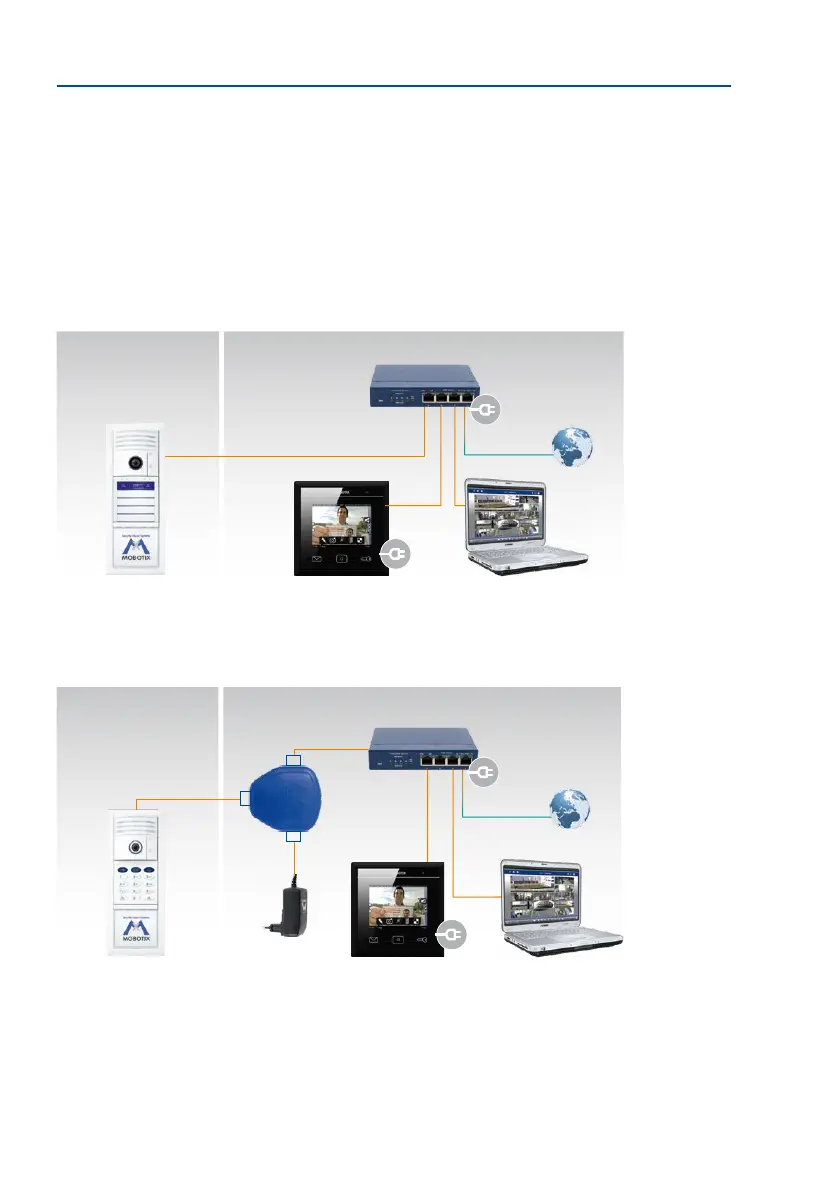
If the door station is to be connected for operation with multiple remote stations (computers
with MxManagementCenter or MxDisplay+ units) in an existing network (for example, via an
Internet box), MOBOTIX again recommends using a MOBOTIX PoE adapter (MX-NPA-PoE) or
a switch with multiple ports to supply power to the door station. Connect the devices as
shown in the following connection diagram:
Connection Using a PoE Switch
Connection Using MOBOTIX PoE Adapter
If multiple PoE-supplied
end devices (such as
several IP cameras) are to
be operated, you should
consider using a PoE switch
Outside Inside
MxDisplay+ ComputerDoor station
PoE switch & router
LAN/Internet
The T26 (with additional PoE
power supply, for example,
using the MOBOTIX PoE
adapter) and its remote
stations can also be con-
nected to an existing WLAN
router with integrated
switch function (DSL box)
Outside Inside
MxDisplay+ ComputerDoor station
Switch & router
LAN/Internet
PC/Power
LAN/Power
Camera
RJ45
PoE adapter
(MX-NPA-PoE)
Power supply



 To Next Page