110
T26 System Manual Part 1: Installation
2.6 Installing the Mx2wire+ Indoor Unit
2.6.1 Overview of Mx2wire+ Technology and Connectors
The Mx2wire+ technology that is optionally available with the T26 is used to connect the
door station to the network via a simple two-wire cable such as the connection cable of an
existing doorbell. An Mx2wire+ set always consists of two devices that communicate with
one another: the Info Module Mx2wire+ in the outdoor station and the compact Mx2wire+
indoor unit.
In addition to data, power is also supplied via the two-wire cable to the Info Module Mx2wire+,
which (connected to the camera module via a patch cable) becomes a PoE injector for the
entire outdoor station and the MX-DoorMaster.
Network Connection and Power Supply (Data and Power)
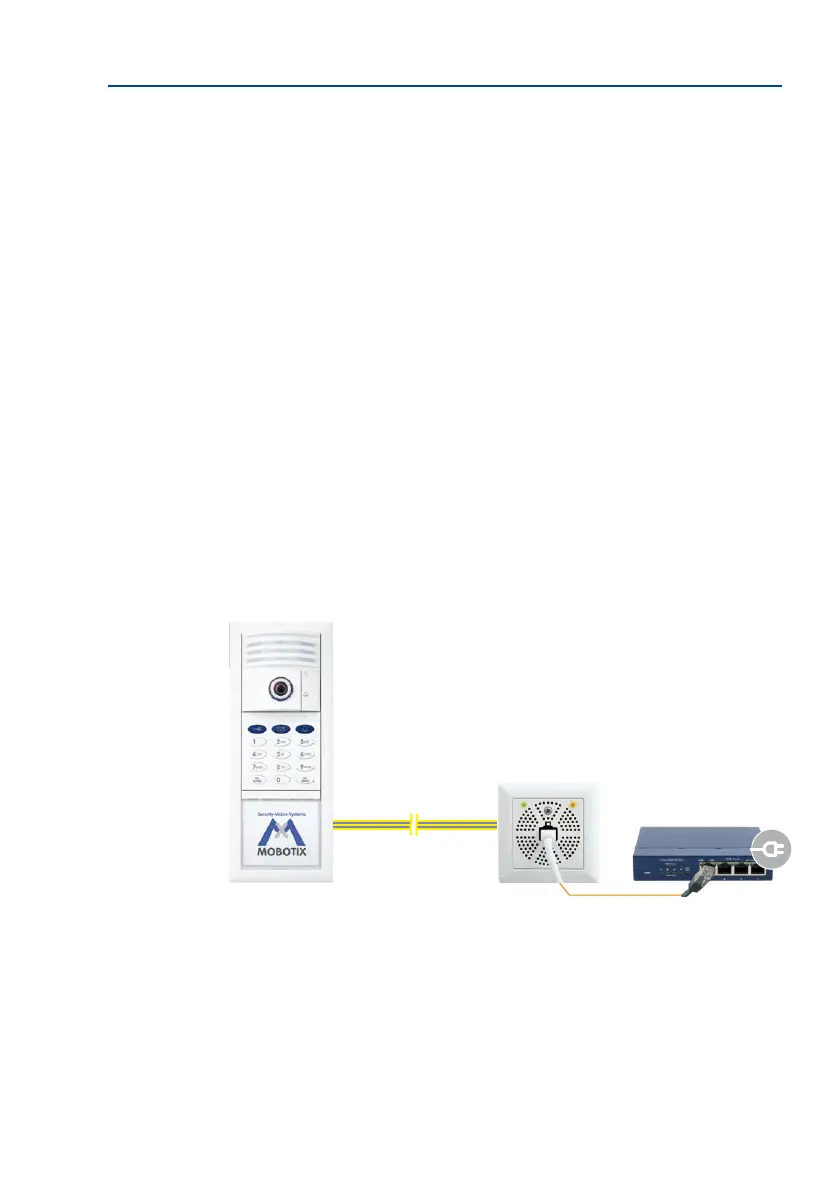
The Mx2wire+ indoor unit has an RJ45 port and is connected by patch cable to a switch or
router, and thus also to the local network and the remote stations. In order for Mx2wire+ to
power the T26, a voltage source is required. There are two ways to achieve this:
1. Power supply from a PoE+ switch (Class 4, IEEE 802.3at, max. 30 W)
Connection: via patch cable on the Mx2wire+ indoor unit.
Advantage: The PoE+ switch directly connects the T26 remote stations as well, and depend
-
ing on the number of available ports, it can also power further PoE devices (door stations,
IP cameras).
Two-wire cable
Data and power
Mx2wire+
indoor unit
PoE+ switch
(IEEE 802.3at)
With Info Module Mx2wire+



 To Next Page