86
T26 System Manual Part 1: Installation
2.4.2 Preparing the BellRFID Access Module
If the installation of the IP-Video-Türstation with T26 is not followed by the initial operation
right away, MOBOTIX recommends to remove the keypad insert and to insert the button set
before starting the installation. This way, the so rubber surface of the T26 base module is
well protected until the module is brought into service (bell buttons are then replaced by the
keypad insert). Note that the base module is weatherproof even without the bell buttons.
For additional information on installing and removing the button set, see Section 2.4.7,
«Removing, Exchanging and Modifying Modules».
1. Label] the name plate(s)
In order to avoid having to remove the module and install it again, you should insert the
proper name plates before starting the initial operation. Use our free-of-charge printing
service on www.mobotix.com in the Support section. Or use the supplied name plates made
from sturdy specialty paper and write the names using a UV-resistant marker.
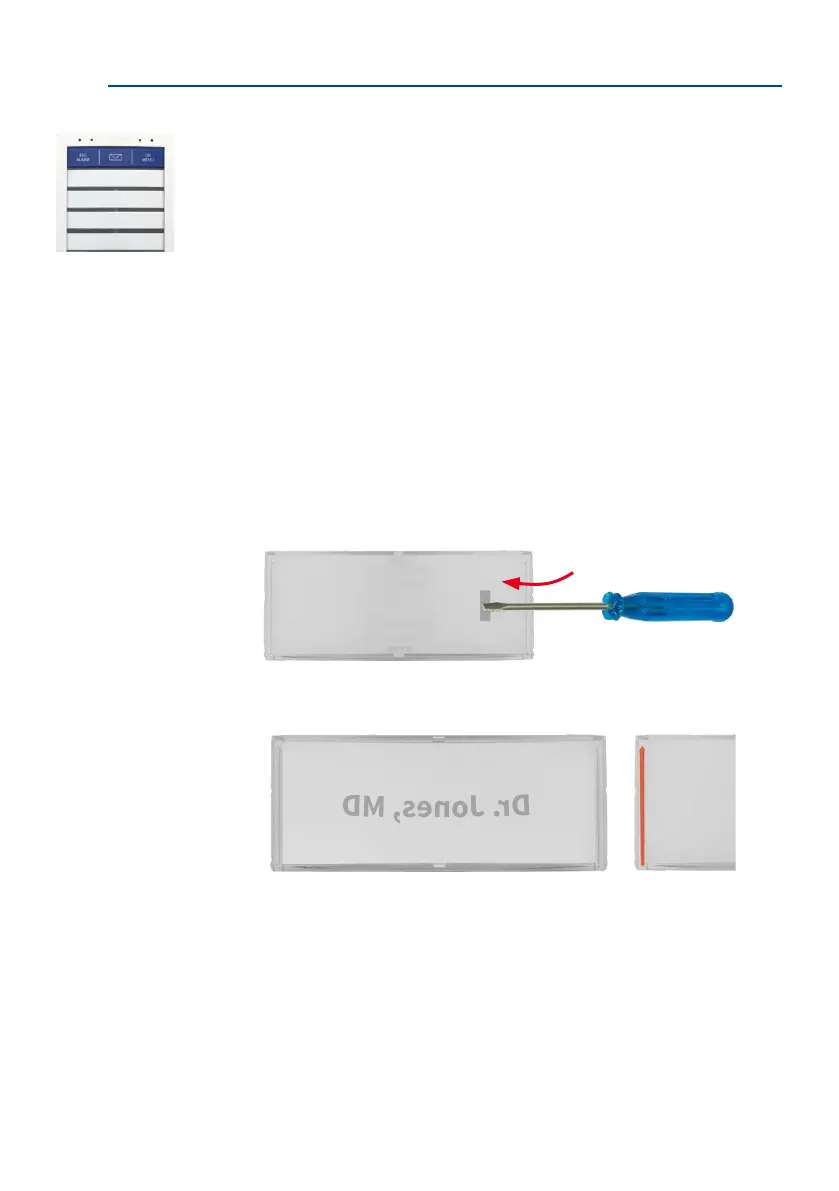
2. Insert the name plate(s)
Remove the silicone insert from the button. Recommendation: Take a suitable tool without
a sharp blade, cautiously insert it into the slot, gently press inward and li the tool as shown.
Insert the labeled or printed name plate as shown (the arrows at the side are pointing
upwards later on).
Access Module BellRFID
Dr. J



 To Next Page